SPIROR HP - DR
6.4.1.WRITTEN EDITINGS AND
VALUES
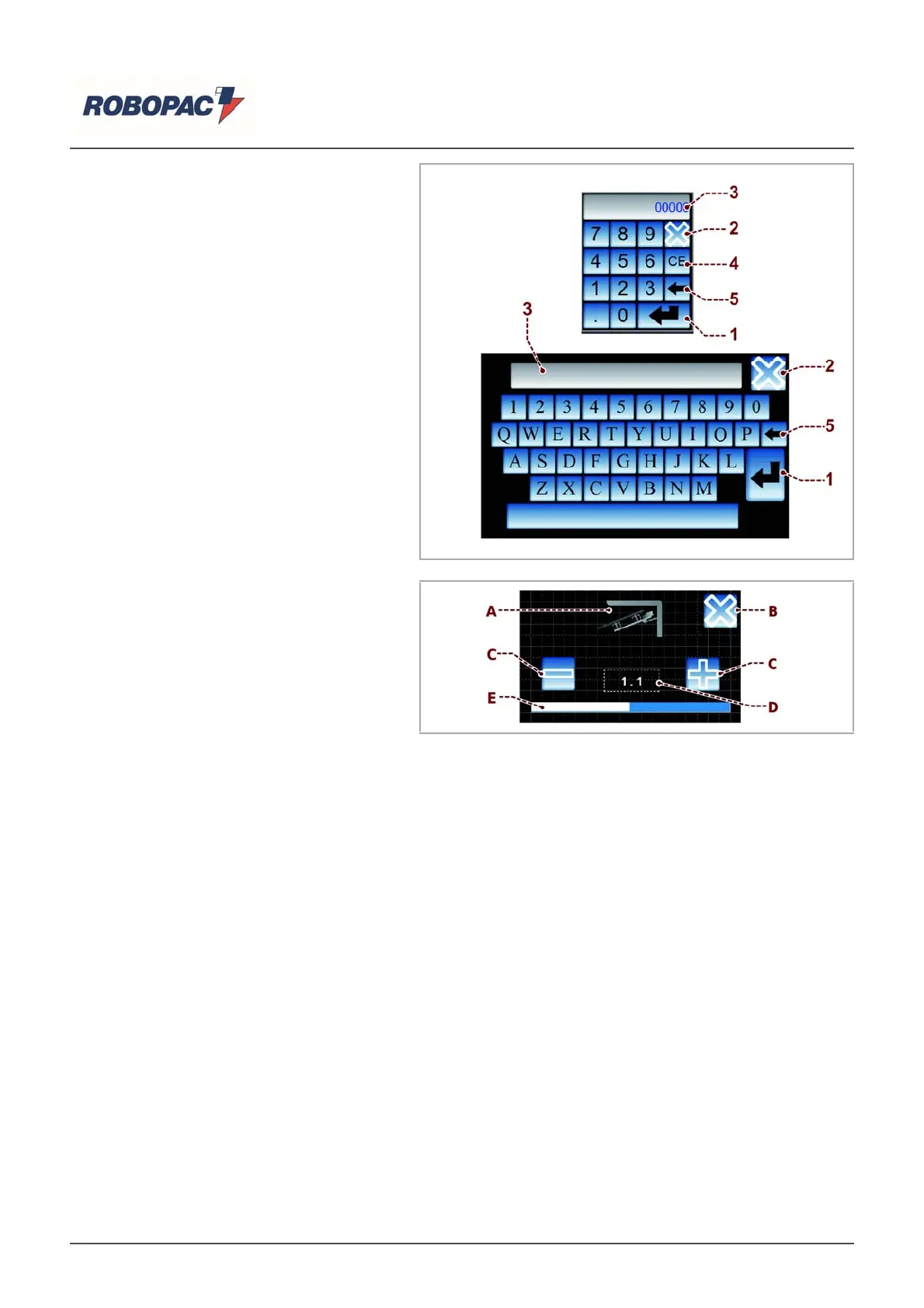
The keypad is displayed each time the
editable or programmable functions are
enabled.
Digit the requested value or name and
confirm by pressing the "Enter" (1) key.
Touch the "Esc" (2) key to disable the
editing mode.
1) Key for confirming and saving the text or
value entered.
2) "ESC" button for disabling the editing
modes and closing the page.
3) Display showing the values and
messages edited.
4) Key for cancelling the message or value
selected.
5) Key for cancelling one character at a
time (starting from right).
6.4.2.PROGRESSIVE REGULATION
OF VALUES
The page is displayed each time the
editable or programmable functions are
enabled.
) Display showing the figure to be set.
B) “ESC” button for closing the page.
C) Buttons to increase or decrease the
value, displayed in the (D) area.
D) It displays the value entered using the push-buttons (D) and the cursor (E).
E) The graphic bar represents the value set for admitted values.
English



 To Next Page