117
Using the Practice Functions
Stopping the Song
4.
Press the [
(Play/Stop)] button so its indicator is turned off.
The song will stop.
If desired, you can specify that the sound of a track will play at a reduced volume rather than going completely silent when you press a
track button and turn off its indicator.
This setting lets you play a specific part at a reduced volume and use it as a “guide” for your playing.
1.
Press the [Menu] button so its indicator is lit.
2.
Touch <Settings>.
* The Menu screen for Settings contains five screen pages. Touch
to switch between the pages.
3.
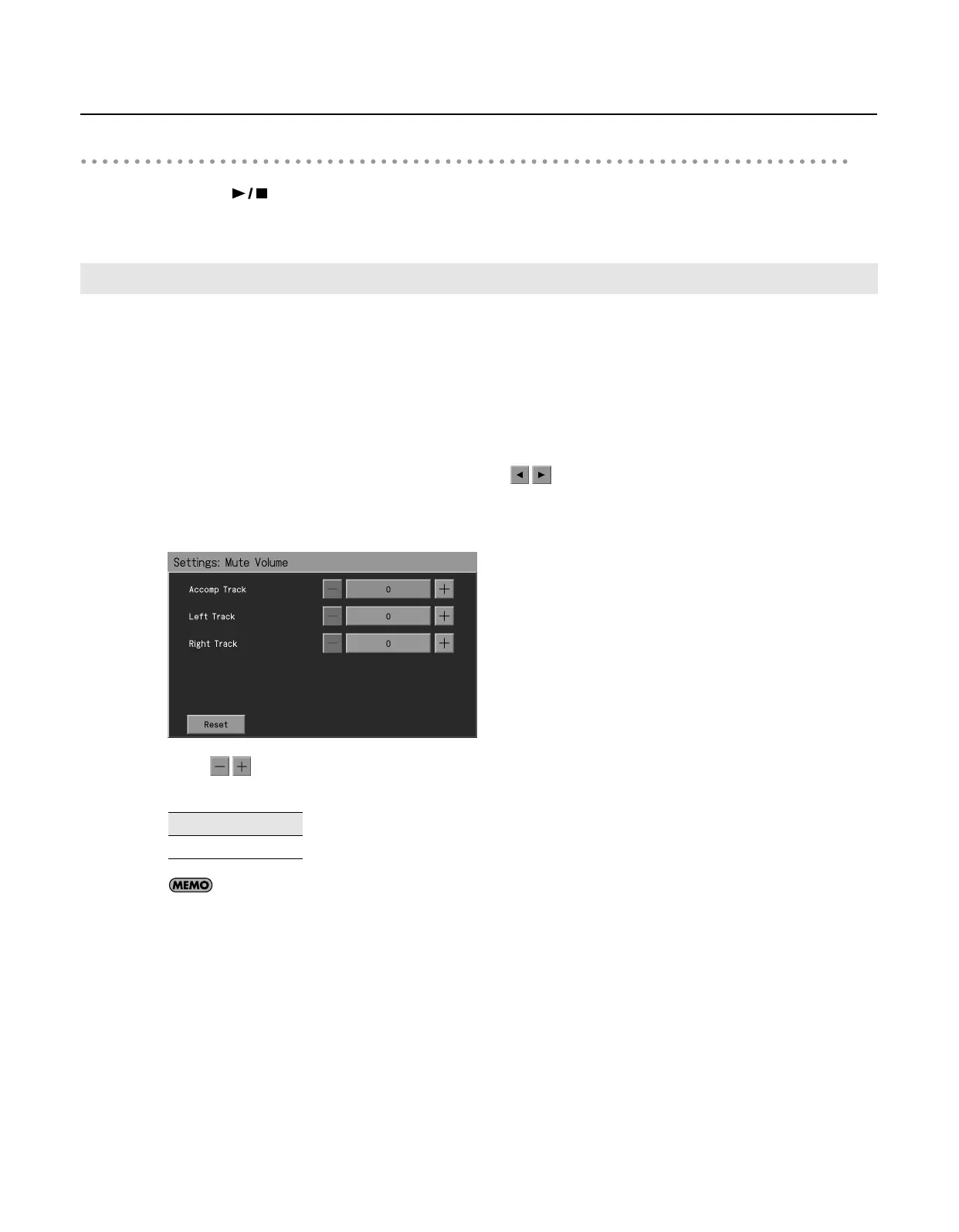
Touch <Mute Volume>.
The “Mute Volume” screen appears.
4.
Touch
for <Accomp Track>, <Left Track>, or <Right Track> to specify the volume for each track when it is
muted.
If you touch <Reset>, the currently selected setting (parameter) will return to its factory setting.
5.
Press the [Exit] button when you’ve finished making settings.
Using the Sound of a Specific Part as a “Guide” (Mute Volume)
Value
0–80
RM-700_e.book 117 ページ 2009年3月18日 水曜日 午前11時5分



 To Next Page