59
Automatic Accompaniment
You can select a variety of Music Styles by pressing a Music Style button.
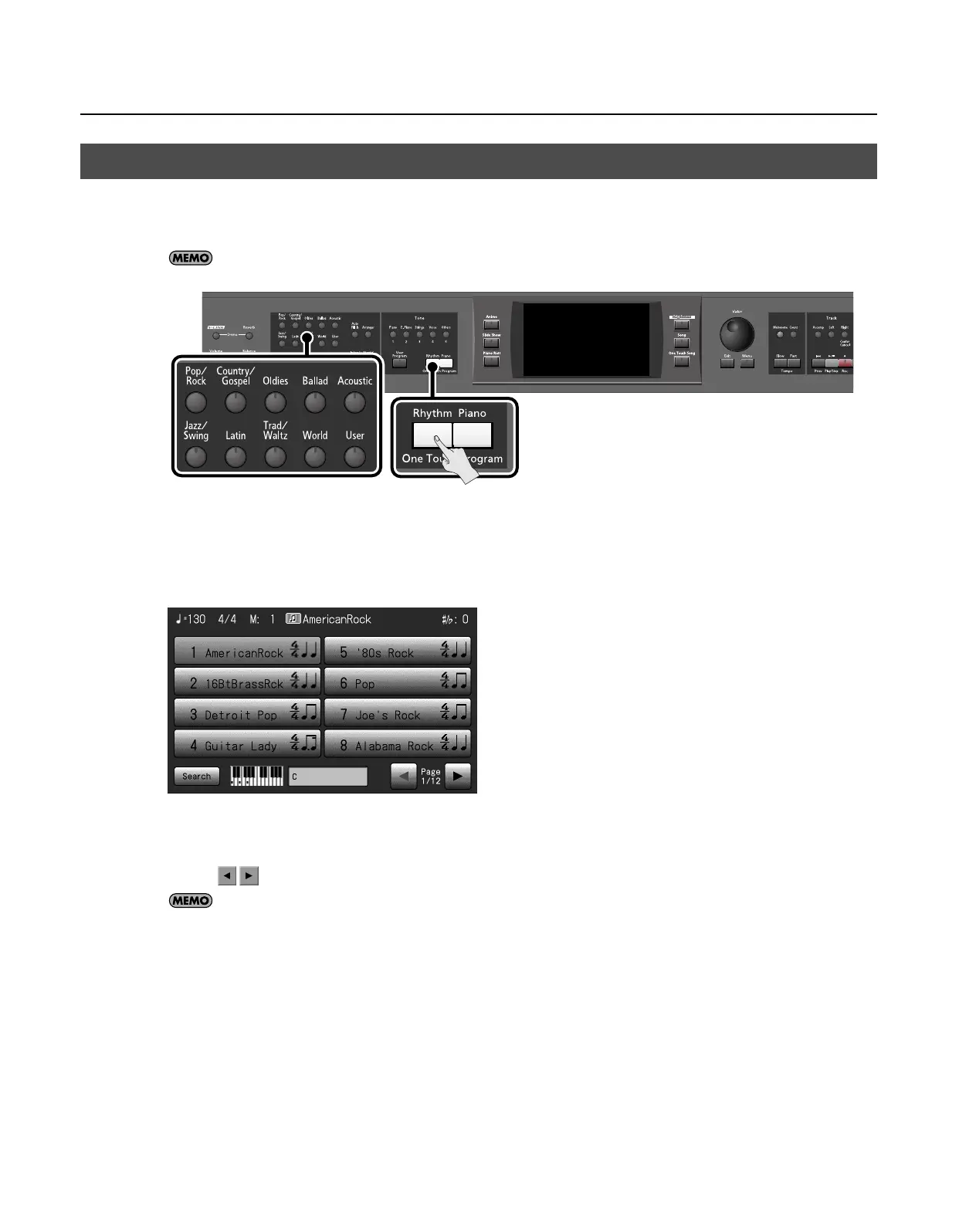
The ten buttons shown below are referred to as the “Music Style buttons”; they allow you to select a Music Styles organized into
groups by musical genre.
For more on the Music Style names, refer to the “Music Style List” (p. 218).
1.
Press the One Touch Program [Rhythm] button.
2.
Press one of the Music Style buttons to select the Music Style group.
The Music style button’s indicator will light, and a Music style screen like the following will appear.
The display will show the Music styles in the Music Style group you selected.
3.
Touch a Music Style name to select the Music Style.
* Touch
to switch pages.
You can touch <Search> to find Music Styles that match the selected criteria (p. 60).
4.
When you’ve selected a Music Style, press the [Exit] button.
The display returns to the Basic screen.
Next, all you have to do is press a chord in the left side of the keyboard, and the selected accompaniment style will start playing.
Selecting Music Styles (Music Style Buttons)
RM-700_e.book 59 ページ 2009年3月18日 水曜日 午前11時5分



 To Next Page