148
Creating a Music CD
After you’ve written the desired songs to a CD-R, you’ll need to perform the following “Finalize” operation so that the CD can be
played by a conventional CD player as a music CD.
1.
Insert an unfinalized CD-R disc into the CD drive.
2.
Press the [Song] button so its indicator is lit.
The Song Selection screen appears.
3.
Touch <File>.
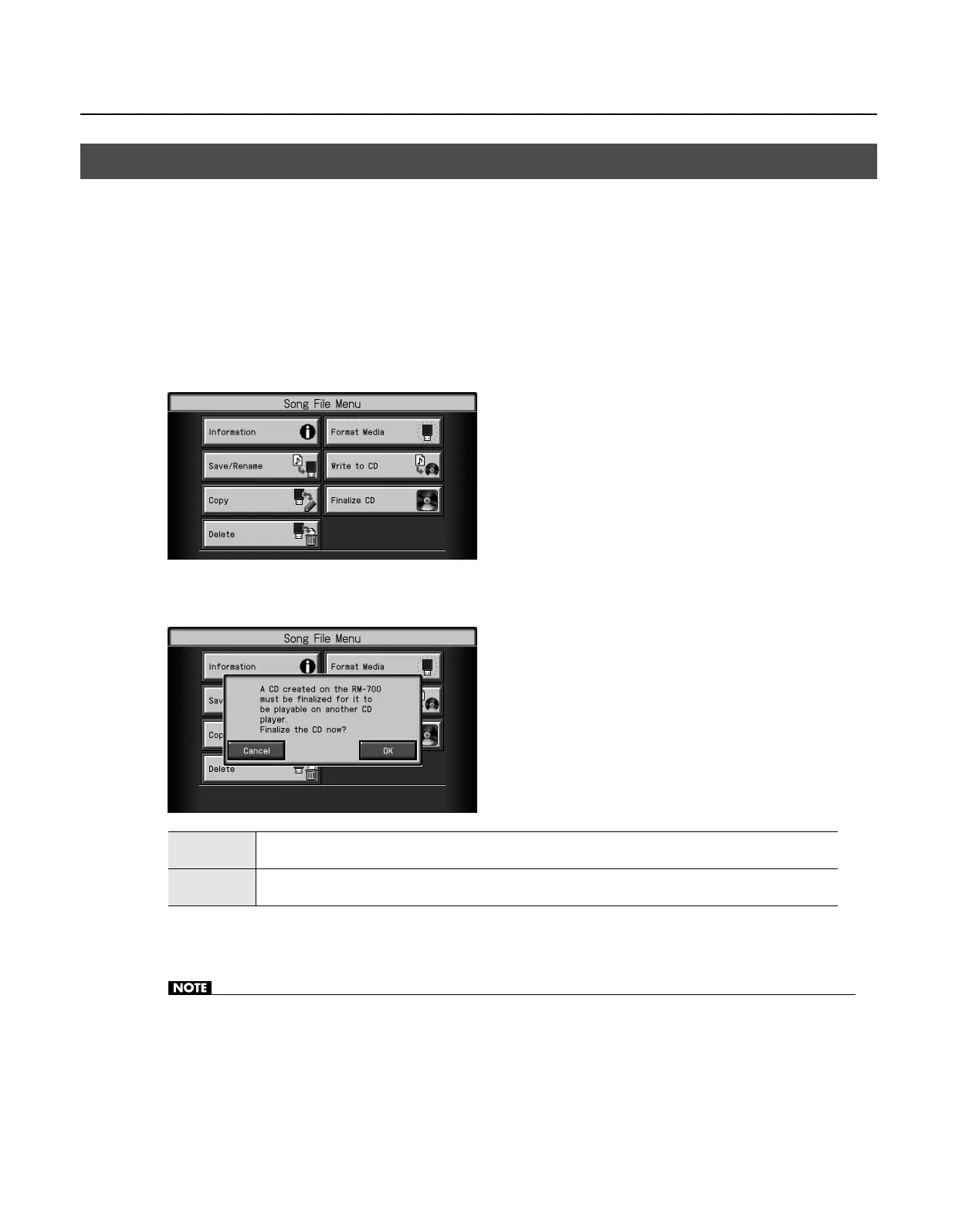
The “Song File Menu” screen appears.
4.
Touch <Finalize CD>.
A screen like the following appears.
5.
Touch <OK>.
Finalization will begin, and when it is completed you will return to the Song File Menu screen.
• Never turn off the power while the “Executing...” indication is shown.
• We cannot guarantee that a music CD created on the RM-700 will play on all CD players. Depending on your CD player’s support for
CD-R discs, music CDs you create may not play correctly.
Preparing a CD-R Disc for Playback on Another CD Player (Finalize)
OK
The disc will be finalized to complete the music CD.
No further data can be written to a CD-R disc that has been finalized, even if space remains on the disc.
Cancel
The disc will not be finalized when writing is finished.
After the tracks have been written, you will still be able to add more tracks if space remains on the disc.
RM-700_e.book 148 ページ 2009年3月18日 水曜日 午前11時5分



 To Next Page