22
Reference Manual
00809-0100-4803, Rev GA
Configuration
September 2017
Configuration
1. Expand the Gas category.
2. Select the Custom Gas option.
3. Enter the Nominal Operating Pressure and Temperature Ranges. Engineering Assistant will use these
ranges to identify the pressure and temperature values at which the fluid properties are required.
4. Select Next to proceed to the Custom Gas Fluid Properties tab.
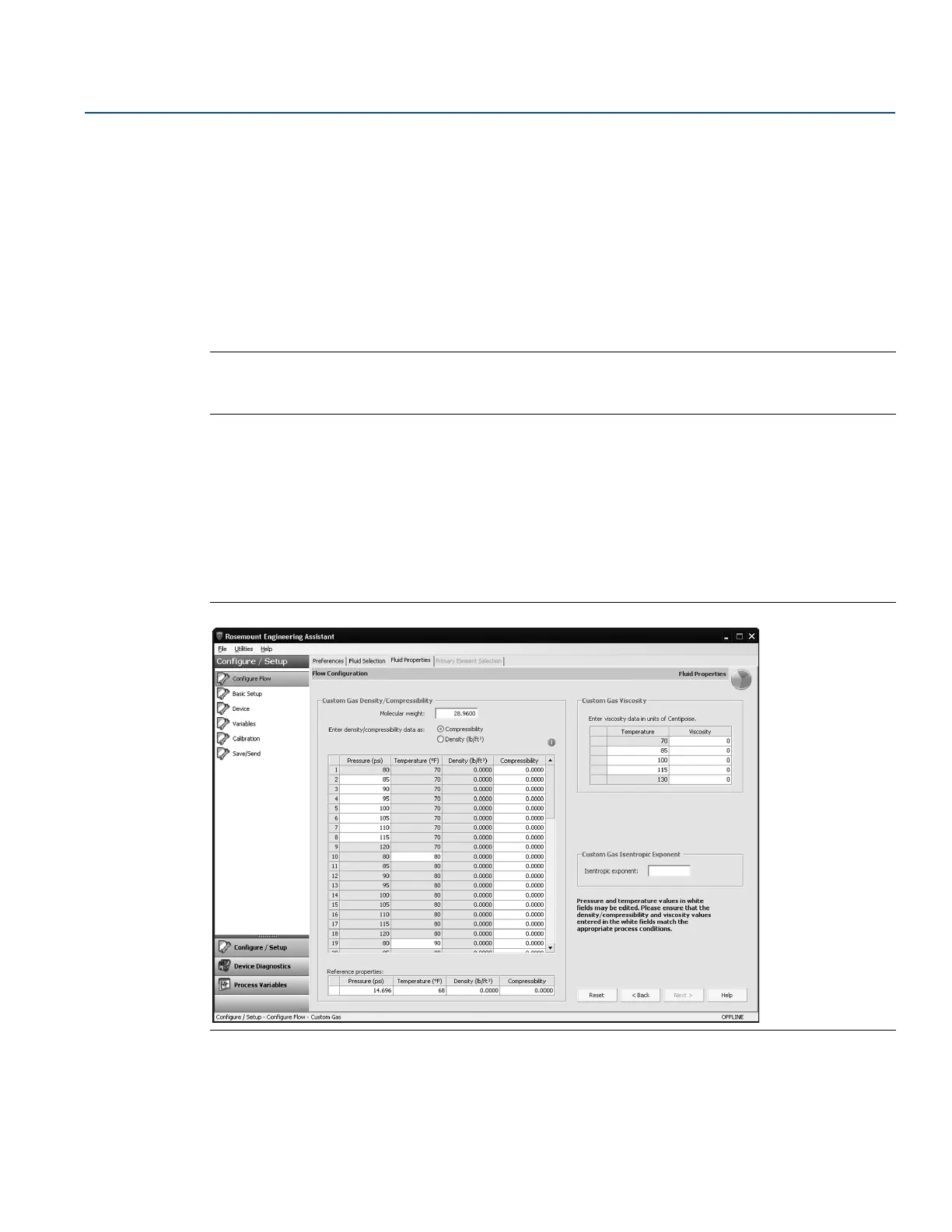
5. Enter the Molecular Weight of the Custom Gas. When the molecular weight of the gas is entered, the
other data entry fields on the tab are enabled as shown in Figure 2-16 on page 22.
6. Select either Density or Compressibility and enter data.
Note
All pressure and temperature values may be edited except the minimum and maximum values. The
minimum and maximum values were set on the Fluid Selection tab.
7. Enter the Density or Compressibility at reference conditions.
8. Enter the Custom Gas Viscosity at the given temperatures. Note that all temperature values may be
edited except the minimum and maximum temperatures.
9. Enter the Custom Gas Isentropic Exponent.
10.Select Next to continue with the flow configuration on the Primary Element Selection tab.
11.Proceed with the steps in “Primary element selection” on page 13.
Figure 2-16. Custom Gas Fluid Properties Tab











 To Next Page