User manual
SANTEC IP cameras
_________________________________________________________________________________
- 119 -
2.3.6.2 Network share (NAS)
These settings can be found under this path:
System > Storage management > Network share
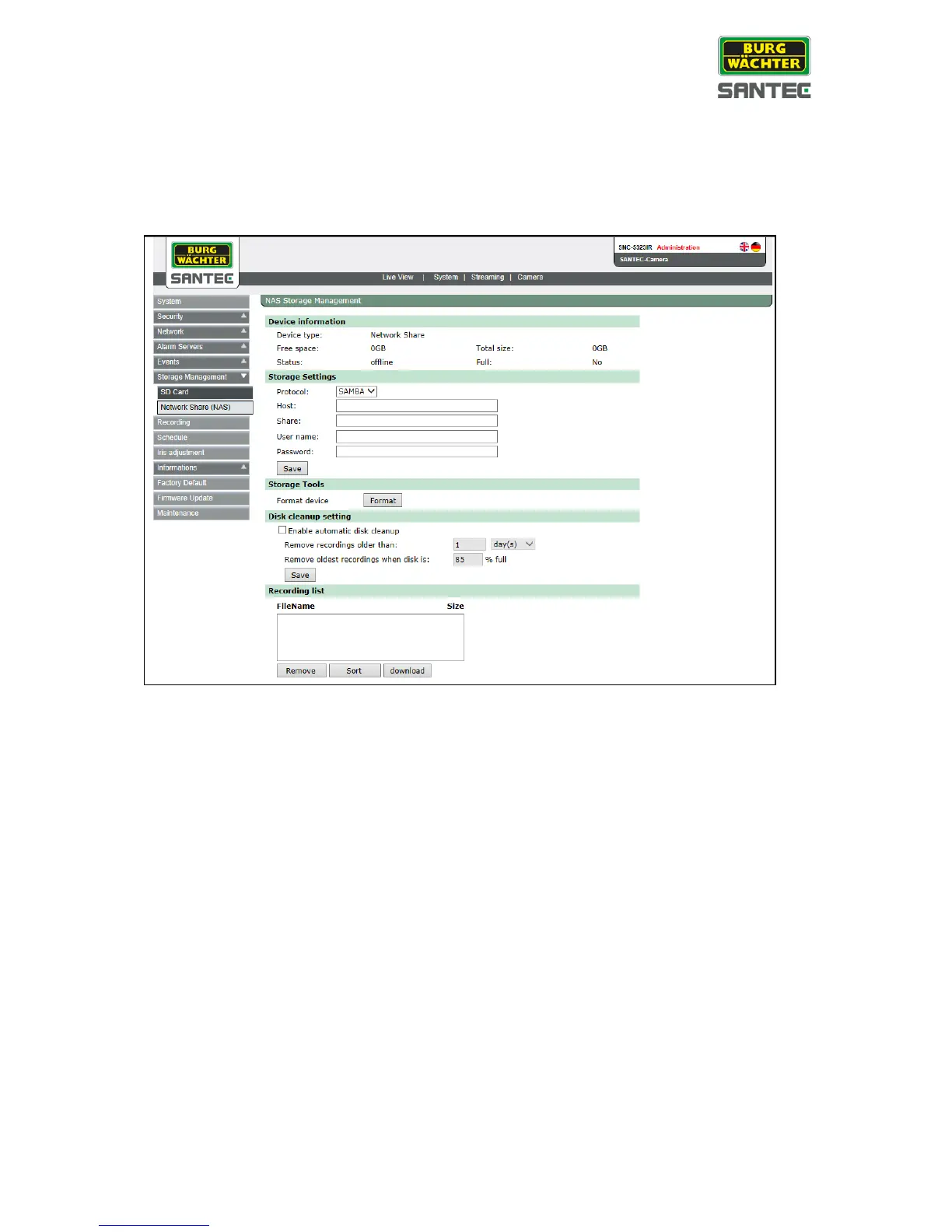
On this page, you can define a NAS server or enable Windows. The camera can store videos
here (similar to a SD card).
Storage settings:
• Protocol: Only „Samba“ is available for the time being.
• Host: IP or host name of the NAS server or the Windows computer.
• Share: Share name on server. The camera creates a sub-folder in the share folder.
This folder is called „Camera model MAC address“, e.g. „SNC-3302-001E44010203“.
In this sub-folder, all recordings are stored in order to separate them from recordings
from other cameras which use the same share.
• User name, password: User name and password for share access (as created in the
server). The user has to have reading and writing authority.
Storage tools:
• Format device: All camera data are deleted within share (see above).
Disk cleanup setting:
This is a ring storage. Deletes the oldest video to make space according to configured days
or if the share has less space than a specified percentage (similiar to a SD card).
Recording list: Same as for SD card.


 To Next Page