EasyManua.ls Logo

Santec SNC-3302 - Snc-6302, Snc-6312 Irh, Snc-6315 Irh, Snc-6323 Irh

Santec SNC-3302
160 pages
Print Icon
To Next Page IconTo Next Page
To Previous Page IconTo Previous Page
Loading...
User manual
SANTEC IP cameras
_________________________________________________________________________________
- 34 -
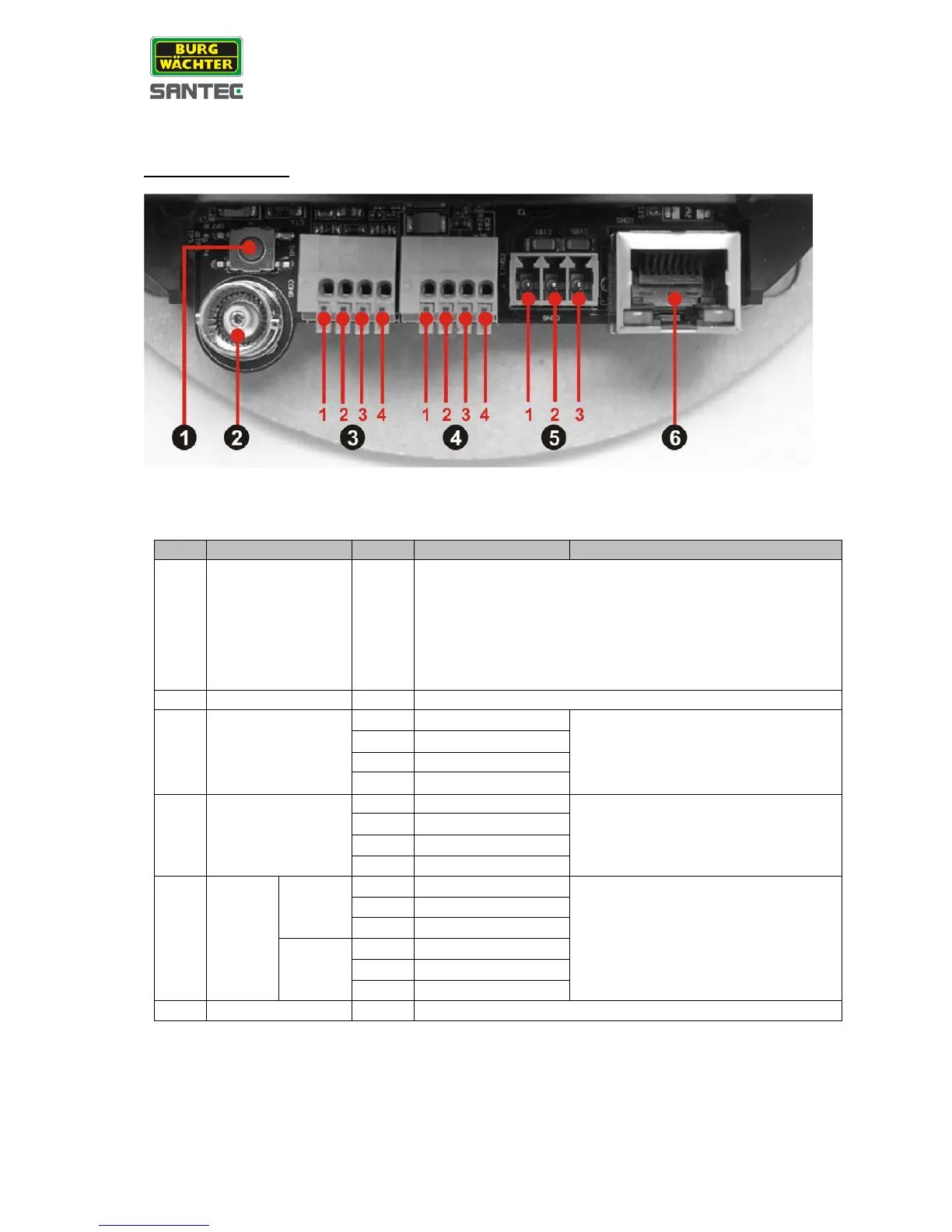
SNC-6302, SNC-6312IRH, SNC-6315IRH, SNC-6323IRH:
Camera inside view:
No.
Connector
Pin
Definition
Remarks
1 Reset Button -
Restore to factory default
Keep camera connected to power.
Use a pointed device to press onto the reset button and
hold it for approx. 1 sec.
Release the button and wait approx. 1 sec.
Press and hold the reset button for approx. 30 sec.
The camera is now restored to factory default settings.
2
BNC
-
Analogue video output
3 Alarm I/O
1
GND (Input -)
Alarm connection
2
Input +
3
Output -
4
Output +
4 Audio I/O
1
Output (L)
Two-way audio transmission
2
Output (R)
3
GND
4
Input
5 Power
DC 12V
1
Power
Power connection
2
Reserved
3
GND
AC 24V
1
Power-1
2
Earth GND
3
Power-2
6
RJ-45
-
10/100 Mbps Ethernet / PoE

Table of Contents

Related product manuals