EasyManua.ls Logo

Santec SNC-3302 - Snc-4323 Ir

Santec SNC-3302
160 pages
Print Icon
To Next Page IconTo Next Page
To Previous Page IconTo Previous Page
Loading...
User manual
SANTEC IP cameras
_________________________________________________________________________________
- 12 -
QUICK INSTALLATION GUIDE: SNC-4323IR
To operate the IP dome camera, please follow these steps:
1. Install the camera in the desired location.
2. Connect the camera to power using PoE (PoE switch or PoE injector required) or
12 V DC / 24 V AC.
3. Insert the CD (included in the delivery) into your PC/laptop and install the IP-finder.
4. The IP-finder displays an IP address for the camera. Double-click on the IP address
and the Internet Explorer comes up automatically. In case this doesn’t work, you may
also enter the IP address (as shown by the IP-finder) manually into the Internet
Explorer. Using the IP-finder, another IP address can be assigned to the camera, if
required.
Note:
The camera comes with a default IP address:
Default IP address: 192.168.1.168 (or by DHCP, if available)
User name: admin
Password: 9999

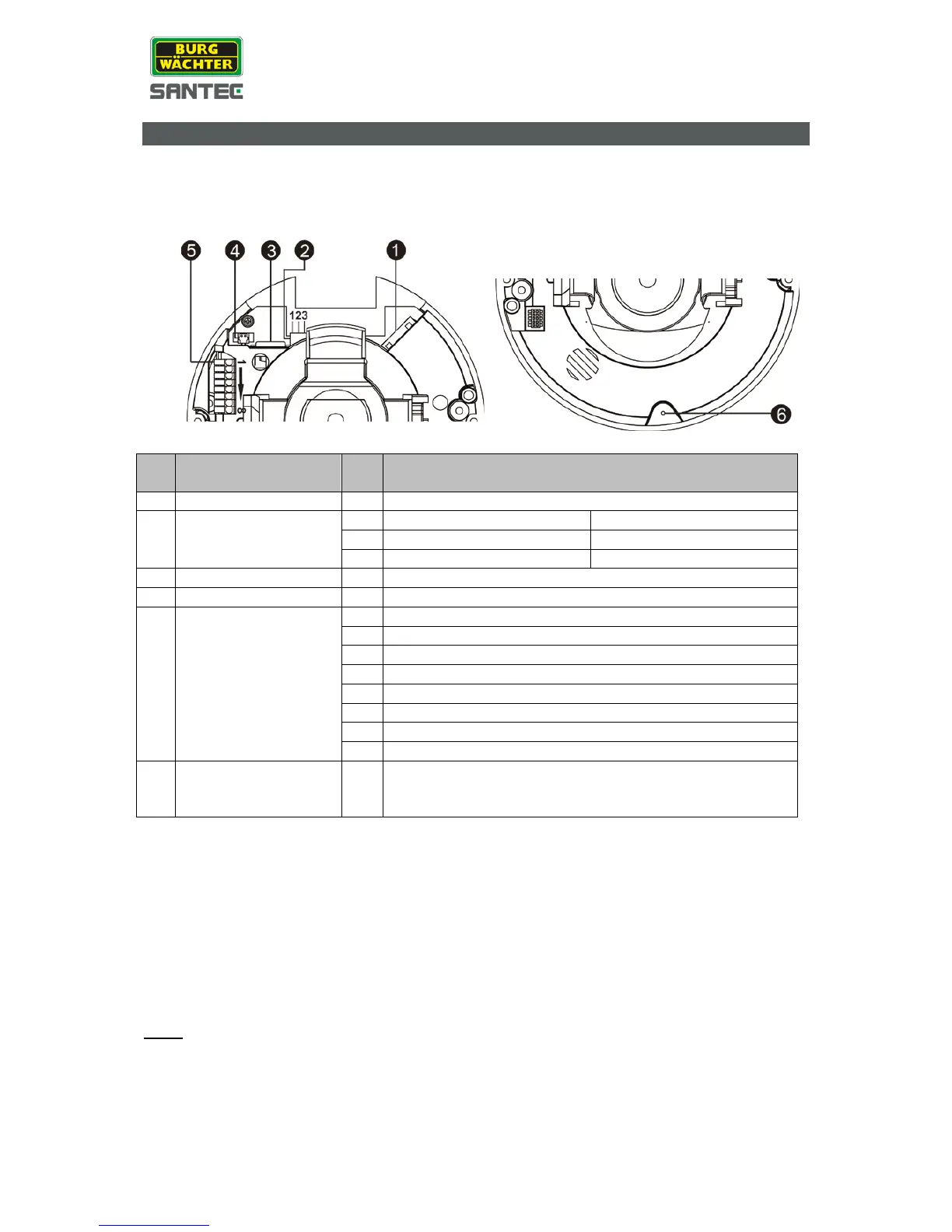
No
.
Connector
Pin
Definition
1
RJ-45
-
10/100 Mbps Ethernet / PoE
2
Power
24 V AC / 12 V DC
1
24 V AC: Power -1
12 V DC: Power
2
24 V AC: GND
12 V DC: Reserved
3
24 V AC: Power -2
12 V DC: GND
3
Micro SD card slot
-
For video recording
4
BNC
-
Analogue video output
5 Alarm & Audio I/O
1
Alarm In (–)
2
Alarm In (+)
3
Alarm Out (–)
4
Alarm Out (+)
5
Audio Out (L)
6
Audio Out (R)
7
GND
8
Audio In
6 Reset button -
Press the reset button (at least 20 sec.) using a
pointed, thin object to reset the camera to factory
default settings.

Table of Contents

Related product manuals