12
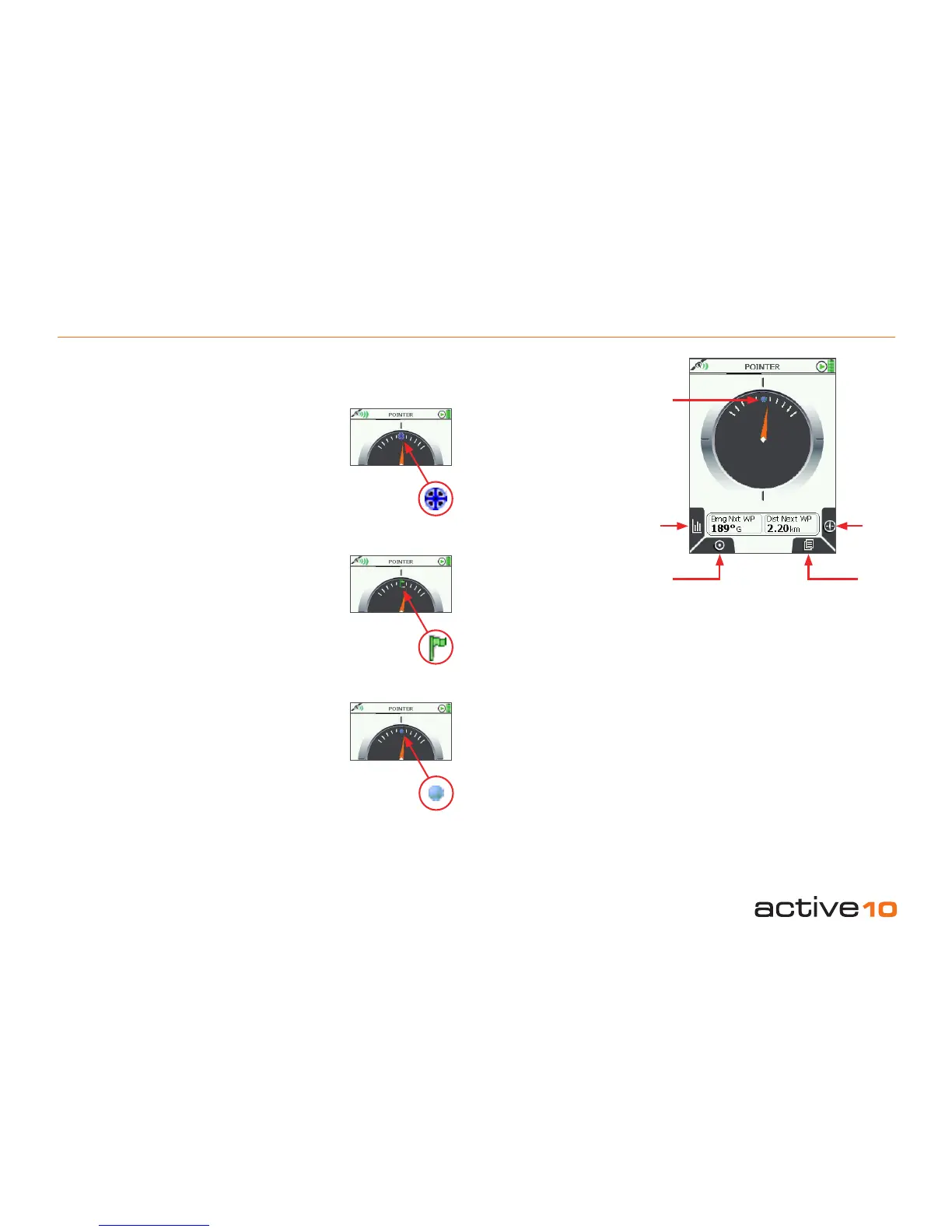
There are 3 types of ‘target’ to select from
using the Target type button.
4.02a POINTER Page
(GPS Map → MAIN MENU → COMPASS →
POINTER)
If you wish, instead of using a compass there
is an option of following a pointer, which you
can set to point in the direction of your desired
destination ie. a waypoint, POI or GoTo point.
To access the POINTER page, press the
Pointer button on the COMPASS page
(section 4.02).
Buttons:
Target type
Scroll through overlays giving data on either
nearest Waypoint, Point Of Interest or Go To
Point
Lock to GPS
Return to last map screen
Compass
Return to COMPASS page (section 4.02)
Page
Go to TRIP LOG page (section 4.03)
Compass
Target
type
Figure 4.02a
4.02a POINTER
Nearest Point Of
Interest (POI)
Only available if
a POI has been
entered (section
9.00). A POI icon will
appear at the top of
the pointer image.
GoTo Point
Only available once a
GoTo Point has been
set (section 8.00). A
green ag will appear
at the top of the
pointer image.
Next WayPoint
Only available once
a route has been
plotted (section 7.00).
A blue dot will appear
at the top of the
pointer image.
In each case the two data eld overlay
contains information on bearing and distance
to the target.
Lock to
GPS
Page
Target
icon



 To Next Page