Audio and Media Mode
the track list. The track that is currently play-
ing is highlighted
›››
Fig. 36.
●
Search through the track list and press the
desired track.
If there is information available on the track,
the track is displayed (for audio CDs) or the
name of the file (MP3), rather than
Track +
number
.
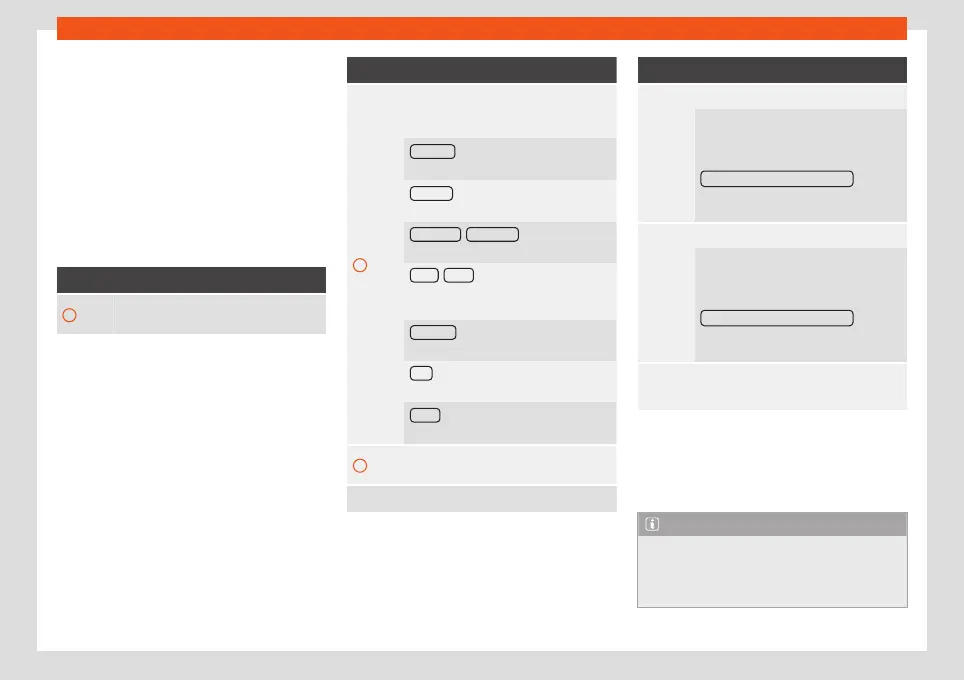
Overview of the function buttons on the
track list
Function button: function
A
Open the Source menu. Select another
media source by pressing.
Function button: function
B
Indicates the media source being ex-
plored. If pressed it goes to the root folder
of the device indicated on the icon.
JUKEBOX
a)
: Internal hard drive of the In-
fotainment system (SSD)
›››
page 52.
CD/DVD
b)
: Internal CD and DVD drive
›››
page 48.
SD CARD 1 , SD CARD 2 *: SD memory
card
›››
page 49.
USB 1 , USB 2 *: External data storage de-
vice connected to the USB port
›››
page 49.
BT AUDIO : External media player con-
nected by Bluetooth
®
›››
page 51.
AUX : Audio source connected to the
AUX-IN socket
›››
page 50
WLAN
c)
: External audio source connec-
ted by WLAN
›››
page 53
C
Press the function button to open the top
folder of the media source.
Starts playback of the first track.
Function button: function
Repeat all tracks.
Repeats all the tracks that are on the
same memory level as the track being
played at that moment. If in the
Media
Settings
menu
Mix/Repeat including subfolders is activa-
ted, it also includes the subfolders
›››
page 56.
Random play.
Includes all the tracks that are on the
same memory level as the track being
played at that moment. If in the
Media
Settings
menu
Mix/Repeat including subfolders is activa-
ted, it also includes the subfolders
›››
page 56.
CLOSE
×
To close the track list.
a)
Only available for the model: “Navi System Plus”.
b)
The DVD drive is only available for the model: “Navi
System Plus”.
c)
Only available for the model: “Navi System” (with
WLAN connection) and “Navi System Plus”.
Note
The tracks, folders and playlists can also
be selected by turning the setup button,
and can be played or opened by pressing
it.
47



 To Next Page