SensusRF gateway user manual
| 29/10/2019
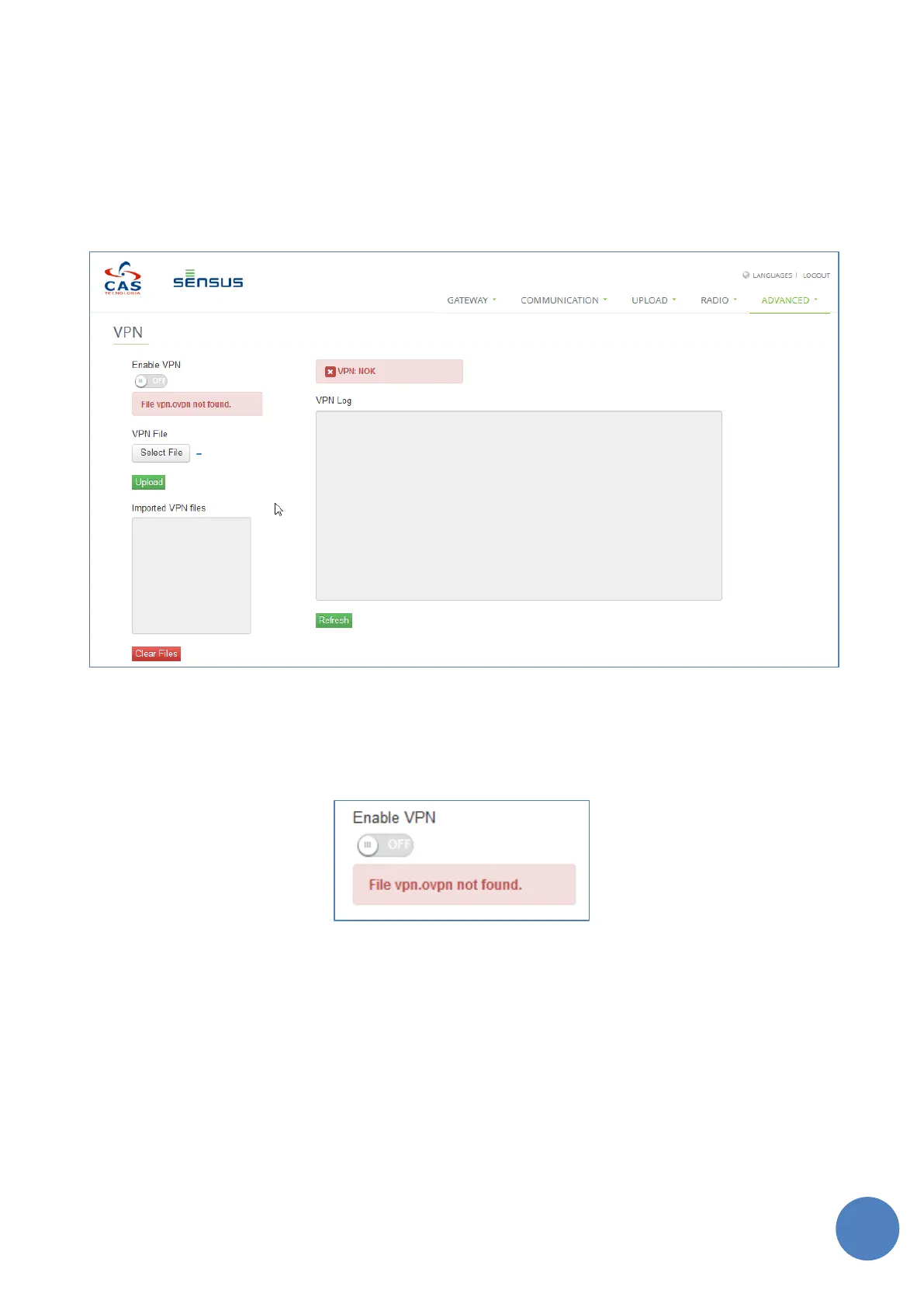
• Enable or disable the VPN feature
• Load or delete the VPN configuration files
• Check the VPN status
• Check the VPN client IP Address
• Check the VPN client logs
FIGURE 13-13 – VPN CLIENT WEB PAGE
A client configuration file named “vpn.ovpn” is mandatory and must be loaded on the webpage to allow the
VPN feature to be properly configured, as this is the main VPN configuration file.
FIGURE 13-14 – VPN CLIENT CANNOT BE ANALBED WITHOUT THE MAIN CONFIGURATION FILE “VPN.OVPN”
Other files can be loaded in the getaway, and the main client configuration file will be responsible to refer
them. Those additional files must be referred inside the vpn.ovpn without any path, like the example below.
A “Certification Authority Certificate” file, authenticating the remote server, called “vpn-server-
certificate.crt” can be refereed inside the vpn.ovpn such as:
ca vpn-server-certificate.crt
Make sure that non-interactive authentication is enabled (the connection is established by a daemon
process, the password cannot be entered manually by the user)


 To Next Page