5200 Multi Purpose and 5200 Multi Purpose HF Gas Analysers
05230001A / Revision 916
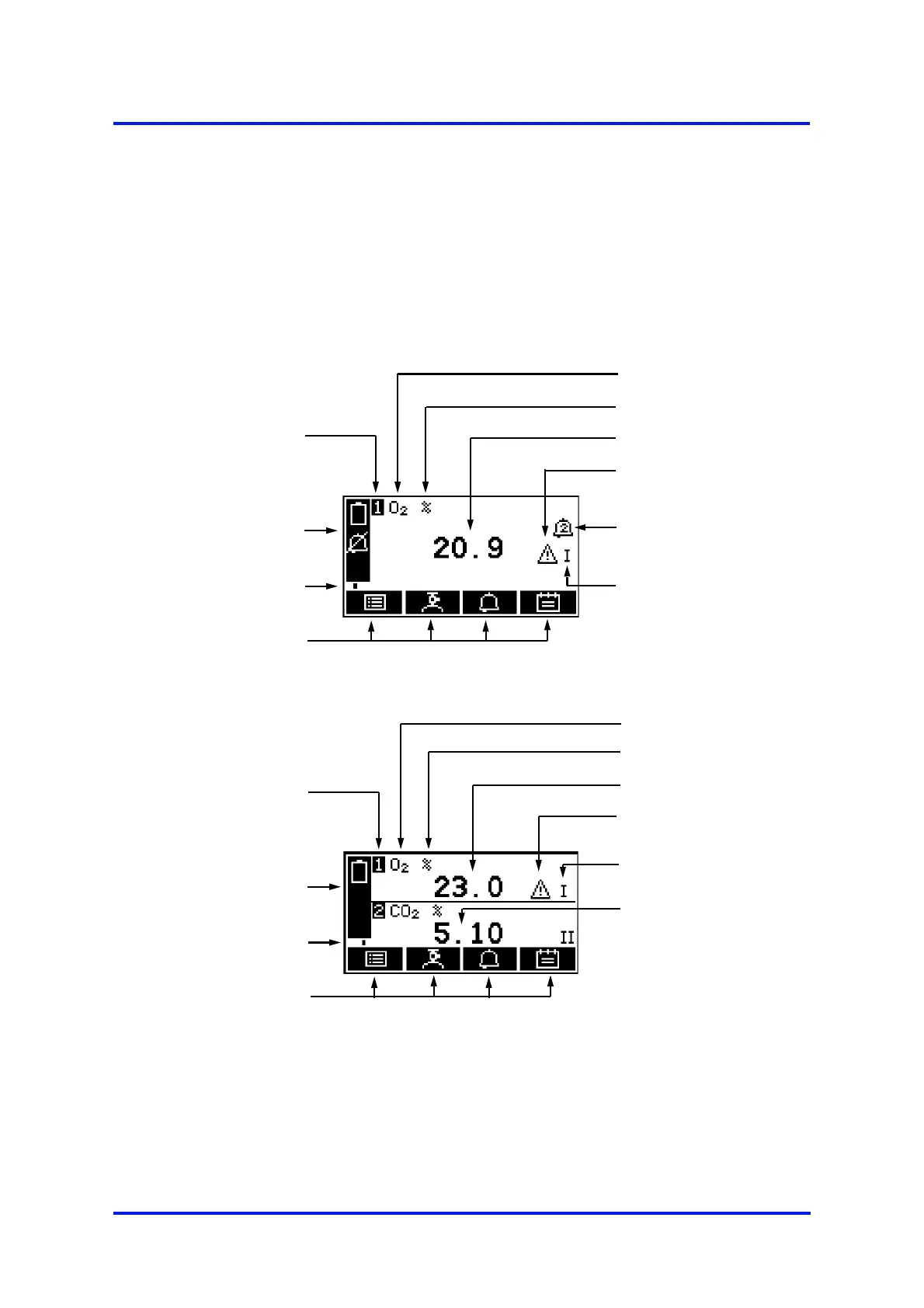
The Measurement screen is then displayed, as shown in Figure 3 below. Note that:
• If your Multi Purpose is configured for a single sample gas measurement, the
1-measurement screen will be shown, as in detail A below.
• If your Multi Purpose is configured for two sample gas measurements, the
2-measurement screen will be shown, as in detail B below.
(Continued on page 17)
(A) 1-measurement screen:
(B) 2-measurement screen:
* Optional feature
Figure 3 - The Measurement screen
Gas being measured
Current measurement
Status icon bar
(see Section 4.4)
Soft key legends
Alarm icon: see
Section 6.5.1
Software health
indicator
Transducer number
("1" always shown)
Fault icon: see
Section 8
Measurement units
milliAmp Range*:
see Section 6.6.1
Gases being measured
Current measurement 1
Status icon bar
(see Section 4.4)
Soft key legends
Fault icon: see
Section 8
Software health
indicator
Transducer numbers
Measurement units
milliAmp Ranges*:
see Section 6.6.1
Current measurement 2












 To Next Page