49
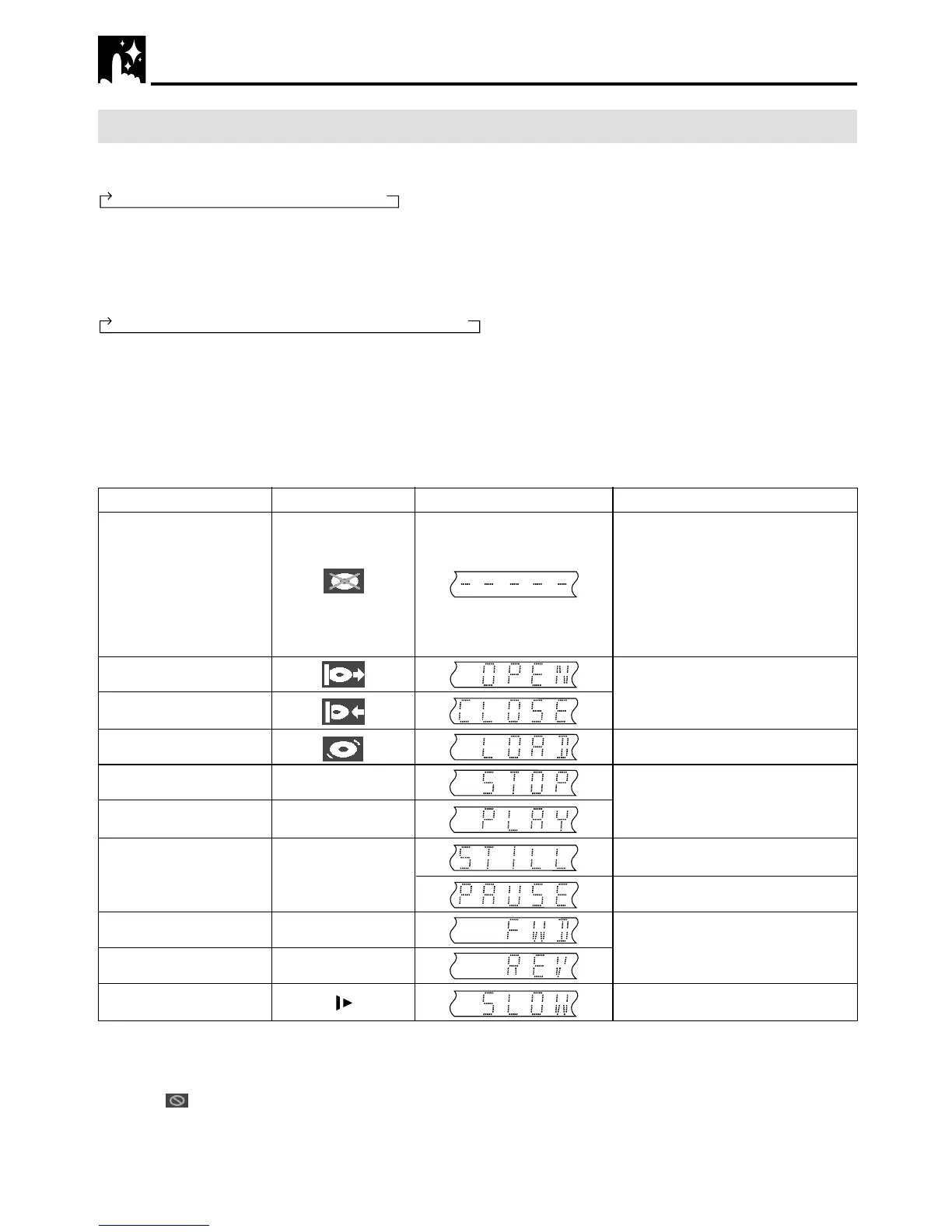
DVD Display Information
If no disc is loaded or
an unplayable disc is
loaded when this Unit
is switched on
Tray open
Tray closed
Loading
Stopped
Playing
Still/Paused
Fast forward
Fast reverse
Slow
TV Screen DVD Front Panel Display Remarks
Operation Mode Indicators
Each time ON SCREEN on the remote control unit is pressed, the display on the TV screen changes the mode
in the following sequence:
• AUTO mode .... Displays indicators for 3 seconds when operation begins.
• ON mode ......... Displays indicators continually until the operation mode is changed.
• OFF mode ....... Does not display indicators.
Each time DISPLAY on the remote control unit is pressed, the DVD Front Panel Display changes the mode in
the following sequence:
• Time mode ..................... Displays the playing time*.
•
Operation Status mode
.... Displays the operation you perform such as “PLAY”, “REV”.
• Title mode ...................... Displays the total number of titles, chapters, or tracks.
* When the disc you attempt to play has no information on time, the operation status is displayed.
This Unit displays the information shown below on the TV screen and on the DVD Front Panel Display depend-
ing on the operation status.
Display Examples
“– – – ––” appears when the tray
is closed and:
1) There is no disc in the tray.
2) The disc type is not DVD or
CD.
3) The disc is not loaded
correctly (upside-down, etc.)
The indicator changes to show
other indicators (total time, etc.)
When a DVD is played back.
When an audio CD is played back.
Does not work with CDs.
Region (Local) Number Error Indicator
If the region (local) number of the disc that you attempt to play differs from the region number of this Unit (see
page 8), “
REGION CODE ERROR” appears on the TV screen and the disc tray slides out. (The disc cannot
be played.)
Ë
û
â
è
È
AUTO mode → ON mode → OFF mode
Time mode
→
Operation Status mode
→
Title mode



 To Next Page