Using the AC Adaptor/Battery
Charger
Precautions:
If used near a radio. the AC adaptor/battery charger
may interfere with reception.
Prevent flammables, liquids, and metal objects from
entering the unit.
This is a sealed unit. Do not attempt to open or
modify it.
Do not damage, drop, or subject the unit to
vibration.
Do not leave the unit in direct sunlight.
Avoid using the unit in humid or extremely hot
places.
If the power source becomes disconnected during
recording, playback, or other operations, the tape
vyill remain wrapped around the drum and may be
damaged. Reconnect the power source to the main
unit immediately.
The supplied AC adaptor/battery charger is
specially designed for use with the VIEWCAM. and
should not be used as a power supply for other
camcorders.
Charging the Battery Pack
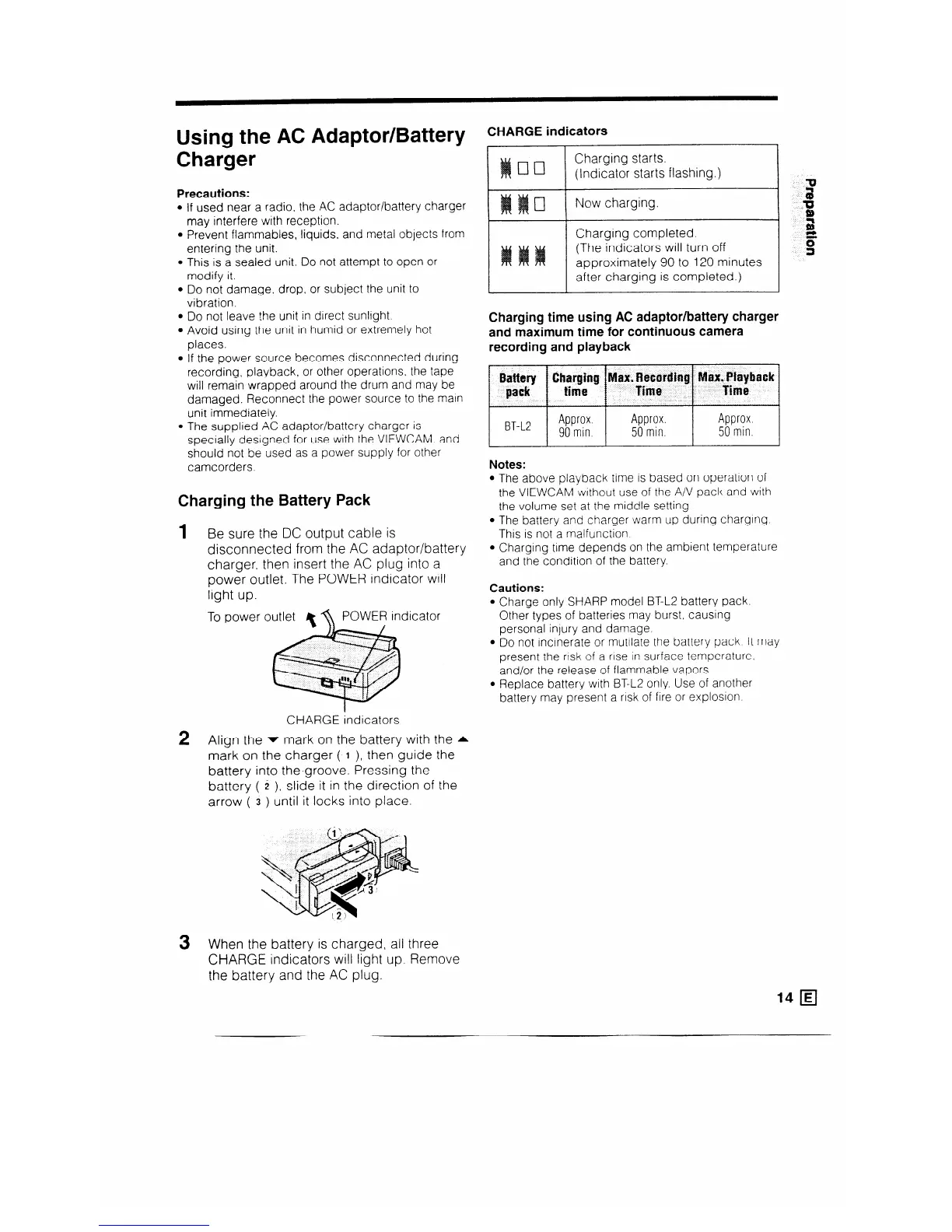
1 B e sure the DC output cable is
disconnected from the AC adaptor/battery
charger, then insert the AC plug into a
power outlet. The POWER indicator will
light up.
To power outlet POWER indicator
.
CHARGE indicators
2 Align the v mark on the battery with the A
mark on the charger (‘1 ), then guide the
battery into the,groove. Pressing the
battery ( i ), slide it in the direction of the
arrow ( 3 ) until it locks into place.
CHARGE indicators
Charging starts.
(Indicator starts flashing.)
Now charging.
Charging completed
(The indicators will turn off
approximately 90 to 120 minutes
after charging is completed.)
Charging time using AC adaptor/battery charger
and maximum time for continuous camera
recording and playback
Notes:
l The above playback time is based on operation of
the VIEWCAM swithout use of the A/V pack and with
the volume set at the middle setting.
l The battery and charger warm up during charging
This is not a malfunction
l Charging time depends on the ambient temperature
and the condition of the battery.
Cautions:
l Charge only SHARP model BT-L2 battery pack.
Other types of batteries may burst, causing
personal injury and damage.
l Do not incinerate or mutilate the battery pack It may
present the rusk of a rise in surface temperature.
and/or the release of flammable vapors.
l Replace battery with BT-L2 only. Use of another
battery may present a risk of fire or explosion
3 When the battery is charged, all three
CHARGE indicators will light up. Remove
the battery and the AC plug.



 To Next Page