Connections and Editing
Connection to TV without
Audionlideo Jacks
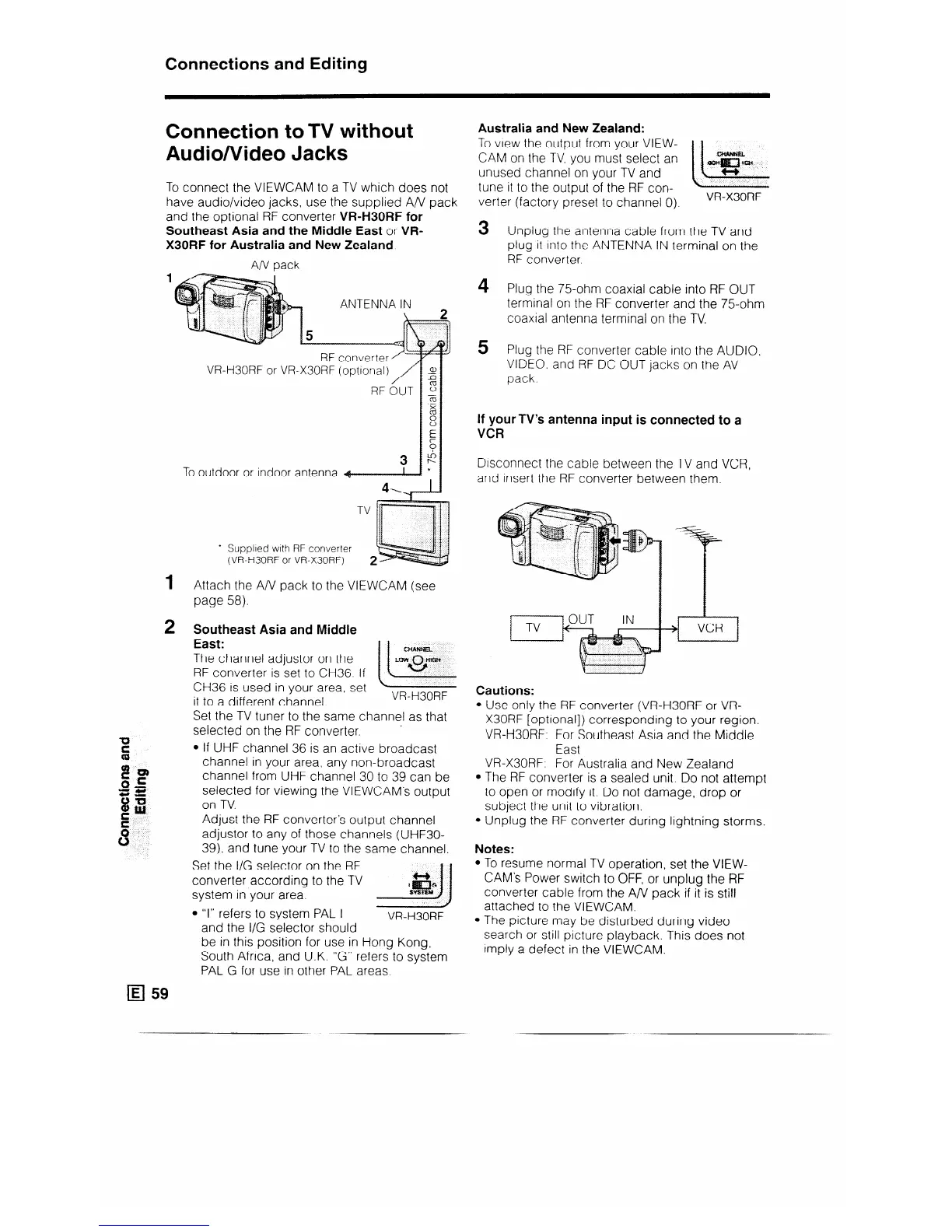
To connect the VIEWCAM to a TV which does not
have audio/video jacks, use the supplied A/V pack
and the optional RF converter VR-H30RF for
Southeast Asia and the Middle East or VR-
X30RF for Australia and New Zealand
AIV pack
1
ANTENNA IN
VRH30RF or VRX30RF (optlonal)
To outdoor or indoor antenna
’ Supplied with RF converter
(VRH30RF or VRX30RF)
Attach the A/V pack to the VIEWCAM (see
page 58).
Southeast Asia and Middle
East:
cH.WWEL
The channel adjustor on the
RF converter is set to CH36. If
CH36 is used in your area, set
ii-
““tr””
0
it to a different channel.
VR-H30RF
Set the TV tuner to the same channel as that
selected on the RF converter.
l If UHF channel 36 is an active broadcast
channel in your area, any non-broadcast
channel from UHF channel 30 to 39 can be
selected for viewing the VIEWCAM’s output
on TV.
Adjust the RF converter’s output channel
adjustor to any of those channels (UHF30-
39). and tune your TV to the same channel.
Set the I/G selector on the RF
converter according to the TV
system in your area.
l “I” refers to system PAL I
VR-H30RF
and the I/G selector should
be in this position for use in Hong Kong,
South Africa, and U.K. “G” refers to system
PAL G for use in other PAL areas.
Australia and New Zealand:
To view the output from your VIEW- 1 1
CAM on the TV. you must select an
unused channel on your TV and
tune it to the output of the RF con-
verter (factory preset to channel 0).
VR-X30RF
3
Unplug the antenna cable from the TV and
plug it Into the ANTENNA IN terminal on the
RF converter.
4 Plug the 75-ohm coaxial cable into RF OUT
terminal on the RF converter and the 75ohm
coaxial antenna terminal on the TV.
5
Plug the RF converter cable into the AUDIO.
VIDEO. and RF DC OUT jacks on the AV
pack.
If your TV’s antenna input is connected to a
VCR
Dtsconnect the cable between the TV and VCR,
and insert the RF converter between them.
Cautions:
l Use only the RF converter (VR-H30RF or VR-
X30RF [optional]) corresponding to your region.
VR-H30RF. For Southeast Asia and the Middle
tast
VR-X30RF: For Australia and New Zealand
l The RF converter is a sealed unit. Do not attempt
to open or modify it. Do not damage, drop or
subject the unit to vibration.
l Unplug the RF converter during lightning storms.
Notes:
l To resume normal TV operation, set the VIEW-
CAM’s Power switch to OFF, or unplug the RF
converter cable from the A/V pack if it is still
attached to the VIEWCAM.
l The picture may be disturbed during video
search or still picture playback. This does not
Imply a defect in the VIEWCAM.



 To Next Page