Programme Search
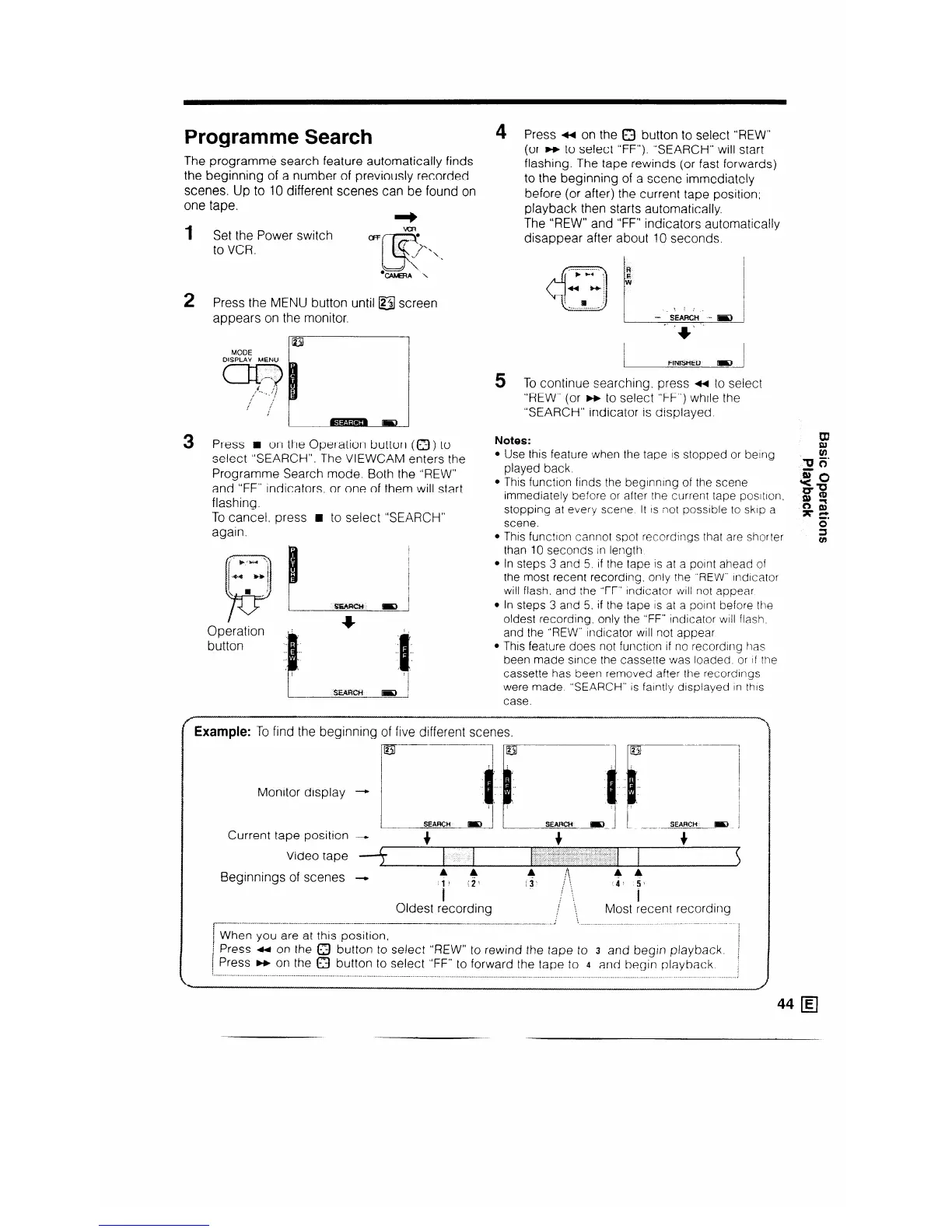
The programme search feature automatically finds
the beginning of a number of previously recorded
scenes. Up to 10 different scenes can be found on
one tape.
4
1
2
Set the Power switch
to VCR.
Press the MENU button until @ screen
appears on the monitor.
Press n on the Operation button (0) to
select “SEARCH”. The VIEWCAM enters the
Programme Search mode. Both the “REW”
and “FF” indicators, or one of them will start
flashing.
To cancel. press n to select “SEARCH”
again.
Operation
button
5
Press 4 on the 0 button to select “REW”
(or m to select “FF”). “SEARCH” will start
flashing. The tape rewinds (or fast forwards)
to the beginning of a scene immediately
before (or after) the current tape position;
playback then starts automatically.
The “REW” and “FF” indicators automatically
disappear after about 10 seconds.
/ RN&SUED m 1
To continue searching. press 4 to select
“REW” (or m to select “FF”) while the
“SEARCH” indicator is displayed.
Notes:
Use this feature when the tape IS stopped or being
played back.
This function finds the beginning of the scene 4P
immediately before or after the current tape posItIon.
=P
1;~ 1
stopping at every scene It IS not possible to skip a
scene.
This functton cannot spot recordings that are shorter
than 10 seconds in length
In steps 3 and 5. If the tape is at a point ahead of
the most recent recording. only the “REW” Indicator
will flash. and the “FF” Indicator will not appear
In steps 3 and 5. if the tape IS at a point before the
oldest recording. only the “FF” indicator wtll flash,
and the “REW” indicator will not appear
This feature does not function if no recording has
been made since the cassette was loaded. or If the
cassette has been removed after the recordings
were made “SEARCH” is faintly displayed In this
case.
Example: To find the beginning of five different scenes.
Monitor display
Current tape position
Video tape
Beginnings of scenes
--+
-
4
,, ,,+
+
(
: . . i : :. . .
I
3
Oldest recording
i
i
I
:
; .
Most recent recording
t-----
-_.---- ._.x.......I.. - . . . .._. ---.I ..-.- _.-~
-~-_._-..___-_-_---.-...-_---. _,
.._.
1 When you are at this position,
i Press ti on the a button to select “REW” to rewind the tape to 3 and begin playback.
1 Press m on the 0 button to select “FF” to forward the tape to 4 and begin playback
. . . . . . . . . . . . . . . . . . . . . . . . . . . . . . . . . . . . . . . . . . . . . . . . . . . . . . . . . . . . . . . . . . . . . . . . . . . . . . . . . . . . . . . . . . . . . . . . . . . . . . . . . . . . . . . . . . . . .
,_.________...__..__..........................
_. ________ ___ __



 To Next Page