Preparation
Powering the VIEWCAM from
Your Car Battery
Use the optional VR-4 IOCH car battery adaptor/
battery charger (or the VW4 10CA car battery
adaptor) when you want to power the VIEWCAM
from the battery of your car while tt IS idling or
being driven
1
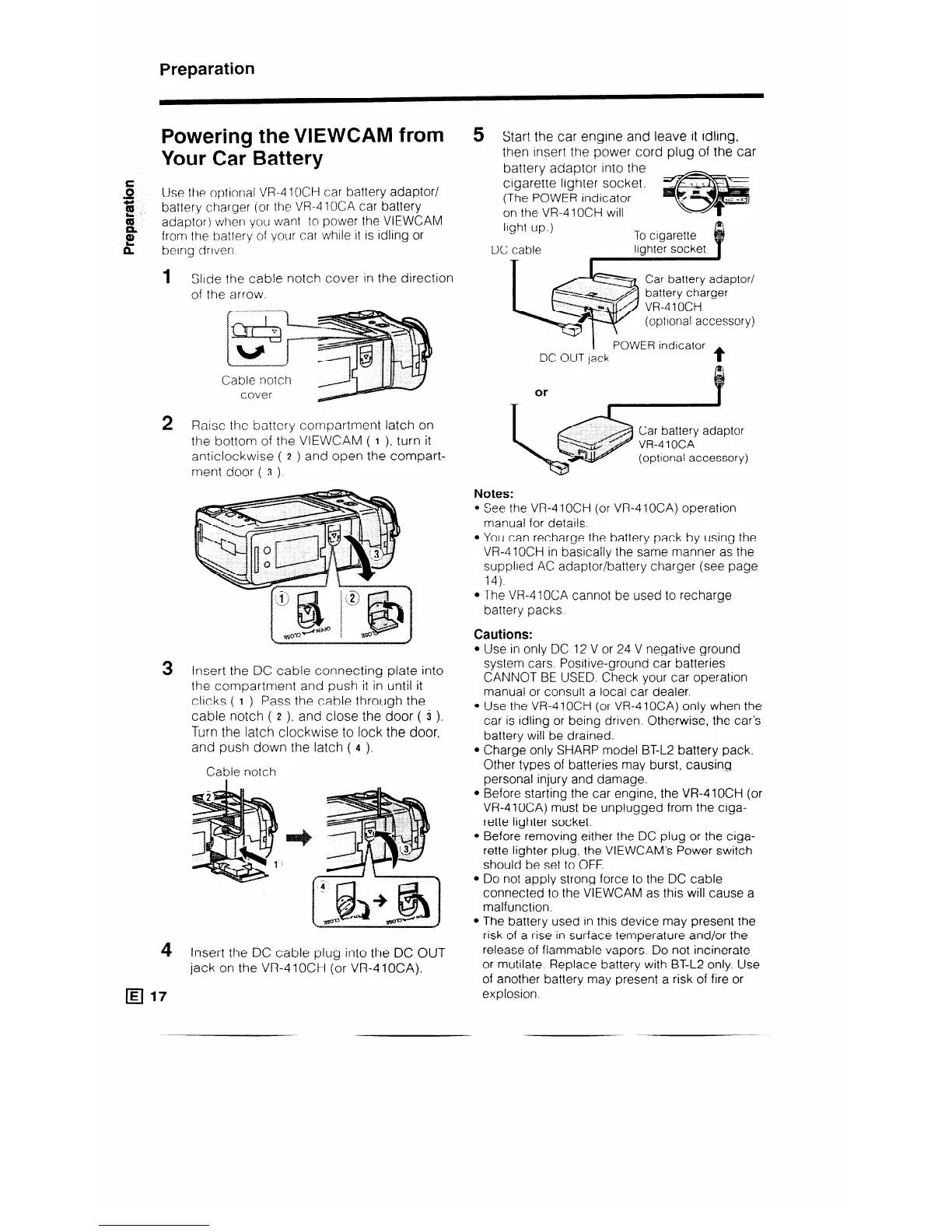
Slide the cable notch cover in the direction
of the arrow.
Cable notch
cover
2 Raise the battery compartment latch on
the bottom of the VIEWCAM ( I ), turn it
anticlockwise ( 2 ) and open the compart-
ment door ( 3 ).
3
Insert the DC cable connecting plate into
the compartment and push it in until it
clicks ( I ). Pass the cable through the
cable notch ( z ), and close the door ( 3 ).
Turn the latch clockwise to lock the door,
and push down the latch ( 4 ).
Cable notch
4
Insert the DC cable plug into the DC OUT
jack on the VR410CH (or VR410CA).
q 17
5 Start the car engine and leave it idling,
then insert the power cord plug of the car
battery adaptor into the
cigarette lighter socket.
(The POWER indicator
on the VR-41 OCH will
light up.)
To cigarette
DC cable
lighter socket
Lq
Car battery adaptor/
battery charger
*)
W-4 1 OCH
(optional accessory)
POWER indicator
DC OUT jack
t
or
Notes:
l See the VR-4 1 OCH (or VR-4 1 OCA) operation
manual for details.
l You can recharge the battery pack by using the
VR-410CH in basically the same manner as the
supplied AC adaptor/battery charger (see page
14).
l The VR-410CA cannot be used to recharge
battery packs.
Cautions:
l Use in only DC 12 V or 24 V negative ground
system cars. Positive-ground car batteries
CANNOT BE USED. Check your car operation
manual or consult a local car dealer.
l Use the VR-410CH (or VR-410CA) only when the
car is idling or being driven. Otherwise, the car’s
battery will be drained.
l Charge only SHARP model BT-L2 battery pack.
Other types of batteries may burst, causing
personal injury and damage.
l Before starting the car engine, the VR-41OCH (or
VR-410CA) must be unplugged from the ciga-
rette lighter socket.
l Before removing either the DC plug or the ciga-
rette lighter plug, the VIEWCAM’s Power switch
should be set to OFF.
l Do not apply strong force to the DC cable
connected to the VIEWCAM as this will cause a
malfunction.
l The battery used in this device may present the
risk of a rise in surface temperature and/or the
release of flammable vapors. Do not incinerate
or mutilate. Replace battery with BT-L2 only. Use
of another battery may present a risk of fire or
explosion.
_



 To Next Page