Warning Indicators
EJECTTHECASSE'llE. EJECTTHECASSEllE.
DEW
-b ii-
. ...*...
INSERTACASSEllE.
~ROT'ECT. GAB-
,' <.
THETAPEENDSSOON.
@zl
CHANGETHECASSEllE.
TAPE END
REPLACETHELAMP. REPLACETHELAMP.
0
!
0
!
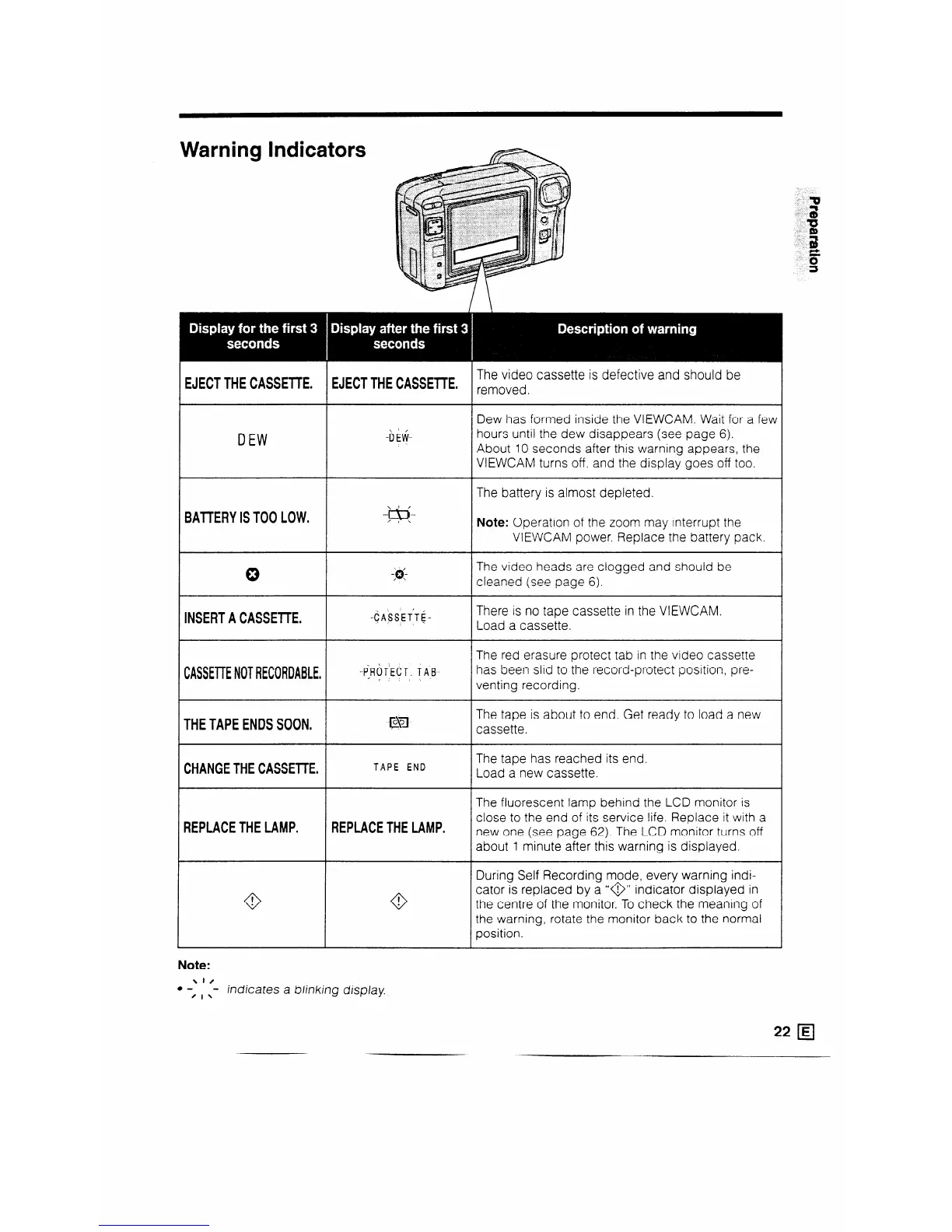
The video cassette is defective and should be
removed.
Dew has formed inside the VIEWCAM. Wait for a few
hours until the dew disappears (see page 6).
About 10 seconds after this warning appears, the
VIEWCAM turns off, and the display goes off too.
The battery is almost depleted.
Note: Operation of the zoom may interrupt the
VIEWCAM power. Replace the battery pack.
The video heads are clogged and should be
cleaned (see page 6).
There is no tape cassette in the VIEWCAM.
Load a cassette.
The red erasure protect tab in the video cassette
has been slid to the record-protect position, pre-
venting recording.
The tape is about to end. Get ready to load a new
cassette.
The tape has reached its end.
Load a new cassette.
The fluorescent lamp behind the LCD monitor is
close to the end of its service life. Replace it with a
new one (see page 62). The LCD monitor turns off
about 1 minute after this warning is displayed.
During Self Recording mode, every warning indi-
cator is replaced by a “@” indicator displayed in
the centre of the monitor. To check the meaning of
the warning, rotate the monitor back to the normal
position.
Note:
\I/
l -
’ I x
- indicates a blinking display.



 To Next Page