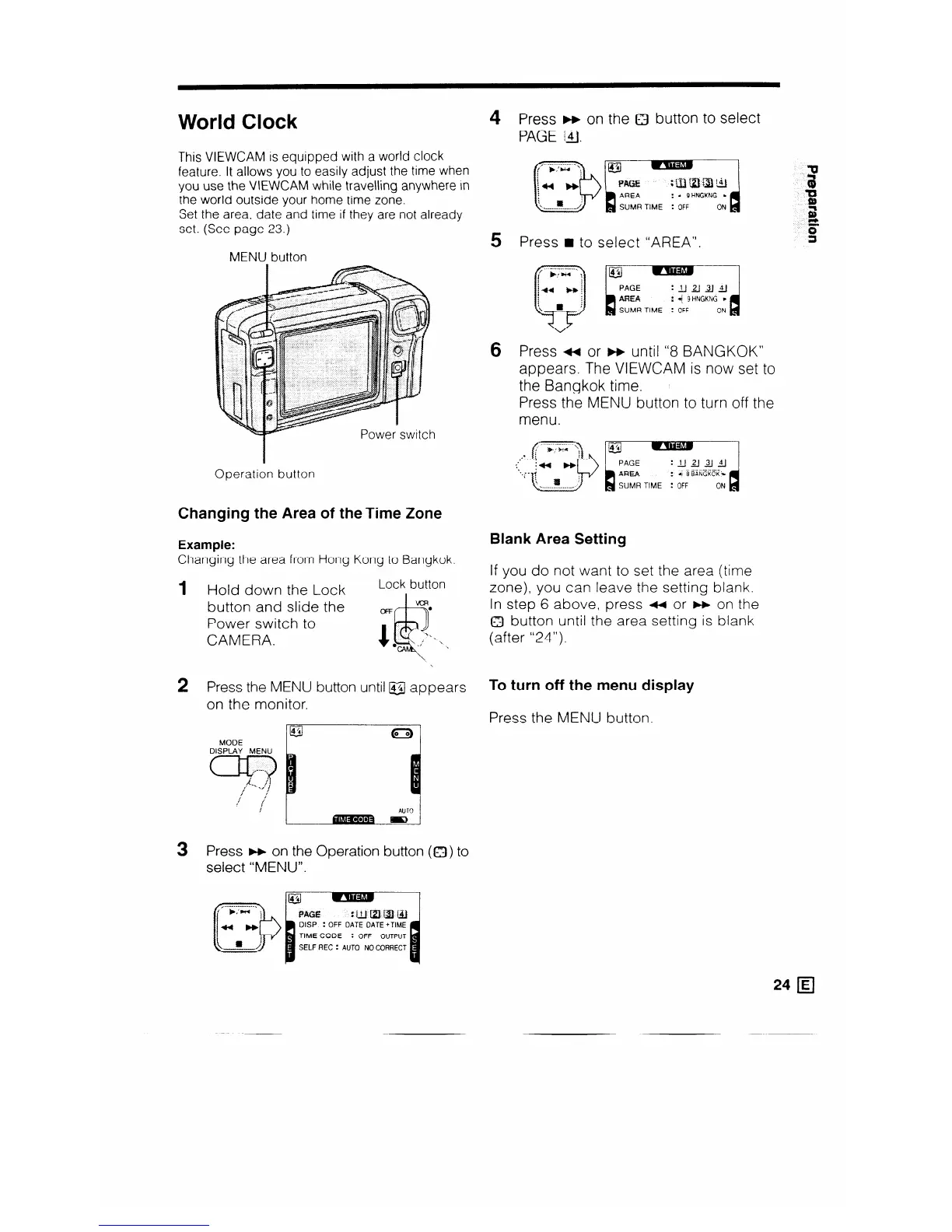
World Clock
This VIEWCAM is equipped with a world clock
feature. It allows you to easily adjust the time when
you use the VIEWCAM while travelling anywhere in
the world outside your home time zone.
Set the area, date and time if they are not already
set. (See page 23.)
MENU button
Operation button
Changing the Area of theTime Zone
Example:
Blank Area Setting
Changing the area from Hong Kong to Bangkok.
If you do not want to set the area (time
zone), you can leave the setting blank.
In step 6 above, press ++ or m on the
a button until the area setting is blank
(after “24”).
1
2
3
Hold down the Lock
Lock button
button and slide the
oR
Power switch to
CAMERA.
1 ,
\
Press the MENU button until l$3J appears
on the monitor.
MODE
DISPLAY MENU
=Fj?
/ !
/ {‘
!
Press m on the Operation button (0) to
select “MENU”.
4 Press F+ on the Q button to select
PAGE 14.
5
Press n to select “AREA”.
6
Press ++ or m until “8 BANGKOK”
appears. The VIEWCAM is now set to
the Bangkok time.
Press the MENU button to turn off the
menu.
To turn off the menu display
Press the MENU button.
24 q



 To Next Page