Basic Operations
Camera Recording
Tips on Recording Positions
The rotating LCD monitor screen lets you enjoy
easy video recording in relaxed postures.
l You can record using more natural body pos-
tures since you can see the subject on-screen,
without having to hold the VIEWCAM against
your eye
l The LC[3\ monitor also makes high-angle and
low-angie shots easy
l In hand-held recording, the VIEWCAM has to be
steadied to prevent image shake.
l Use a tripod for very stable recording.
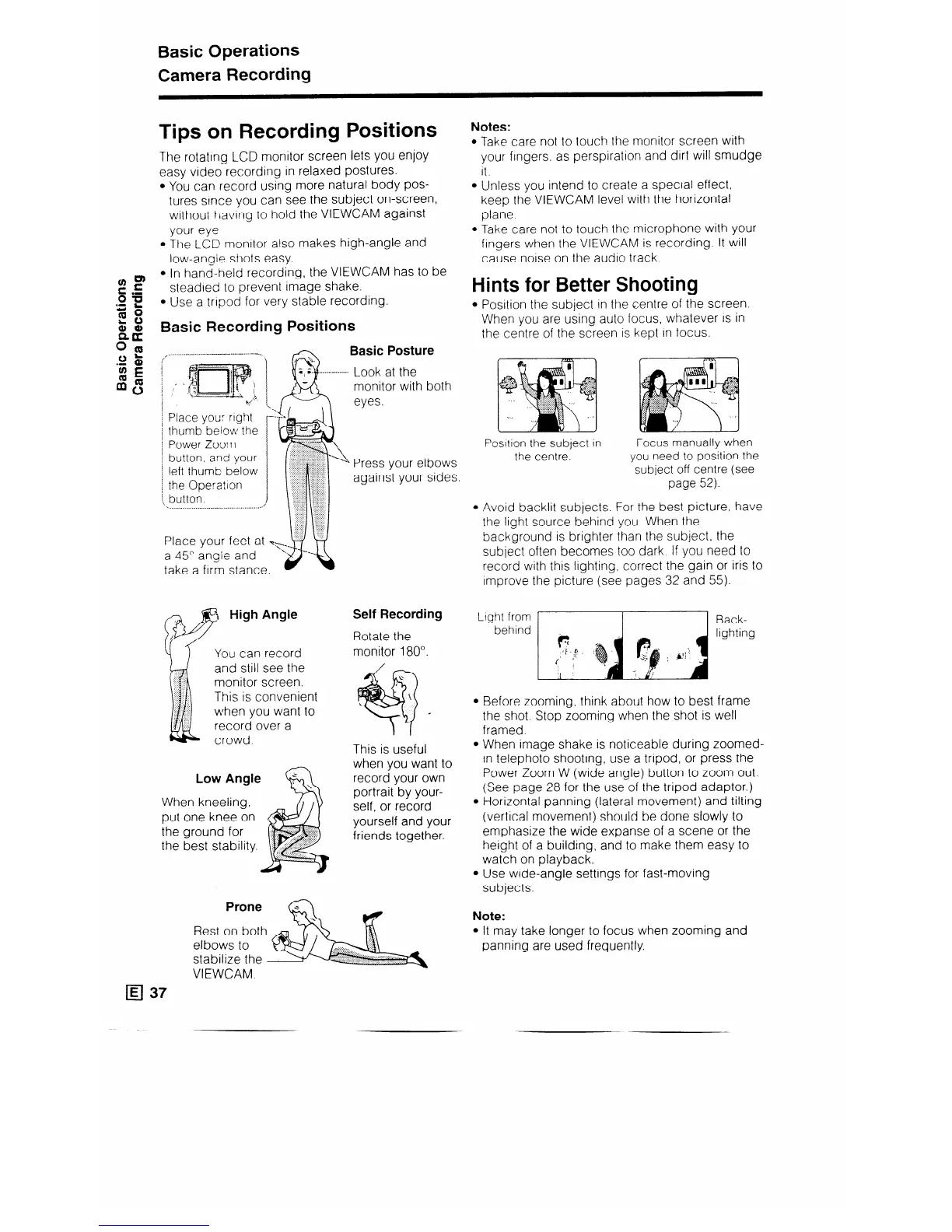
Basic Recording Positions
Notes:
l Take care not to touch the monitor screen with
your fingers. as perspiration and dirt will smudge
It.
l Unless you intend to create a special effect,
keep the VIEWCAM level with the horizontal
plane
l Take care not to touch the microphone with your
fingers when the VIEWCAM is recording. It will
cause noise on the audio track.
Hints for Better Shooting
l Position the subject in the centre of the screen.
When you are using auto focus, whatever IS in
the centre of the screen is kept in focus.
Place you: right
thumb below the
Power Zoom
button, and your
left thumb below
the Operation
button.
Basic Posture
Look at the
monitor with both
eyes.
High Angle
You can record
and still see the
monitor screen.
This is convenient
when you want to
record over a
crowd.
Wh en kneeling,
Put
one knee on
the ground for
the best stability.
Low Angle
Press your elbows
against your sides
Self Recording
Rotate the
monitor 180”.
This is useful
when you want to
record your own
portrait by your-
self, or record
yourself and your
friends together.
Rest on both
elbows to
stabilize the
Posttion the subject in
the centre.
Focus manually when
you need to position the
subject off centre (see
page 52).
l Avoid backlit subjects. For the best picture, have
the light source behind you. When the
background is brighter than the subject, the
subject often becomes too dark. If you need to
record with this lighting. correct the gain or iris to
improve the picture (see pages 32 and 55).
Ltght from
Back-
behind
lighting
l Before zooming, think about how to best frame
the shot. Stop zooming when the shot is well
framed.
l When image shake is noticeable during zoomed-
in telephoto shooting, use a tripod, or press the
Power Zoom W (wide angle) button to zoom out.
(See page 28 for the use of the tripod adaptor.)
l Horizontal panning (lateral movement) and tilting
(vertical movement) should be done slowly to
emphasize the wide expanse of a scene or the
height of a building, and to make them easy to
watch on playback.
l Use wide-angle settings for fast-moving
subjects.
Note:
l It may take longer to focus when zooming and
panning are used frequently.
VIEWCAM.



 To Next Page