Connections and Editing
Editing
Cutting Unwanted Sequences
Video editing lets you refine your videos by
removing unwanted sequences from your tape,
or transposing one sequence with another.
This VIEWCAM lets you monitor the source pro-
gramme on the built-in LCD monitor without
having to connect it to an external TV or video
monitor.
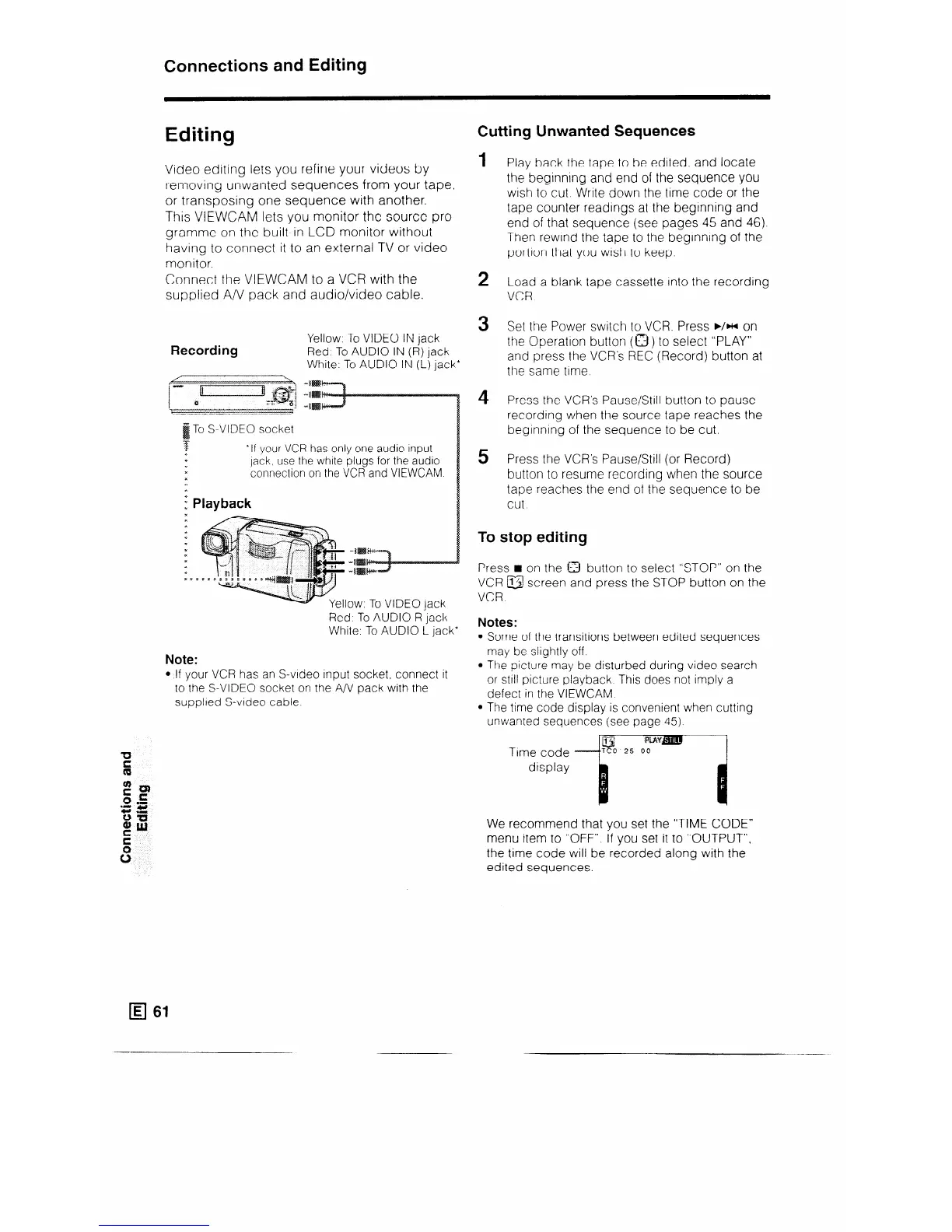
Connect the VIEWCAM to a VCR with the
supplied A/V pack and audio/video cable.
Recording
Yellow: To VIDEO IN jack
Red. To AUDIO IN (R) jack
White: To AUDIO IN (L) jack*
Red, To AUDIO R jack
White: To AUDIO L jack*
Note:
l If your VCR has an S-video Input socket, connect it
to the S-VIDEO socket on the A/V pack with the
supplied S-video cable
To S-VIDEO socket
*If your VCR has only one audio input
jack, use the white plugs for the audio
connection on the VCR and VIEWCAM.
: Playback
c
1
2
3
4
5
Play back the tape to be edited, and locate
the beginnIng and end of the sequence you
wish to cut Write down the time code or the
tape counter readings at the beginning and
end of that sequence (see pages 45 and 46).
Then rewind the tape to the beginning of the
portion that you wish to keep.
Load a blank tape cassette Into the recording
VCR
Set the Power switch to VCR. Press ./H on
the Operation button (a) to select “PLAY”
and press the VCR’s REC (Record) button at
the same ttme.
Press the VCR’s Pause/Still button to pause
recording when the source tape reaches the
beginning of the sequence to be cut.
Press the VCR’s Pause/Still (or Record)
button to resume
tape reaches the
cut
recording when the source
end of the sequence to be
To stop editing
Press n on the 0 button to select “STOP” on the
VCR @I screen and press the STOP button on the
VCR.
Notes:
Some of the transitions between edited sequences
may be slightly off.
The picture may be disturbed during video search
or still picture playback This does not imply a
defect in the VIEWCAM.
The time code display is convenient when cutting
unwanted sequences (see page 45).
Time code
display
We recommend that you set the “TIME CODE”
menu item to “OFF” If you set it to “OUTPUT”,
the time code will be recorded along with the
edited sequences.
q 61



 To Next Page