Using the Hand Strap
Attaching the Shoulder Strap
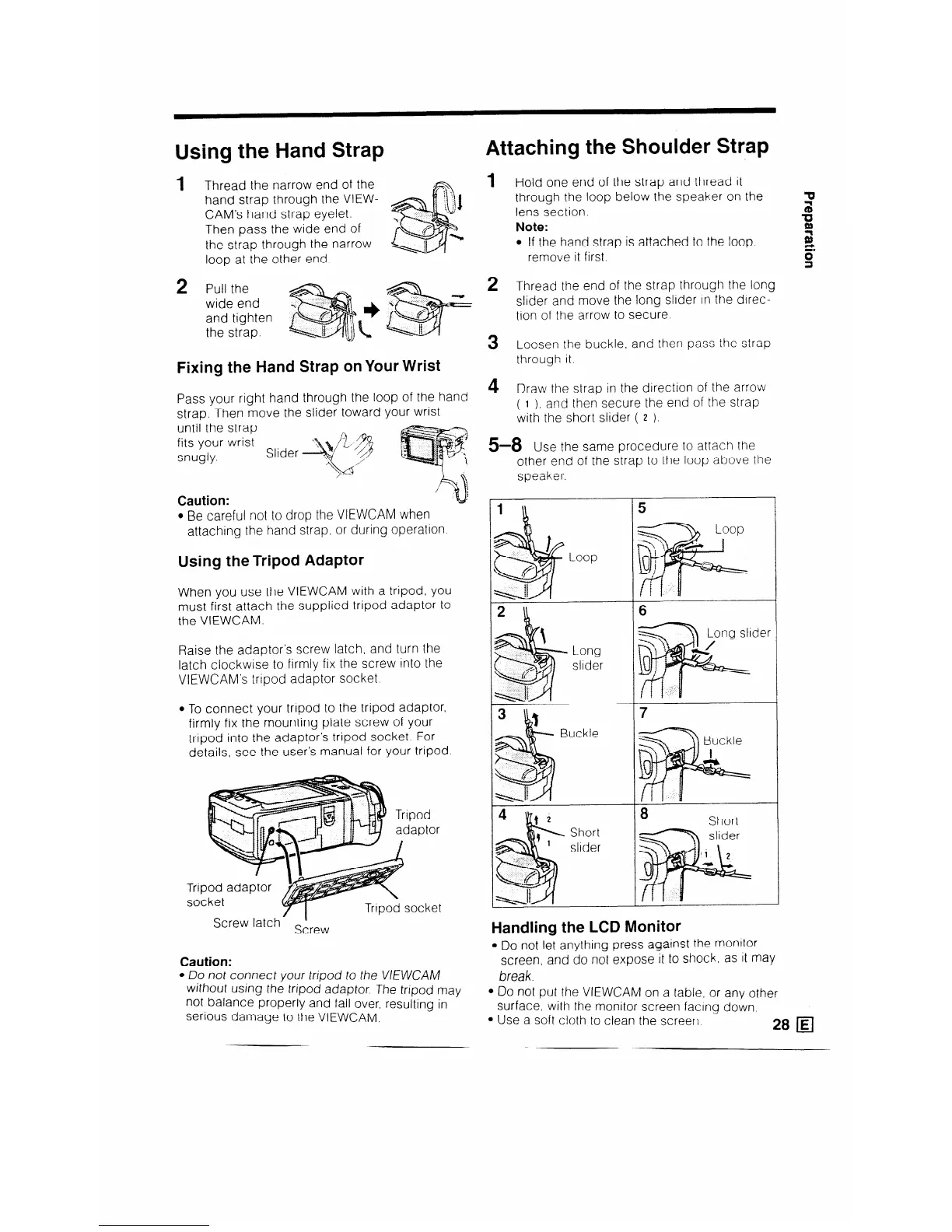
1 Thread the narrow end of the
hand strap through the VIEW-
CAM’s hand strap eyelet.
Then pass the wide end of
the strap through the narrow
loop at the other end
2 Pull the
wide end
and tighten
the strap.
Fixing the Hand Strap on Your Wrist
Pass your right hand through the loop of the hand
strap. Then move the slider toward your wrist
until the strap
fits your wrist
snugly.
Slider
Caution:
u
;
l Be careful not to drop the VIEWCAM when
attaching the hand strap. or during operation
Using the Tripod Adaptor
When you use the VIEWCAM with a tripod, you
must first attach the supplied tripod adaptor to
the VIEWCAM.
Raise the adaptor’s screw latch, and turn the
latch clockwise to firmly fix the screw into the
VIEWCAM’s tripod adaptor socket.
l To connect your tripod to the tripod adaptor,
firmly fix the mounting plate screw of your
tripod into the adaptor’s tripod socket. For
details, see the user’s manual for your tripod
Screw latch-
Sirew
Caution:
- DO not connect your tripod to the VIEWCAM
without using the tripod adaptor. The tripod may
not balance properly and fall over, resulting in
serious damage to the VIEWCAM.
1
Hold one end of the strap and thread it
through the loop below the speaker on the
lens section.
Note:
l If the hand strap is attached to the loop.
remove it first.
2
3
4
r
Thread the end of the strap through the long
slider and move the long slider in the direc-
tion of the arrow to secure
Loosen the buckle, and then pass the strap
through it.
Draw the strap in the direction of
( 1 ). and then secure the end of
with the short slider ( 2 ).
the arrow
the strap
a-8 Use the same procedure to at
tach the
other end of the stra
speaker.
Loop
Long
slider
Buckle
Short
slider
3 to the loop above the
6
Handling the LCD Monitor
l DO not let anything press against the monitor
screen, and do not expose it to shock as it may
break.
l 00 not put the VIEWCAM on a table, or any other
surface, with the monitor screen facing down
l Use a soft cloth to clean the screerl
28 q



 To Next Page