Basic Operations
Camera Recording
l Refer to pages 19-21 on how to operate
the monitor display.
Unlike conventional camcorders, this model frees
you from having to peer into a small viewfinder.
You can watch the subject on the large LCD
monitor screen for easier. more enjoyable video-
shooting.
Easy Camera Recording with
Full Auto
Kz!
Before you start recording. perform the operations
.G 2
described on pages 13 through 28 to prepare your
58
VIEWCAM for recording.
%g 1
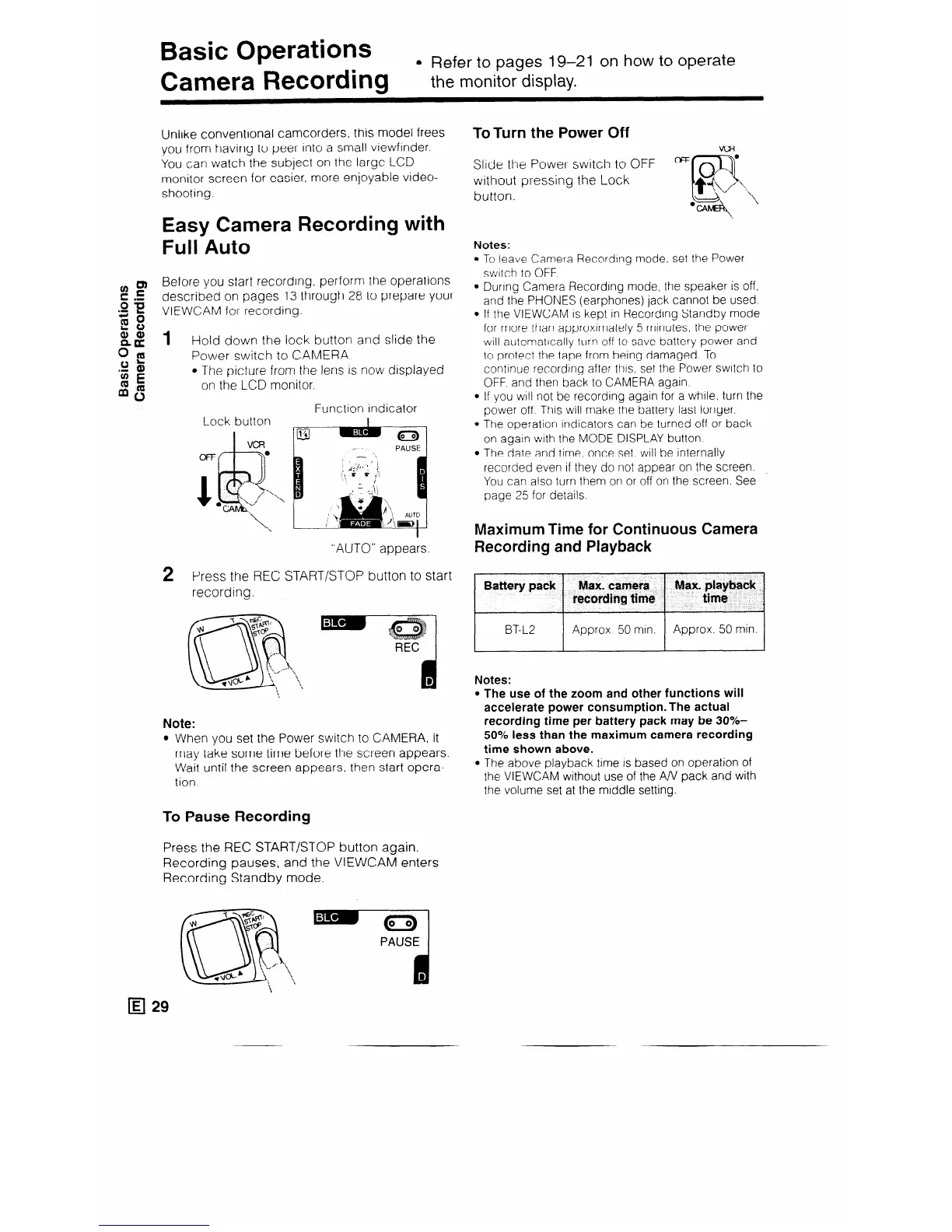
Hold down the lock button and slide the
22
Power switch to CAMERA.
‘g E
l The picture from the lens is now displayed
mb
on the LCD monitor.
Function indicator
“AUTO” appears.
2 Press the REC START/STOP button to start
recording.
Note:
l When you set the Power switch to CAMERA, it
may take some time before the screen appears.
Wait until the screen appears, then start opera-
tion
To Pause Recording
Press the REC START/STOP button again.
Recording pauses, and the VIEWCAM enters
Recording Standby mode.
ToTurn the Power Off
Slide the Power switch to OFF
OTr
without pressing the Lock
button.
Notes:
l To leave Camera Recording mode, set the Power
switch to OFF
l Durrng Camera Recording mode, the speaker is off.
and the PHONES (earphones) jack cannot be used.
l If the VIEWCAM IS kept in Recording Standby mode
for more than approximately 5 mtnutes. the power
will automatrcally turn off to save battery power and
to protect the tape from being damaged To
continue recordrng after thrs, set the Power swrtch to
OFF. and then back to CAMERA again.
l If you WIII not be recording again for a while. turn the
power off This will make the battery last longer.
l The operation indicators can be turned off or back
on again with the MODE DISPLAY button
l The date and time, once set, will be internally
recorded even if they do not appear on the screen.
You can also turn them on or off on the screen. See
page 25 for details.
Maximum Time for Continuous Camera
Recording and Playback
BaUery pack Max. camera
tecotiing time
I
BT-L2 Approx 50 min.
Approx. 50 min.
Notes:
l The use of the zoom and other functions will
accelerate power consumption. The actual
recording time per battery pack may be 30%-
50% less than the maximum camera recording
time shown above.
l The above playback time is based on operation of
the VIEWCAM without use of the A/V pack and with
the volume set at the middle setting.



 To Next Page