Preparation
To Display Area, Date and Time on the
Monitor
c
1
0
Refer to page 20 to display function
c,
screen a and select MENU-PAGE lj_J.
(d
3 2P
ress w on the Operation button (0 ) to
Q)
a’
select “DISP.“.
3
Press w or w on the 0 button to select
“DATE” or “DATE+TIME”.
4 Press the MENU button to turn off the
menu display. The area, date and time
will be displayed on the monitor.
DISPLAY MENU
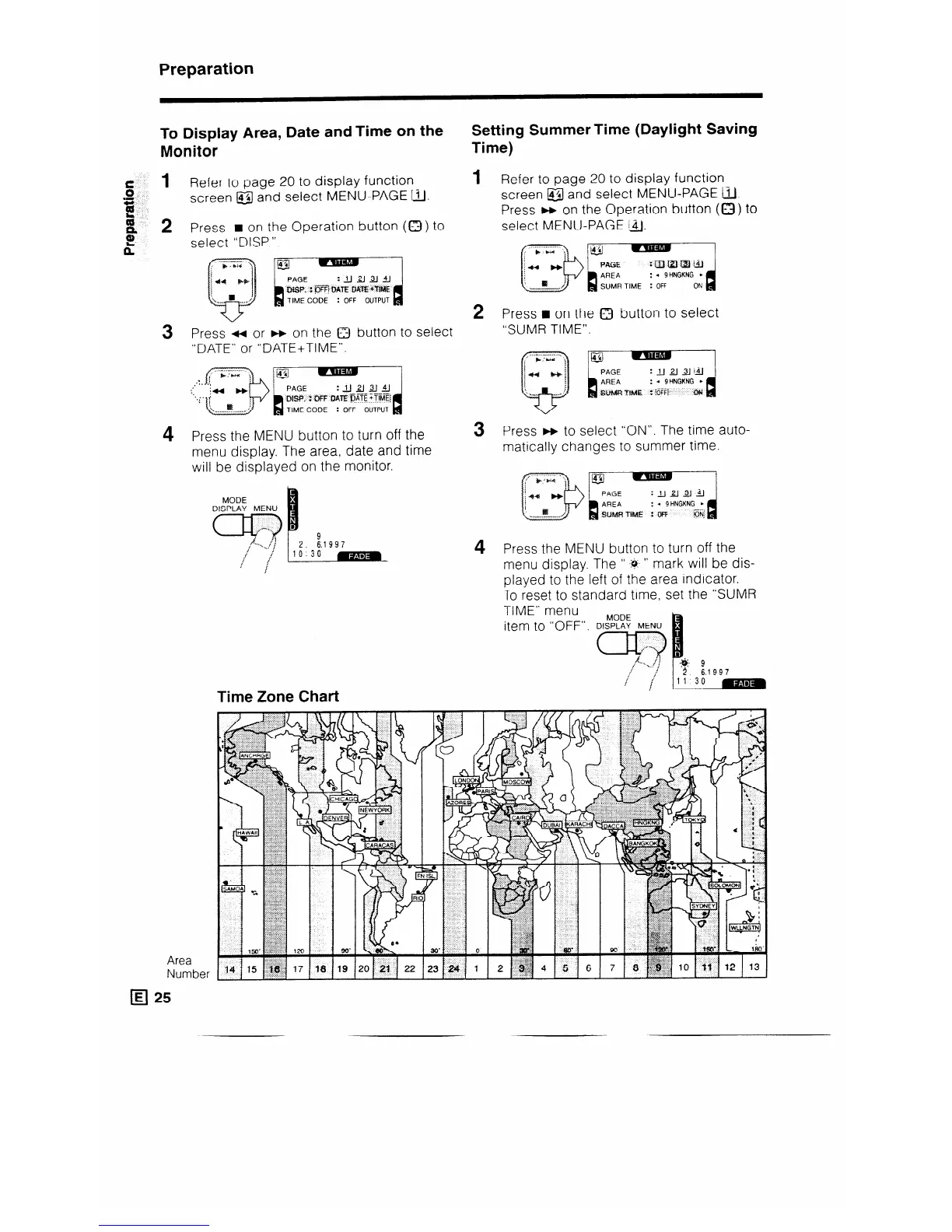
Time Zone Chart
Area
Number
q 25
Setting Summer Time (Daylight Saving
Time)
1 Refer to page 20 to display function
screen &/ and select MENU-PAGE IjJ.
Press w on the Operation button (Q ) to
select MENU-PAGE 14.
2 Press q on the 0 button to select
“SUMR TIME”.
3 Press w to select “ON”. The time auto-
matically changes to summer time.
4 Press the MENU button to turn off the
menu display. The ” -:4. ” mark will be dis-
played to the left of the area indicator.
To reset to standard time, set the “SUMR
TIME” menu
item to “OFF”.



 To Next Page