47
D717 User Manual Directories
• Adding additional phone number (subentry) for a name
◦ Jane Smith's entry has only one phone number, her SIP phone number. In this example, the
phone number of Jane Smith's landline will be added to the directory.
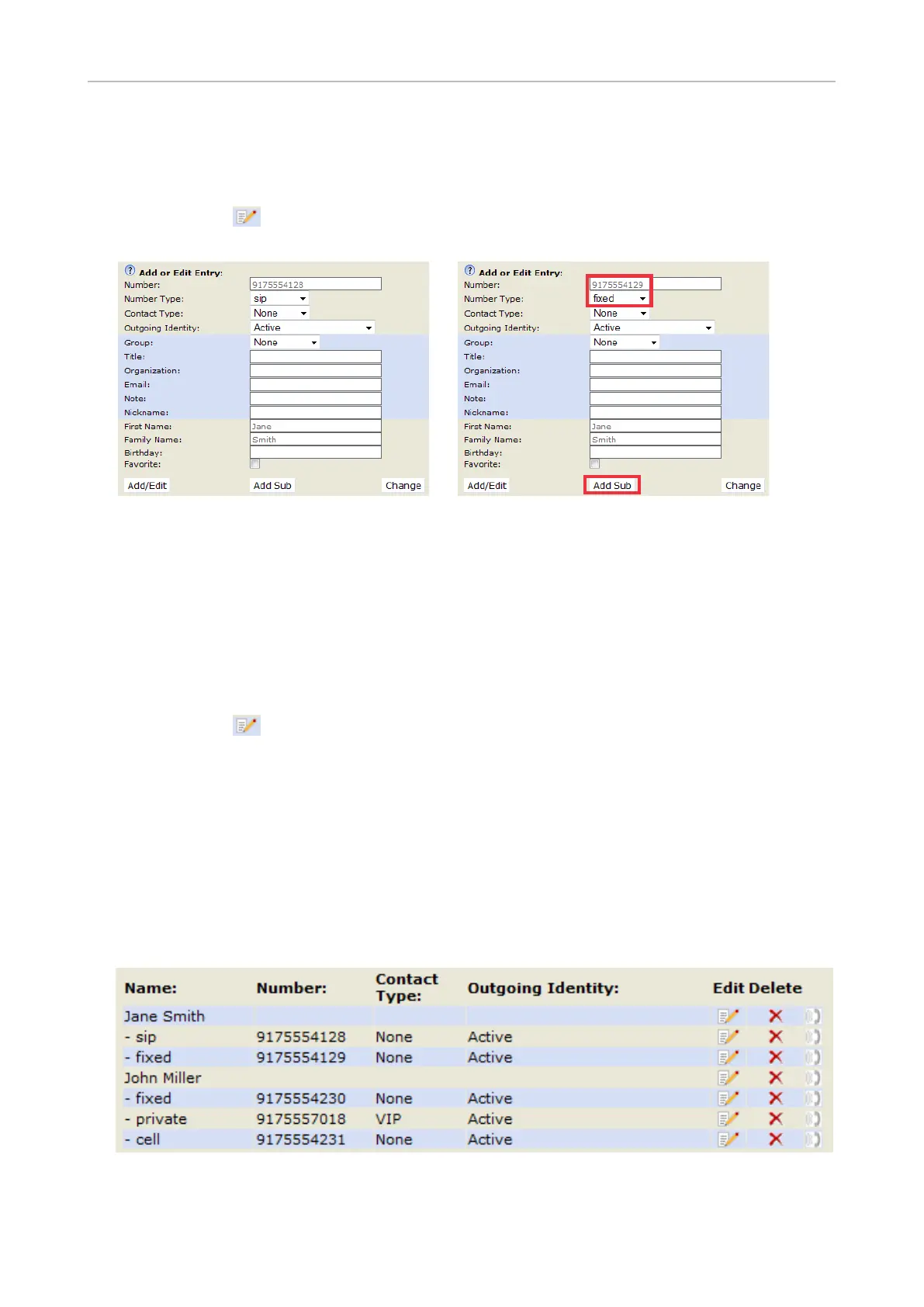
- Click on in Jane Smith's line (Fig. 1, above). The data is shown in "Add or Edit" area
(Fig. 2).
Fig. 2 Fig. 3
- Enter the phone number in the text field of "Number" (Fig. 3).
- Select "fixed" from the drop-down menu of "Number type" (Fig. 3).
- Optional: Select a contact type and an outgoing identity from drop-down lists (Fig. 3).
- Click on "Add Sub" (Fig. 3).
◦ John Miller's entry has a SIP number and a private number. In this example, his cell phone
number will be added as a third number.
- Click on in the line containing John Miller's name. The data is shown in "Add or Edit"
area.
- Enter the phone number in the text field of "Number".
- Select the number type.
- Optional: Select a contact type and an outgoing identity from the respective drop-down
list.
- Click on "Add Sub".
The directory now contains Jane Smith's landline number and John Miller's mobile phone number
(Fig. 4).
Fig. 4



 To Next Page