31
D717 User Manual Getting to Know Your Phone
Display settings
The backlight on the display of the phone and on the displays of the connected expansion modules are
adjusted separately on the phone and on the phone's web interface for the times when the devices are
active and when they are idle. For the phone's display you also have the option to to use the built-in
ambient light sensor to automatically adjust the backlight's intensity in accordance with the ambient
light within the sensor's detection area.
NOTE: When the phone has been inactive for a specified number of seconds, the backlight will return
to idle mode (not applicable to the phone display when the ambient light sensor is turned on). This
setting is available only on the phone's web user interface, not on the phone itself. The phone setting
is applied to all D7 extension modules connected to the phone, as well.
For the display modes and options of the SmartLabels, see "Display options for SmartLabel keys" on
page 84.
Adjusting the backlight on the phone's display
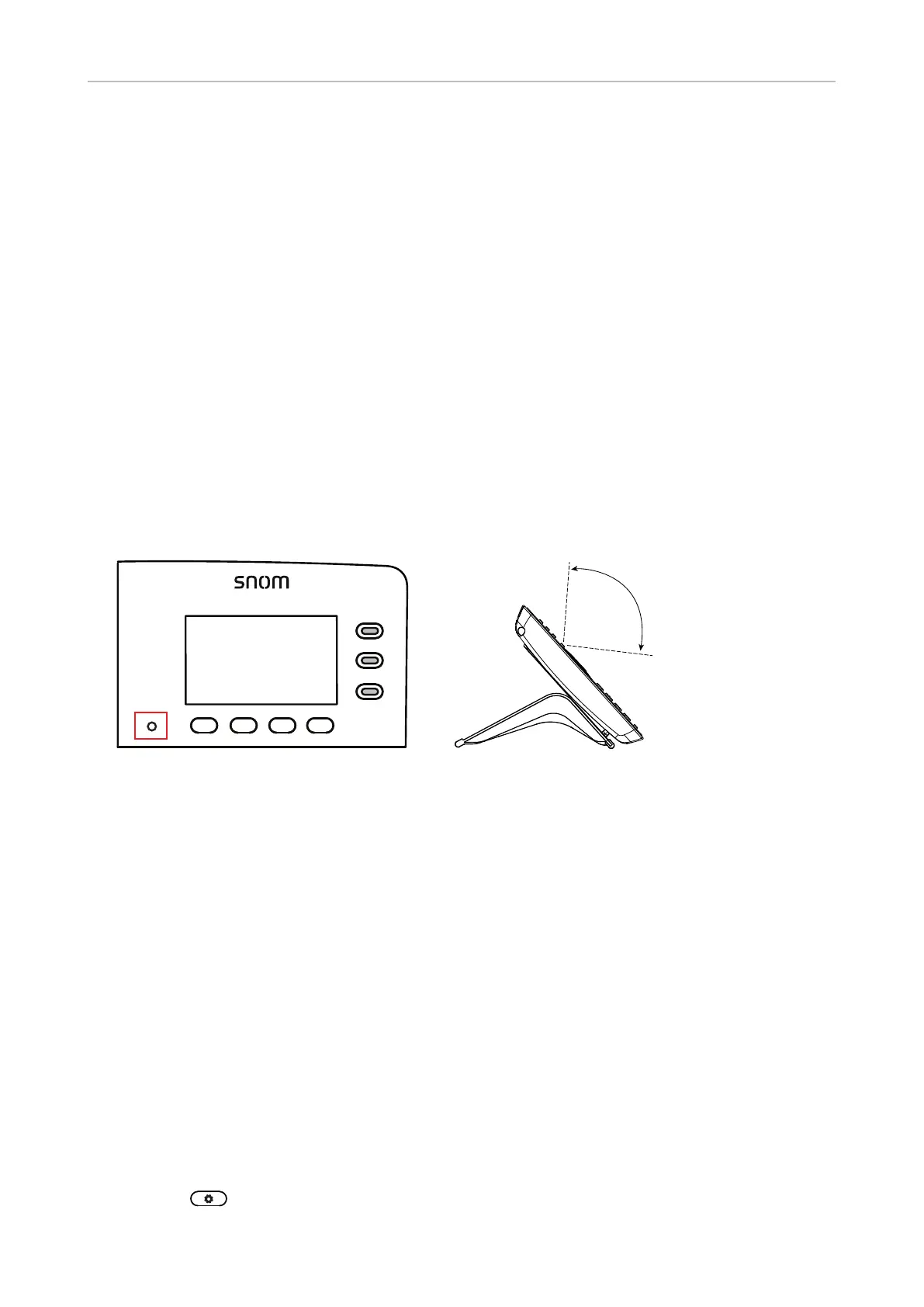
• Ambient light sensor. The sensor is located in the lower left corner of the glass covering the
display and the surrounding area (Fig. 1).
Detection
area approx.
100 degrees
Fig. 1 Fig. 2
Settings:
◦ On. The sensor adjusts the backlight in accordance with the ambient light within the sensor's
detection area (Fig. 2) when the phone is idle and when it is active. The settings for
manual adjustment of the backlight when the phone is idle and when it is active are not
available.
◦ O. The sensor is turned o. The settings "backlight on idle" and "backlight on activity"
for the manual adjustment of the backlight are available. See "Manual adjustment of
backlight intensity," below, for more information.
◦ On a ctive. When the phone is active, i.e., in a call, the phone book being edited, etc., the sensor
adjusts the backlight's intensity in accordance with the ambient light within the sensor's
detection area (Fig. 2). When this setting is selected and saved, the item "Backlight when
idle" is added to the "Display" menu where you can adjust backlight intensity for the idle
state.
• Manual adjustment of backlight intensity. When the ambient light sensor is turned o for both
active and idle state or just for the active phone, the intensity of the backlight for the phone's
display is adjusted with these two settings.
1. Press .



 To Next Page