74
D717 User Manual Configuring the Function Keys
10. Press to return to the Context-sensitive keys menu (Fig. 14), or press for 3 seconds to return
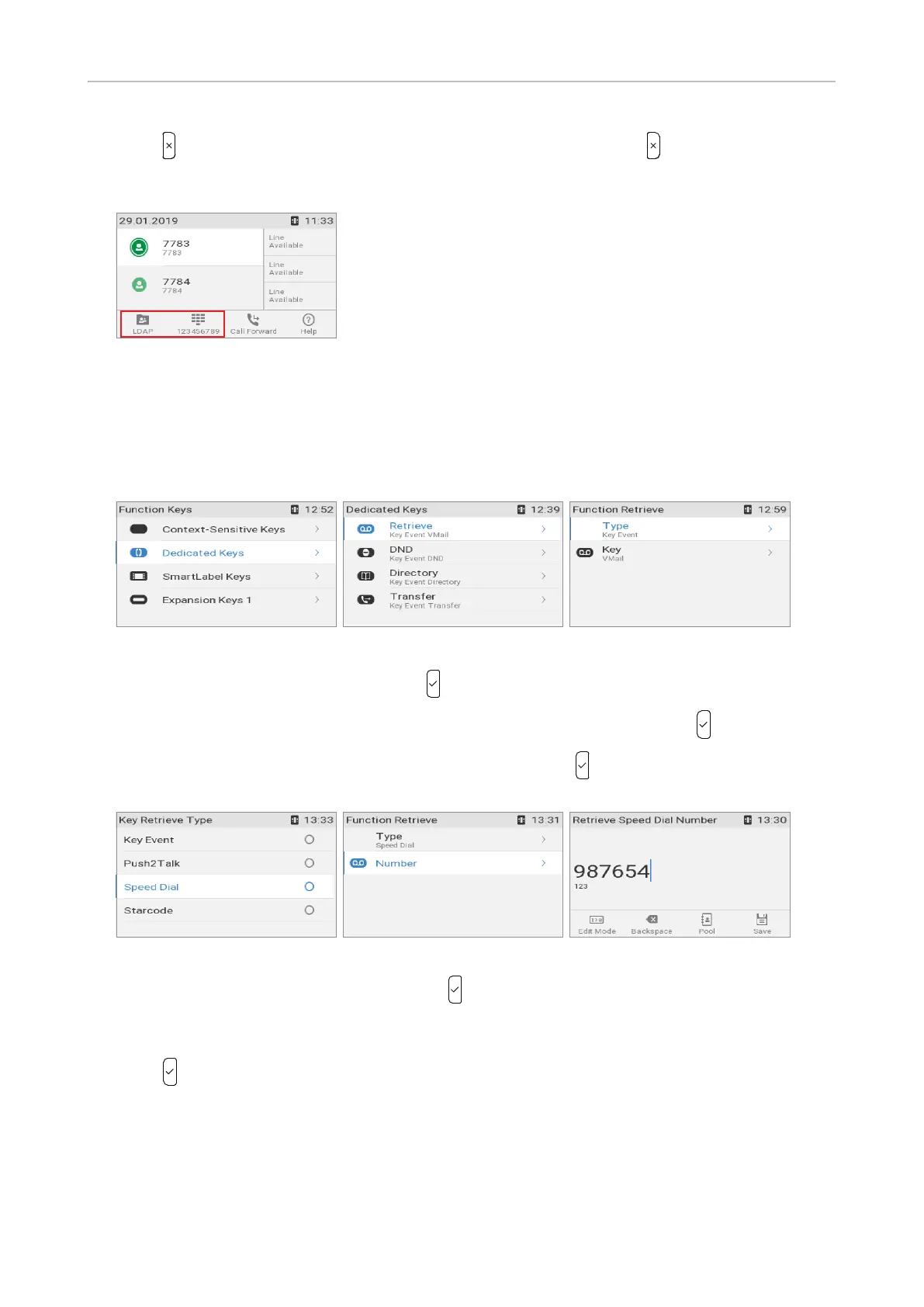
to the idle screen where the symbols in the function key line have been changed to LDAP and
speed dial, respectively (Fig. 15).
Fig. 15
Dedicated keys
The default settings are the functionalities represented by the symbols printed on the respective
hard keys.
Fig. 16 Fig. 17 Fig. 18
1. Select Dedicated keys (Fig. 16) and press .
1. Select a key, in our example it is the message retrieve key (Fig. 17), and press .
2. In the Function retrieve menu, select Type (Fig. 18) and press . The list Key retrieve type (Fig.
19) lists the available functionalities (see "Appendix 4 - Programmable Functions" on page 115).
Fig. 19 Fig. 20 Fig. 21
3. Select a functionality from the list and press to save and return to the Function retrieve menu
which may prompt further settings depending on the selected functionality. In our example (Fig.
20) the functionality is speed dialing, and the display prompts you to enter the number (Fig. 21).
4. Press to save and return to the Function retrieve menu.



 To Next Page