16
v1.01
M215SC User Manual Setting Up
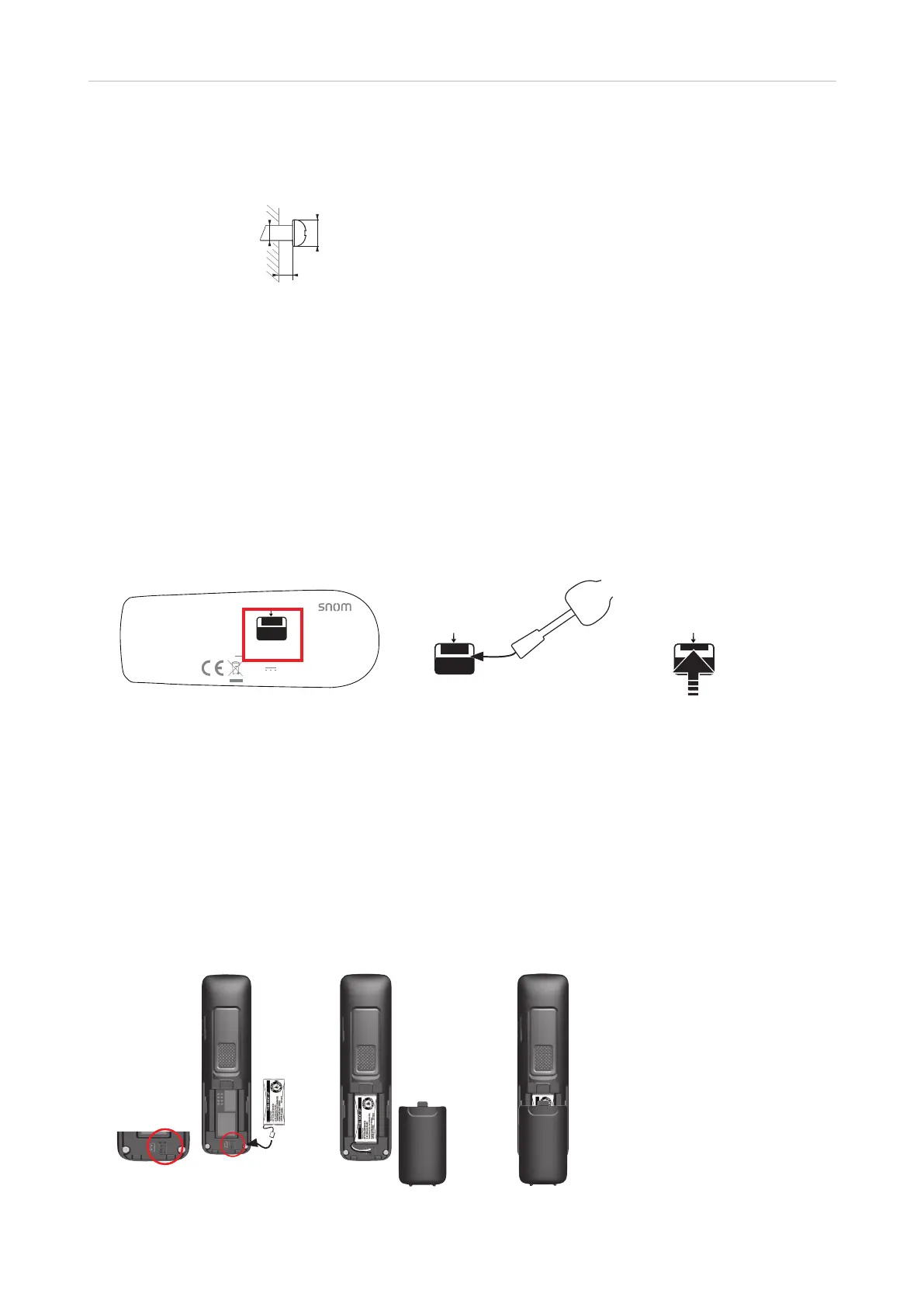
2. Installing the mounting screws.
a. Mark the centers of the two holes on the wall. The centers have to be 60 mm (2.3622") apart
horizontally (see Fig. 3 on page 15).
max. 4 mm
∅ min. 5 mm
(0.1969“)
~ 3 mm (0.1181“)
Fig. 4
b. Drill the holes and insert the wall anchors flush to the wall.
c. Tighten the screws until only 3 (0.1181") mm protrude from the wall (Fig. 4).
3. Place the two holes on the bracket over the screws on the wall and gently pull the base station down on the
screws until they lock into place.
4. Connect the Ethernet cable to the RJ45 jack on the side of the device (see Fig. 1 on page 15) and to your
network router or switch. If a power adaptor is necessary, connect it to the coaxial connector on the side of
the device (see Fig. 1 on page 15) and to an electrical wall outlet.
Detaching the Wall Bracket
Manufactured in China
Snom Technology GmbH
Wittestr. 30 G · 13509 Berlin · Germany
WALL MOUNT SLOT
DC 5V 800mA
Use only power supplies listed
in the user manual
Manufactured in China
Snom Technology GmbH
Wittestr. 30 G · 13509 Berlin · Germany
WALL MOUNT SLOT
DC 5V 800mA
Use only power supplies listed
in the user manual
Manufactured in China
Snom Technology GmbH
Wittestr. 30 G · 13509 Berlin · Germany
WALL MOUNT SLOT
DC 5V 800mA
Use only power supplies listed
in the user manual
Manufactured in China
Snom Technology GmbH
Wittestr. 30 G · 13509 Berlin · Germany
WALL MOUNT SLOT
DC 5V 800mA
Use only power supplies listed
in the user manual
Manufactured in China
Snom Technology GmbH
Wittestr. 30 G · 13509 Berlin · Germany
WALL MOUNT SLOT
DC 5V 800mA
Use only power supplies listed
in the user manual
Manufactured in China
Snom Technology GmbH
Wittestr. 30 G · 13509 Berlin · Germany
WALL MOUNT SLOT
DC 5V 800mA
Use only power supplies listed
in the user manual
Fig. 5 Fig. 6 Fig. 7
1. Insert the flat blade of a slotted screwdriver in the slot labelled "Wall Mount Slot" underneath the footstand
(Fig. 5 and 6).
2. Push the blade (in the opposite direction of the arrow marking underneath the "Wall Mount Slot" label) to
release the catch holding the bracket in place (Fig. 7).
M15 SC Handset
Before first use of the handset, its battery pack should be fully charged; this will take approximately 11 hours of
continuous charging. For best performance, keep the handset in the charger when you are not using it.
Fig. 1 Fig. 2 Fig. 3



 To Next Page