en
29
Note
The RJ45 connectors can be pulled through the multiple cable gland.
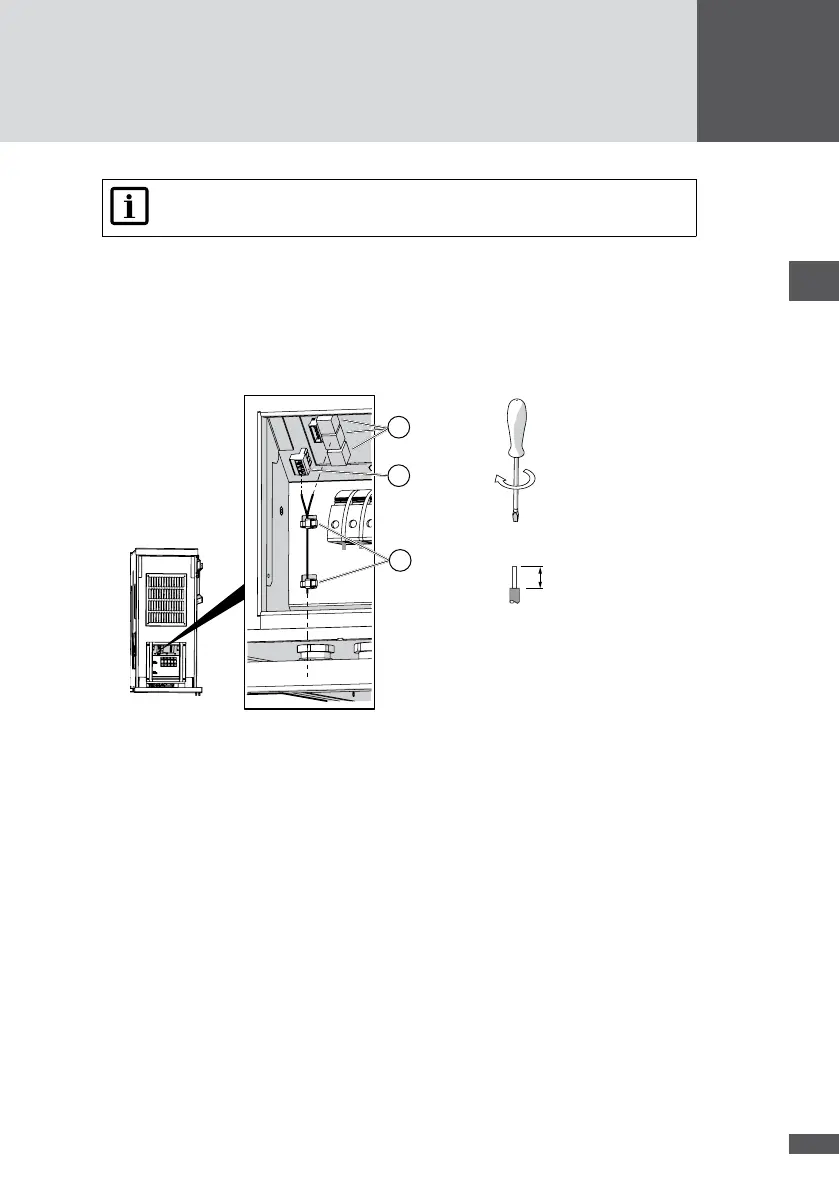
3. Plug the network cables into the RJ45 sockets (Figure 19/No.1) and check that the
connection is locked.
4. RS485 terminal connection (Figure 19/No.2): connect the RS485 network cable as
follows:
– Wire stripping length: 7 mm
– Tightening torque: 0.5 to 0.6 Nm
0.5 … 0.6 Nm
M3
7 mm
3
2
1
Figure 19 Network connection
5. Use cable ties to attach the cables to the housing grips (Figure 19/No. 3).
6. Close off the unused apertures in the multiple cable glands using the locking pins (No.
8 in Section 4.3).
7. Tighten the multiple cable gland (wrench size: 34 mm).
8. Fit the cover of the inverter.
5�6 Connecting status signaling contacts (optional)
The congurable status signaling contacts are used for the remote monitoring of the
inverter. Both power units (MPP tracker 1/2 and MPP tracker 3/4) can be monitored indi-
vidually using a status signaling contact. When the external deactivation is used (see
Section 5.7) the status signaling contacts cannot be used.
The status signaling contacts can be congured, see Section 6.4.4.



 To Next Page