EasyManua.ls Logo

Solartron 1260 - Page 42

Solartron 1260
295 pages
Print Icon
To Next Page IconTo Next Page
To Previous Page IconTo Previous Page
Loading...
t--
•"
*
S
ETTI
NG THE G
E
N
ERAT0
R
Set the
generator
parameters to
provide
a
suitable
drive
for the
item
under test,
(IUT).
Remember that
the drive
specified must
satisfy:
«
the
generator output
capability,
»
the
rating of
the IUT, and
«
the
analyzer
input range.
In
the
present
example the IUT
is driven at
a frequency
of'
15.9kHz At
this
frequency
the impedance
of the
circuit is
approximately
707Q,
and a
drive amplitude
of
IV
(applied both to
the item
under test
and to the
analyzer
VOLTAGE 1 input)
develops a
drive
current of
approximately
1.4mA. The
drive and
expected test
response
are thus
well within the
capabilities
of the generator
and
analyzer.
The
generator
set-up
sequence is:
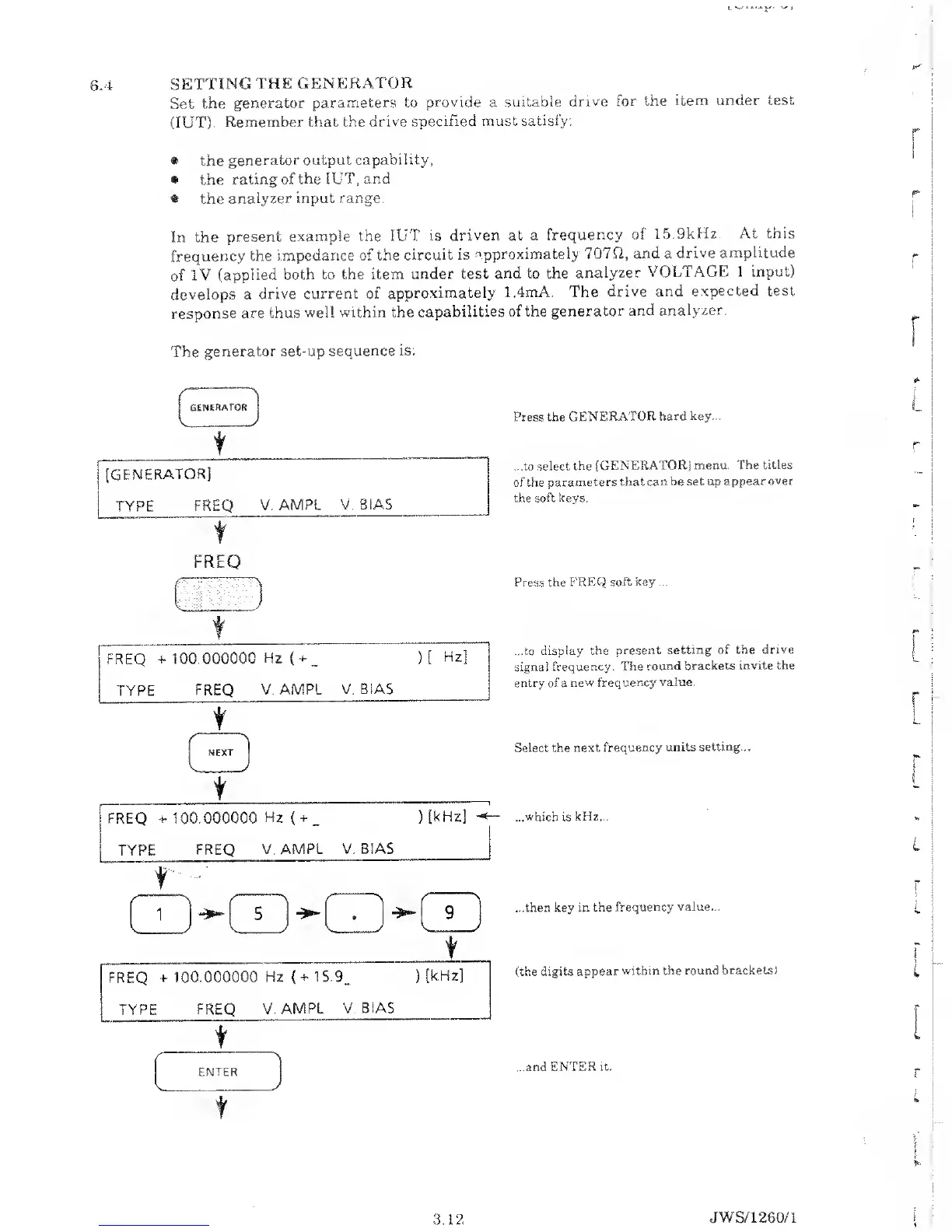
Press the GENERATOR
hard key...
...to select, the
[GENERATOR]
menu. The titles
of the parameters
that can be
set up appear
over
the soft keys.
r
1
FREQ
r~)
FREQ
+ 100.000000
Hz
(
+
_
)[
Hz
TYPE
FREQ
V.AMPL V.
BIAS
t
I
FREQ
-t- 100.000000
Hz
(
+
_
)
(kHz]
TYPE
FREQ
V.AMPL V. BIAS
t
Press
the FREQ soft
key ...
...to display
the present
setting of the
drive
signal
frequency. The
round
brackets invite the
entry of
a
new
frequency
value.
Select
the next
frequency units
setting...
...which is kHz...
...then key in
the frequency
value...
(the digits
appear
within the round
brackets)
...and
ENTER
it.
L
3.12
JWS/1260/1

Table of Contents

Related product manuals