5-9
1-2. INITIALIZATION OF D, E, F, 7 PAGE DATA
1. Initializing the D, E, F, 7 Page Data
Note1: If “Initializing the D, E, F, 7 Page Data” is performed, all data of
the D page, E page, F page and 7 page will be initialized. (It is
impossible to initialize a single page.)
Note2: If the D, E, F, 7 page data has been initialized, “Modification of D,
E, F, 7 Page Data” and all adjustments need to be performed again.
Adjustment page D
Adjustment Address 10 to FF
Adjustment page F
Adjustment Address 10 to FF
Adjustment page E
Adjustment Address 00 to FF
Adjustment page 7
Adjustment Address 00 to FF
Note: NTSC model: CCD-TR618/TR818/TRV49/TRV58/TRV68/
TRV78/TRV88/TRV98
PAL model: CCD-TR618E/TR718E/TR728E/TRV49E/TRV58E/
TRV59E/TRV78E/TRV98E
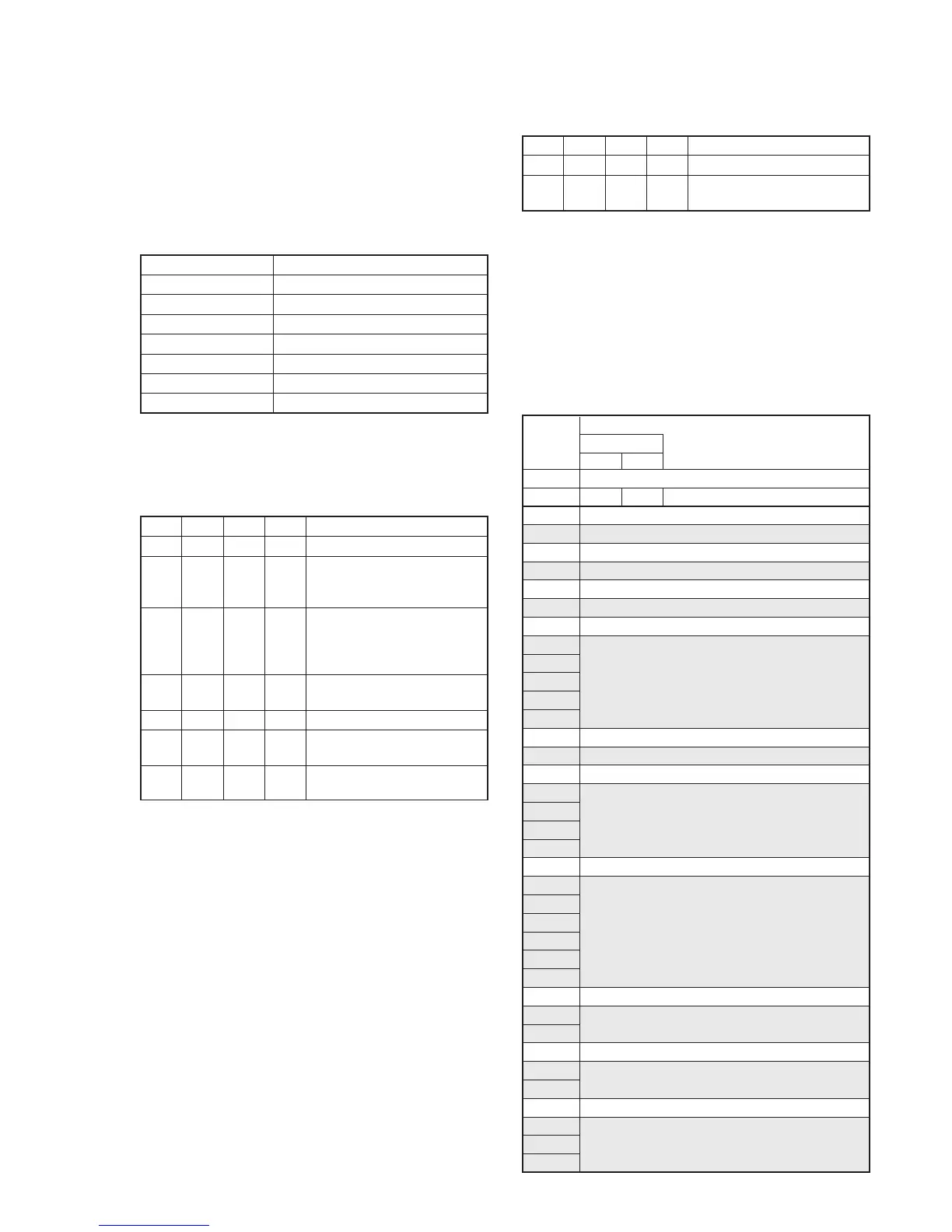
Initializing Method:
Order Page
Address
Data Procedure
1 0 01 01 Set the data.
2 6 00 Set the following data.
55: NTSC model
51: PAL model
3 6 01 Set the following data, and press
PAUSE button.
55: NTSC model
51: PAL model
4 6 02 Check that the data changes to
“01”.
5 2 00 29 Set the data
6 2 01 29 Set the data, and press PAUSE
button.
7 Perform “Modification of D, E,
F, 7 Page Data”.
2. Modification of D, E, F, 7 Page Data
If the D, E, F, 7 page data has been initialized, change the data of
the “Fixed data-2” address shown in the following tables by manual
input.
Modifying Method:
1) Before changing the data, select page: 0, address: 01, and set
data: 01.
2) New data for changing are not shown in the tables because
they are different in destination. When changing the data, copy
the data built in the same model.
Note: If copy the data built in the different model, the camcorder may
not operate.
3) When changing the data, press the PAUSE button of the
adjustment remote commander each time when setting new
data to write the data in the non-volatile memory.
4) Check that the data of adjustment addresses is the initial value.
If not, change the data to the initial value.
Processing after Completing Modification of D, E, F, 7 Page
data
Order Page
Address
Data Procedure
1 2 00 29 Set the data
2 2 01 29 Set the data, and press PAUSE
button.
Note: If the following symptoms occur after completing of the
“Modification of D, E, F, 7 page data”, check that the data of the
“Fixed data-2” addresses of D page are same as those of the same
model of the same destination.
1) The battery end mark on the LCD or viewfinder screen is flashing.
2) The power is shut off so that unit cannot operate.
3. D Page Table
Note1: Fixed data-1: Initialized data. (Refer to “1. Initializing the D, E, F,
7 Page Data”.)
Fixed data-1: Modified data. (Refer to “2. Modification of D, E, F,
7 Page Data”.)
Address Remark
Initial value
NTSC PA L
00 to 0F
10
11 to 12
13
14
15
16 to 19
1A
1B to 1E
1F
20
21
22
23
24 to 26
27
28 to 2C
2D
2E
2F
30
31 to 3F
40
41
42
43
44
45
46 to 47
48
49
4A to 4C
4D
4E
4F
50
51
52
00 00 Test mode
Fixed data-1
Fixed data-2
Fixed data-1
Fixed data-2
Fixed data-1
Fixed data-2
Fixed data-1
Fixed data-2
(Modified data. Copy the data built in
the same model.)
Fixed data-1
Fixed data-2
Fixed data-1
Fixed data-2
(Modified data. Copy the data built in
the same model.)
Fixed data-1
Fixed data-2
(Modified data. Copy the data built in
the same model.)
Fixed data-1
Fixed data-2
Fixed data-1
Fixed data-2
Fixed data-1
Fixed data-2
(Modified data. Copy the data built in
the same model.)










 To Next Page