5-48
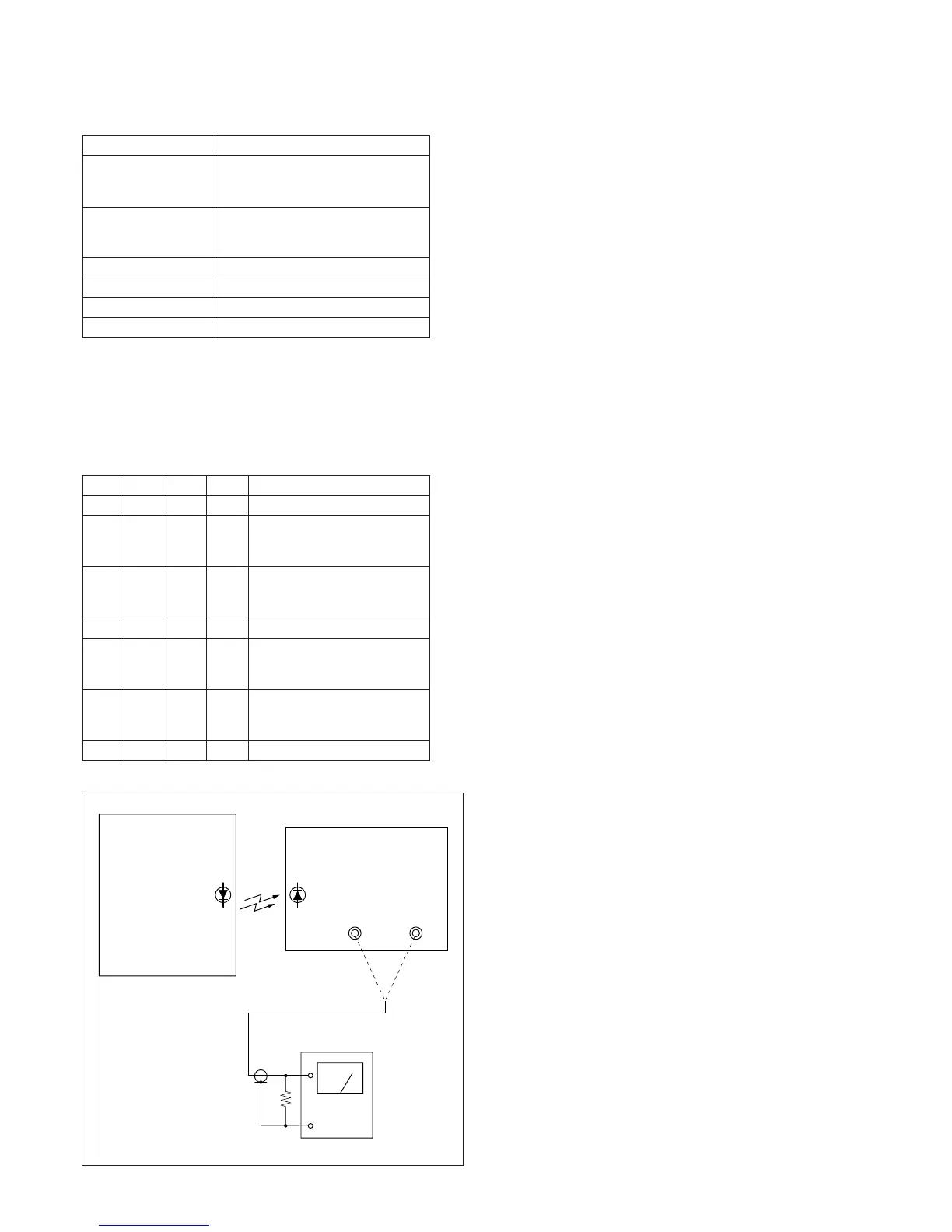
AUDIO OUT
L
47k
Ω
47k
Ω
(1-249-437-11)
Main unit
Audio level meter
R
IR receiver jig
Fig. 5-3-15.
3. IR Audio Deviation Adjustment (MI-041 board)
Mode Playback
Signal Alignment tape:
For checking operation
(WR5-5NSP(NTSC))
Measurement Point AUDIO L terminal and AUDIO R
terminal of IR receiver jig
(Terminated at 47kΩ)
Measuring Instrument Audio level meter
Adjustment Page F
Adjustment Address 7F
Specified Value Signal level: –7.5 ± 2.0 dBs
Note: This adjustment should be carried out upon completion of the audio
system adjustments.
Connection of Equipment:
Connect the measuring device as shown in the following figure,
and adjust.
Adjusting method:
Order Page
Address
Data Procedure
1 0 01 01 Set the data.
2 Connect the audio level meter to
the AUDIO L terminal of the IR
receiver jig.
3F7F
Change the data and set the 400Hz
audio signal level to the specified
value.
4 F 7F Press PAUSE button.
5 Connect the audio level meter to
the AUDIO R terminal of the IR
receiver jig.
6F7F
Check that the 400Hz audio signal
level is within the specified value.
If outside, repeat from step 2.
7 0 01 00 Set the data.










 To Next Page