2. VCO Adjustment (PD-131 board)
Set the VCO free-run frequency. If deviated, the LCD screen will
be blurred.
Mode VTR stop
Signal No signal
Measurement Point Pin 8 of CN5502 (XHD OUT)
Measuring Instrument Frequency counter
Adjustment Page 7
Adjustment Address E5, E6
Specified Value f = 15734 ± 30Hz (NTSC)
f = 15625 ± 30Hz (PAL)
Note1: NTSC model: CCD-TRV49/TRV58/TRV68/TRV78/TRV88/
TRV98
PAL model: CCD-TRV49E/TRV58E/TRV59E/TRV78E/TRV98E
Note2: Refer to “1. LCD Type Check” for the discrimination of the LCD
type.
Adjusting method:
Order Page
Address
Data Procedure
1 0 01 01 Set the data.
2 7 E5 Change the data and set theVCO
frequency (f) to the specified value.
3 7 E5 Press PAUSE button.
4 7 E5 Read the data, and this data is
named DE5.
5 Convert DE5 to decimal notation,
and obtain DE5’. (Note3)
6 Calculate DE6’ using following
equations (Decimal calculation)
[2.5 LCD TYPE S]
When D
E5’ 20
DE6’ = DE5’ – 20
When DE5’ < 20
DE6’ = 00
[3.0 LCD TYPE S]
When DE5’ 23
DE6’ = DE5’ – 23
When DE5’ < 23
DE6’ = 00
[3.5 LCD TYPE S]
When DE5’ 4
DE6’ = DE5’ – 4
When DE5’ < 4
DE6’ = 00
7 Convert DE6’ to a hexadecimal
number, and obtain DE6. (Note3)
87E6DE6 Set the data, and press PAUSE
button.
9 0 01 00 Set the data.
Note3: Refer to “Table 5-4-1. Hexadecimal-decimal Conversion Table”.
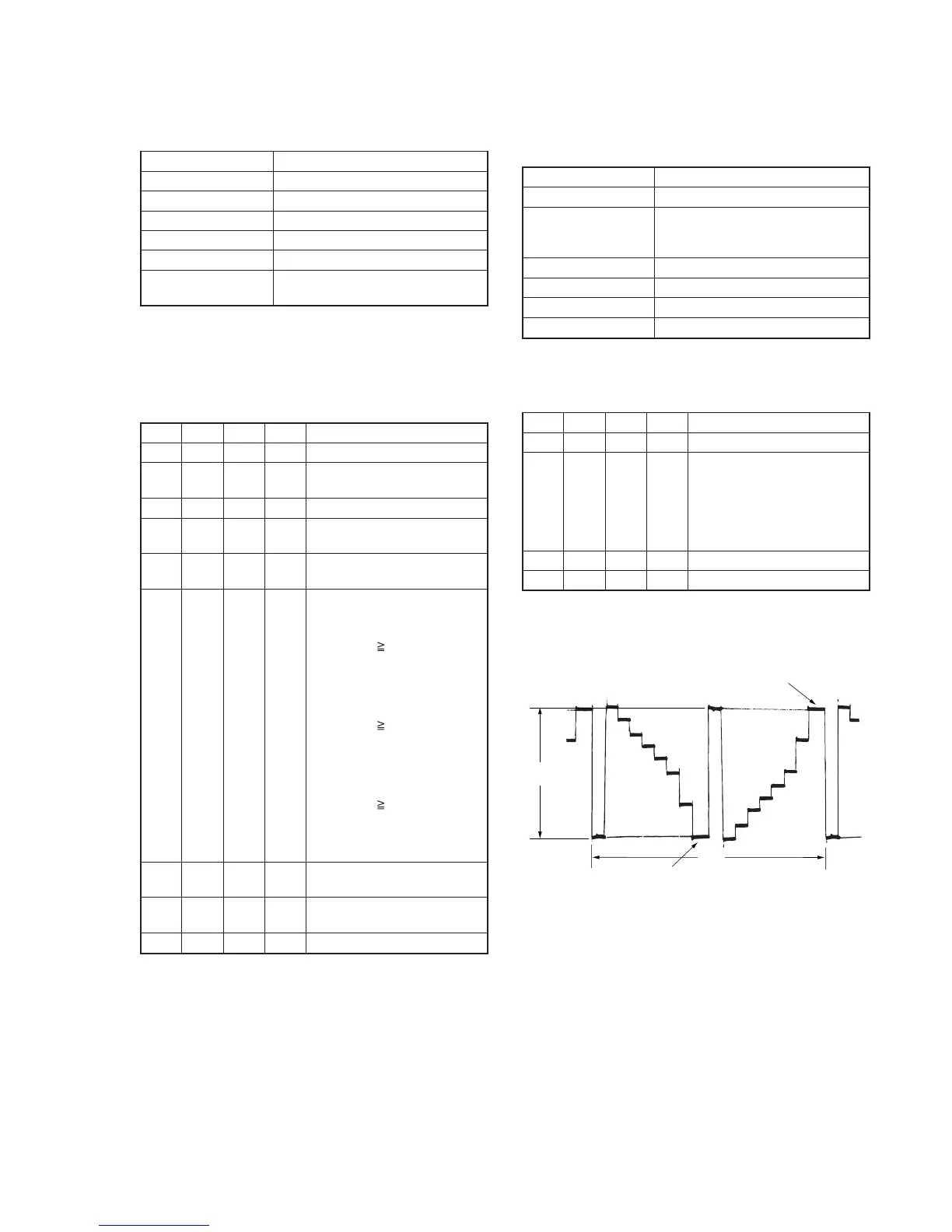
3. RGB AMP Adjustment (PD-131 board)
Set the D range of the RGB decoder used to drive the LCD to the
specified value. If deviated, the LCD screen will become blackish
or saturated (whitish).
Mode VTR stop
Signal No signal
Measurement Point Pin 3 of CN5502 (VG)
External trigger: Pin 4 of CN5502
(PANEL COM)
Measuring Instrument Oscilloscope
Adjustment Page 7
Adjustment Address E8
Specified Value A = 3.60 ± 0.05V
Note: Refer to “1. LCD Type Check” for the discrimination of the LCD
type.
Adjusting method:
Order Page
Address
Data Procedure
1 0 01 01 Set the data.
2 7 E8 Change the data and set the
voltage (A) between the reversed
waveform pedestal and non-
reversed waveform pedestal to
the specified value.
(The data should be “00” to “3F”.)
3 7 E8 Press PAUSE button.
4 0 01 00 Set the data.










 To Next Page