5-26
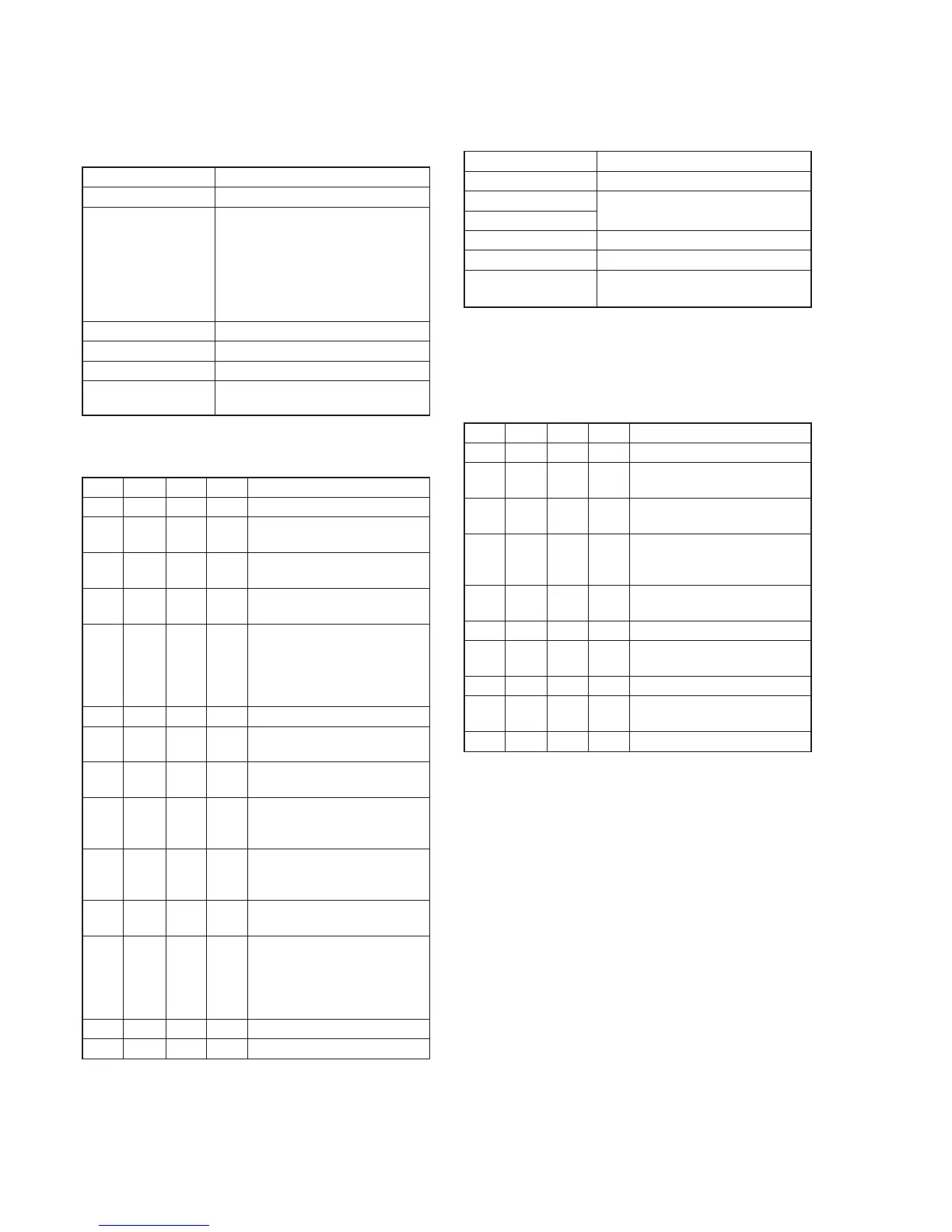
3. Backlight Consumption Current Adjustment
(LB-062 board)
Set the backlight luminance and color temperature.
If deviated, the image may become dark or bright.
Mode Camera
Subject Arbitrary
Measurement Point + Probe: BL 4.75V (Pin 5 of CPC
connector of FP-262 flexible
or Pin 5 of CN713 of VC-251
board)
– Probe: BL (Pin 3 of CPC connector
of FP-262 flexible or Pin 3
of CN713 of VC-251 board)
Measuring Instrument Digital voltmeter
Adjustment Page 7
Adjustment Address DF, E0, E1
Specified Value BRIGHT mode : A=15.5 ± 1mVdc
NORMAL mode : A=9.5 ± 1mVdc
Note1: Perform the adjustment in the following order.
Adjusting method:
Order Page
Address
Data Procedure
1 0 01 01 Set the data.
2 7 DF CA Set the data, and press PAUSE
button.
3 7 E0 07 Set the data, and press PAUSE
button.
4 7 E1 91 Set the data, and press PAUSE
button.
5 7 E0 Change the data and set the
voltage difference (A) between
BL4.75V and BL to the specified
value of BRIGHT mode.
(The data should be “00” to “3F”.)
6 7 E0 Press PAUSE button.
7 7 E0 Read the data, and this data is
named DE0.
8 Convert DE0 to decimal notation,
and obtain DE0’. (Note2)
9 Calculate DDF’ using following
equations (Decimal calculation)
DDF’ = DE0’ + 192
10 Convert DDF’ to a hexadecimal
number, and obtain DDF. (Note2)
(The data should be “C0” to “FF”.)
11 7 DF DDF Set the data, and press PAUSE
button.
12 7 E1 Change the data and set the
voltage difference (A) between
BL4.75V and BL to the specified
value of NORMAL mode.
(The data should be “80” to “9F”.)
13 7 E1 Press PAUSE button.
14 0 01 00 Set the data.
Note2: Refer to “Table 5-4-1. Hexadecimal-decimal Conversion Table”.
4. White Balance Adjustment (VF-141 board)
Correct the white balance.
If deviated, the reproduction of the EVF screen may degenerate.
Mode Camera
Signal Arbitrary
Measurement Point Check on EVF screen
Measuring Instrument
Adjustment Page 7
Adjustment Address DA, DB
Specified Value The EVF screen should not be
colored.
Note1: Check the white balance only when replacing the following parts.
If necessary, adjust them.
1. LCD panel
2. Light induction plate
3. IC4501
Adjusting method:
Order Page
Address
Data Procedure
1 0 01 01 Set the data.
2 7 DA 8D Set the data, and press PAUSE
button.
3 7 DB 83 Set the data, and press PAUSE
button.
4 7 DA Check that the EVF screen is not
colored. If not colored, proceed
to step 10.
5 7 DA Change the data so that the EVF
screen is not colored.
6 7 DA Press PAUSE button.
7 7 DB Change the data so that the EVF
screen is not colored.
8 7 DB Press PAUSE button.
9 7 DB If the EVF screen is colored,
repeat steps 5 to 9.
10 0 01 00 Set the data.










 To Next Page