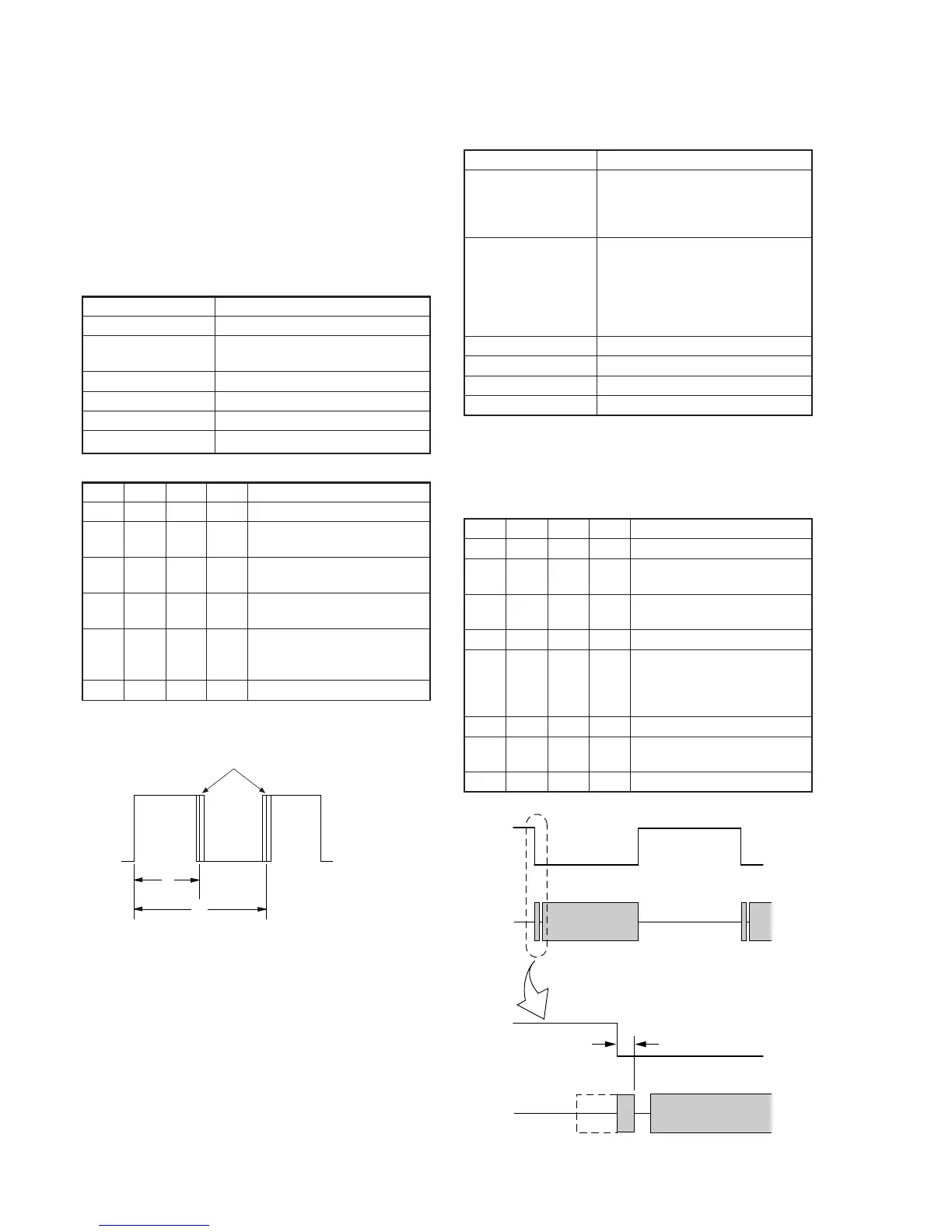
5-40
A
B
Duty = A/B
×
100 [%]
Center of movement
CH1
CH2
Enlargement
t1=0
±
10
µ
sec
CH1
CH2
Fig. 5-3-4.
Fig. 5-3-5.
3-2. SYSTEM CONTROL SYSTEM ADJUSTMENT
1. Initialization of D, E, F, 7 Page Data
If the D, E, F, 7 page data is erased due to some reason, perform “1-
2. INITIALIZATION OF D, E, F, 7 PAGE DATA”, of “5-1.
CAMERA SECTION ADJUSTMENT”
3-3. SERVO SYSTEM ADJUSTMENT
1. CAP FG Offset Adjustment (VC-251 board)
Set the Cap FG signal duty cycle to 50% to establish an appropriate
capstan servo. If deviated, the uneven rotation of capstan and noise
can occur in the LP mode.
Mode Camera recording (SP mode)
Subject Arbitrary
Measurement Point CAP FG (Pin 8 of CN713 or Pin 8
of CPC connector of FP-262 flexible)
Measuring Instrument Oscilloscope
Adjustment Page F
Adjustment Address 64
Specified value Duty = 50 ± 1 %
Adjusting method:
Order Page
Address
Data Procedure
1 0 01 01 Set the data.
2 6 01 81 Set the data, and press PAUSE
button.
3 6 02 Check that the data changes to
“01”.
4 6 01 00 Set the data, and press PAUSE
button.
5 Check that Duty of CAP FG
signal satisfies the specified
value. If not, repeat steps 2 to 5.
6 0 01 00 Set the data.
2. Switching Position Adjustment (VC-251 Board)
If deviated in this case causes switching noise or jitter on the played
back screen.
Mode Playback
Signal Alignment tape:
For tracking adjustment
(WR5-1NP (NTSC))
(WR5-1CP (PAL))
Measurement Point CH1: SWP (Pin qh of CN713 or Pin
qh of CPC connector of FP-262
flexible)
CH2: PB RF (Pin 9 of CN713 or Pin
9 of CPC connector of FP-262
flexible)
Measuring Instrument Oscilloscope
Adjustment Page F
Adjustment Address 62, 63
Specified Value t1= 0 ± 10µ sec
Note: NTSC model:CCD-TR618/TR818/TRV49/TRV58/TRV68/TRV78/
TRV88/TRV98
PAL model: CCD-TR618E/TR718E/TR728E/TRV49E/TRV58E/
TRV59E/TRV78E/TRV98E
Adjusting Method:
Order Page
Address
Data Procedure
1 0 01 01 Set the data.
2 F 22 C0 Set the data, and press PAUSE
button.
3 F 62 Change the data and minimize
“t1”. (Coarse adjustment)
4 F 62 Press PAUSE button
5 F 63 Change the data and adjust so
that the switching position (t1)
becomes the specified value.
(Fine adjustment)
6 F 63 Press PAUSE button
7 F 22 80 Set the data, and press PAUSE
button.
8 0 01 00 Set the data.
Ver 1.1 2001. 04










 To Next Page