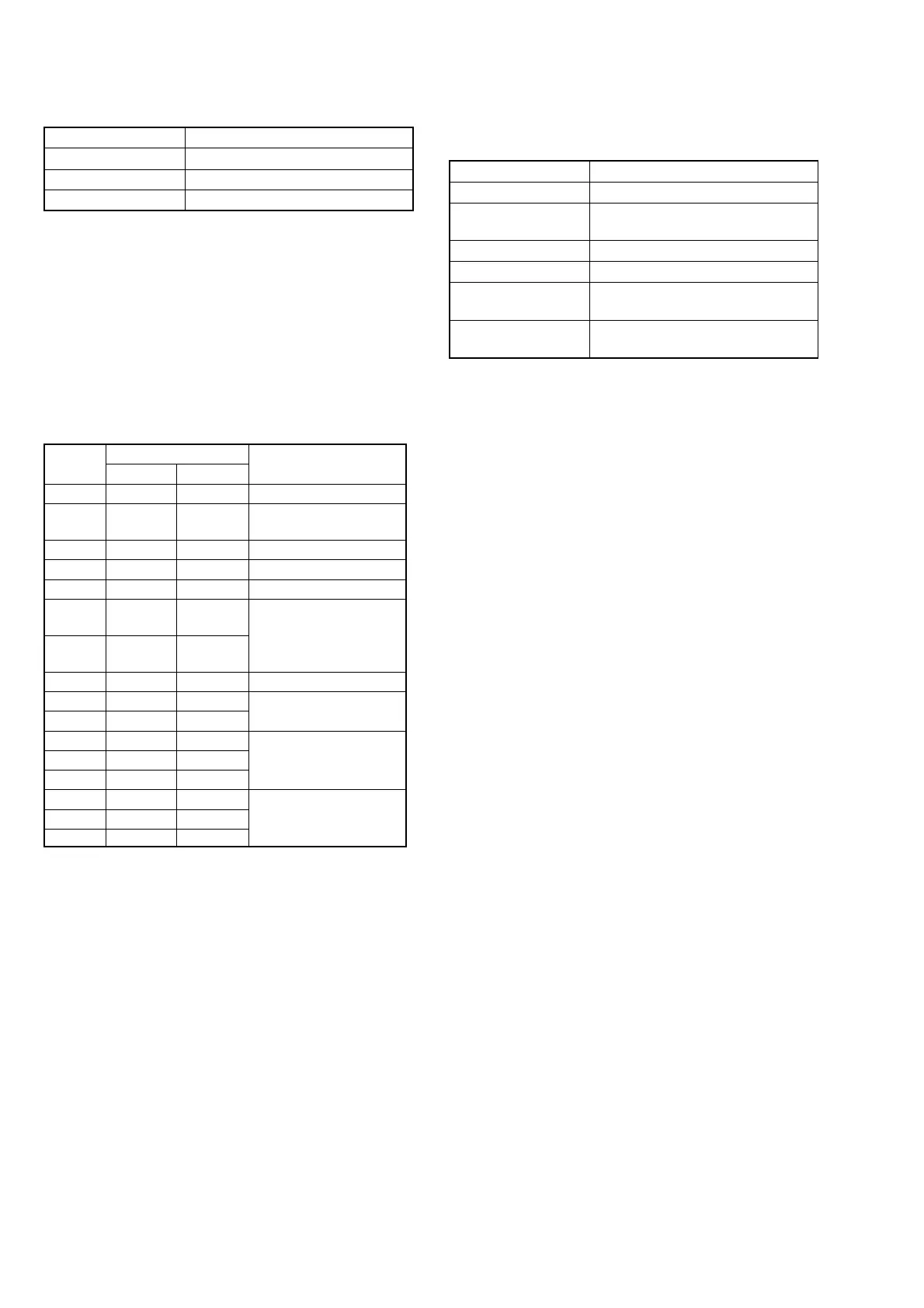
5-30
Address
Data
Remark
COLOR B/W
92 80 80 VCO adj.
93 70 70
VCO adj. (PAL model)
Fixed data (NTSC model)
94 26 26
Fixed data
95 A0 A0 RGB AMP adj.
96 0F 0F Fixed data
97 80 80
White balance adj.
(COLOR LCD EVF model)
98 80 80
Fixed data
(B/W LCD EVF model)
99 30 30 Contrast adj.
9A 80 80 Fixed data
9B 90 90
9C D0 D0 Backlight consumption
9D 10 10 current adj.
9E 10 10
9F 1F 18 Fixed data
B0 FC FC
B2 FF FF
2. EVF Initial Data Input (2)
Mode VTR stop
Signal Arbitrary
Adjustment Page D
Adjustment Address 92 to 9F, B0, B2
Note: COLOR LCD EVF model:
DCR-TRV525/TRV620E/TRV720/TRV720E
B/W LCD EVF model:
DCR-TRV320E: AEP, UK, EE, NE, RU/TRV420E:
AEP/TRV520E: AEP
Adjusting method:
1) Select page: 0, address:01, and set data: 01.
2) Select page: D, and input the data in the following table.
Note: To write in the non-volatile memory (EEPROM), press
the PAUSE button of the adjustment remote commander
each time to set the data.
3) Select page: 0, address:01, and set data: 00.
3. VCO Adjustment (VF-141 board)
Set the VCO free-run frequency. If deviated, the EVF screen will be
blurred.
Mode Camera
Subject Arbitrary
Measurement Point Pin qa of CN1108 (VCO) on VC-235
board
Measuring Instrument Frequency counter
Adjustment Page D
Adjustment Address 92 (NTSC model)
92, 93 (PAL model)
Specified Value f=15734 ± 30 Hz (NTSC model)
f=15625 ± 30 Hz (PAL model)
Note 1: NTSC model: DCR-TRV320/TRV320P/TRV520/
TRV520P/TRV525/TRV720
PAL model: DCR-TRV320E/TRV420E/TRV520E/
TRV620E/TRV720E
Adjusting method (NTSC model):
1) Select page: 0, address: 01, and set data: 01.
2) Select page: D, address: 92, change the data and set the VCO
frequency (f) to the specified value.
3) Press the PAUSE button of the adjustment remote commander.
4) Select page: 0, address: 01, and set data: 00.
Adjusting method (PAL model):
1) Select page: 0, address: 01, and set data: 01.
2) Select page: D, address: 92, change the data, and set the VCO
frequency (f) to the specified value.
3) Press the PAUSE button of adjustment remote commander.
4) Read the adjustment data of step 2), and this data is named
D92.
5) Convert D92 to decimal notation, and obtain D92’.
(Refer to Table 5-4-1 “Hexdecimal-decimal conversion table”
of “5-4. Service Mode”)
6) Calculate D93’ using following equations (decimal calculation),
convert it to a hexdecimal number, and obtain D93.
D93’ = D92’ – 26
Note2: If D93’ < 0, then D93 = “00”
7) Select page: D, address: 93, set data D93, and then press the
PAUSE button of adjustment remote commander.
8) Select page: 0, address: 01, and set data: 00.



 To Next Page