5-55
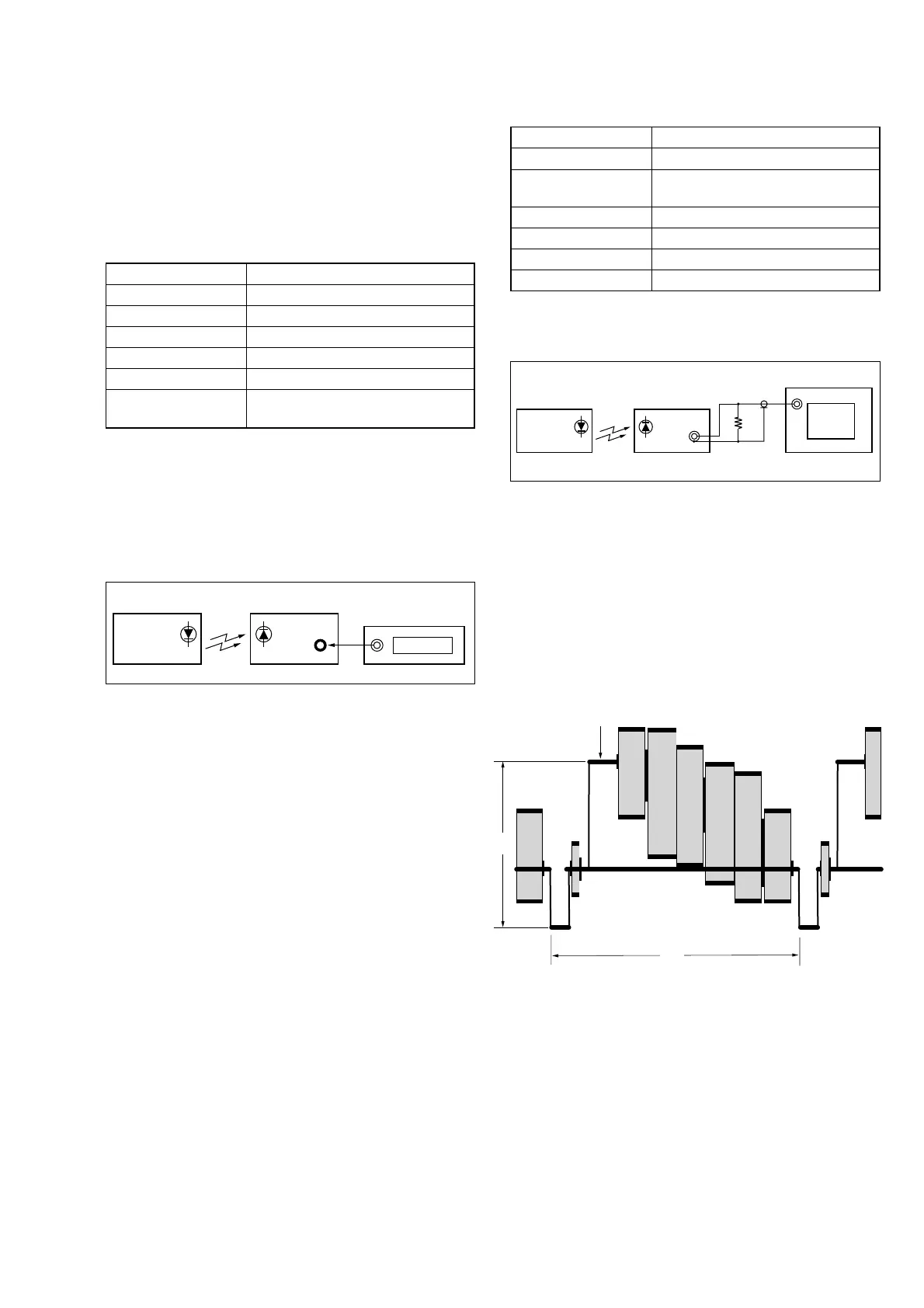
2. IR Video Deviation Adjustment (MI-37 board)
Mode VTR stop
Signal No signal
Measurement Point VIDEO OUT terminal of IR receiver jig
(Terminated at 75 Ω)
Measuring Instrument Oscilloscope
Adjustment Page F
Adjustment Address 7E
Specified Value A=0.82 ± 0.05 V
Connection of Equipment
Connect the measuring device as shown in the following figure,
and adjust.
Adjusting method:
1) Select page: 0, address: 01, and set data: 01.
2) Select page: 3, address: 0C, set data: 01, and press the PAUSE
button of the adjustment remote commander.
3) Select page: F, address: 7E, and change the data, set the video
signal amplitude (A) to the specified value.
4) Press the PAUSE button.
5) Select page: 3, address: 0C, set data: 00, and press the PAUSE
button.
6) Select page: 0, address: 01, and set data: 00.
3-5. IR TRANSMITTER ADJUSTMENTS
Adjust using a IR receiver jig (J-6082-383-A).
Switch setting:
LASER LINK ......................... ON (Red LED is lit)
1. IR Video Carrier Frequency Adjustment
(MI-37 board)
Mode VTR stop
Signal No signal
Measurement Point Pin 5 of CN003 of IR receiver jig (RF)
Measuring Instrument Frequency counter
Adjustment Page F
Adjustment Address 80
Specified Value f=11.85 ± 0.05 MHz (NTSC model)
f=11.55 ± 0.05 MHz (PAL model)
Note: NTSC model: DCR-TRV320/TRV320P/TRV520/
TRV520P/TRV525/TRV720
PAL model: DCR-TRV320E/TRV420E/TRV520E/
TRV620E/TRV720E
Connection of Equipment
Connect the measuring device as shown in the following figure,
and adjust.
Adjusting method:
1) Select page: 0, address: 01, and set data: 01.
2) Select page: 3, address: 0C, set data: 08, and press the PAUSE
button of the adjustment remote commander.
3) Select page: F, address: 80, change the data, and set the video
carrier frequency (f) to the specified value.
4) Press the PAUSE button.
5) Select page: 3, address: 0C, set data: 00, and press the PAUSE
button.
6) Select page: 0, address: 01, and set data: 00.
Main unit
IR receiver jig
Pin 5 of
CN003
Frequency counter
Main unit
IR receiver jig
VIDEO
OUT
75
Ω
75
Ω
(1-247-804-11)
Oscilloscope
Fig. 5-3-16
A
H
White
Fig. 5-3-14
Fig. 5-3-15



 To Next Page