5-54
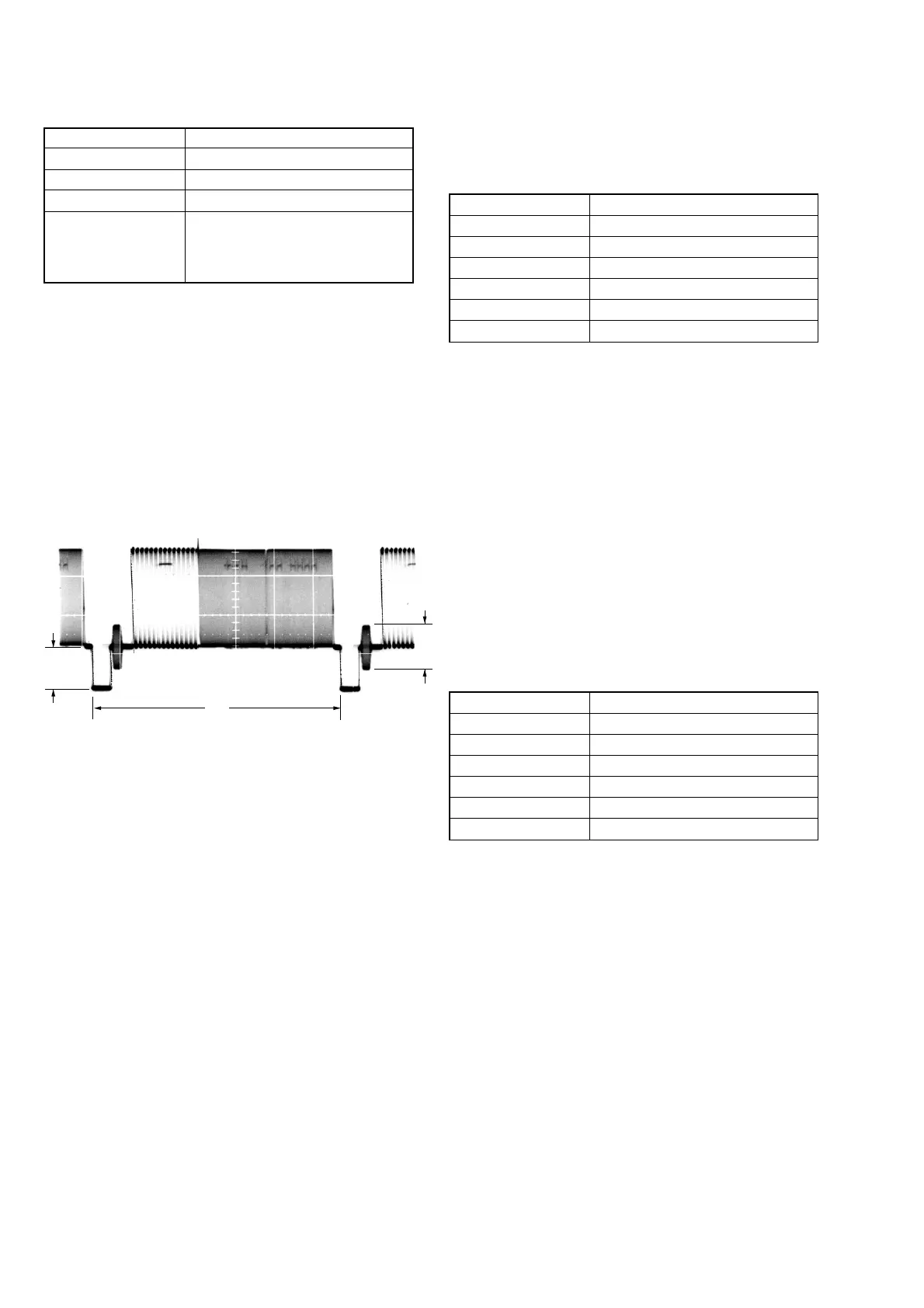
5. VIDEO OUT Y, Chroma Level Check (VC-235 board)
Mode VTR stop
Subject Arbitrary
Measurement Point VIDEO jack (75 Ω terminated)
Measuring Instrument Oscilloscope
Specified Value Sync level: A=286 ± 18 mV (NTSC)
A=307 ± 18 mV (PAL)
Burst level:B=286 ± 18 mV (NTSC)
B=300 ± 18 mV (PAL)
Adjusting method:
1) Select page: 0, address: 01, set data: 01.
2) Select page: D, address: 11, set data: 10, and press the PAUSE
button of the adjustment remote commander.
3) Select page: 3, address: 0C, set data: 02, and press the PAUSE
button.
4) Check that the sync signal level (A) satisfies the specified value.
5) Check that the burst signal level (B) satisfies the specified value.
6) Select page: 3, address: 0C, set data: 00, and press the PAUSE
button.
7) Select page: D, address: 11, set data: 00, and press the PAUSE
button.
8) Select page: 0, address: 01, set data: 00.
6. Hi8/standard 8 mm AFC f
0
Adjustment
(VC-235 board)
(Using Digital Voltmeter)
Adjust the pull-in range of the clock generator (IC2201) for A/D
conversion during Hi8/standard 8 mm playback.
Mode VTR stop
Signal No signal
Measurement Point Pin 2 of CN1108 (AFC F0)
Measuring Instrument Digital voltmeter
Adjustment Page F
Adjustment Address 65
Specified Value A=2.00 ± 0.05 Vdc
Adjusting method:
1) Select page: 0, address: 01, and set data: 01.
2) Select page: 3, address: 0D, set data: 04, and press the PAUSE
button of the adjustment remote commander.
3) Select page: 6, address: 63, set data: 04.
4) Select page: 6, address: 6F, set data: 01.
5) Select page: F, address: 65, change the data and set the DC
voltage (A) to the specified value.
6) Press the PAUSE button.
7) Select page: 3, address: 0D, set data: 00, and press the PAUSE
button.
8) Select page: 6, address: 63, set data: 00.
9) Select page: 6, address: 6F, set data: 00.
10) Select page: 0, address: 01, and set data: 00.
Fig. 5-3-13
H
B
A
7. Hi8/standard 8 mm AFC f
0
Adjustment
(VC-235 board)
(Auto Adjustment)
Adjust the pull-in range of the clock generator (IC2201) for A/D
conversion during Hi8/standard 8 mm playback.
Mode VTR stop
Signal No signal
Measurement Point Display data of Page: 6, Address: 6E
Measuring Instrument Adjustment remote commander
Adjustment Page F
Adjustment Address 65
Specified Value B2 to BA
Adjusting method:
1) Select page: 0, address: 01, and set data: 01.
2) Select page: 3, address: 0D, set data: 04, and press the PAUSE
button of the adjustment remote commander.
3) Select page: 6, address: 63, set data: 04.
4) Select page: 6, address: 6F, set data: 01.
5) Select page: 6, address: 01, set data: C5, and press the PAUSE
button.
6) Select page: 6, address: 02, and check that the data is “01”.
7) Select page: 6, address: 6E, and check that the display data
satisfies the specified value.
8) Select page: 3, address: 0D, set data: 00, and press the PAUSE
button.
9) Select page: 6, address: 01, set data: 00, and press the PAUSE
button.
10) Select page: 6, address: 63, set data: 00.
11) Select page: 6, address: 6F, set data: 00.
12) Select page: 0, address: 01, and set data: 00.



 To Next Page