5-53
4. S VIDEO OUT Chroma Level Adjustment
(VC-235 board)
Mode VTR stop
Subject Arbitrary
Measurement Point Chroma signal terminal of S VIDEO
jack (75 Ω terminated)
External trigger: Y signal terminal of
S VIDEO jack
Measuring Instrument Oscilloscope
Adjustment Page C
Adjustment Address 26, 27
Specified Value Cr level: A=714 ± 14 mV (NTSC)
A=700 ± 14 mV (PAL)
Cb level:B=714 ± 14 mV (NTSC)
B=700 ± 14 mV (PAL)
Burst level: C=286 ± 6 mV (NTSC)
C=300 ± 6 mV (PAL)
Adjusting method:
1) Select page: 0, address: 01, and set data: 01.
2) Select page: D, address: 11, set data: 10, and press the PAUSE
button of the adjustment remote commander.
3) Select page: 3, address: 0C, set data: 02, and press the PAUSE
button.
4) Select page: C, address: 26, change the data and set the Cr
signal level (A) to the specified value.
5) Press the PAUSE button.
6) Select page: C, address: 27, change the data and set the Cb
signal level (B) to the specified value.
7) Press the PAUSE button.
8) Check that the burst signal level (C) is satisfied the specified
value.
9) Select page: 3, address: 0C, set data: 00, and press the PAUSE
button.
10) Select page: D, address: 11, set data: 00, and press the PAUSE
button.
11) Select page: 0, address: 01, and set data: 00.
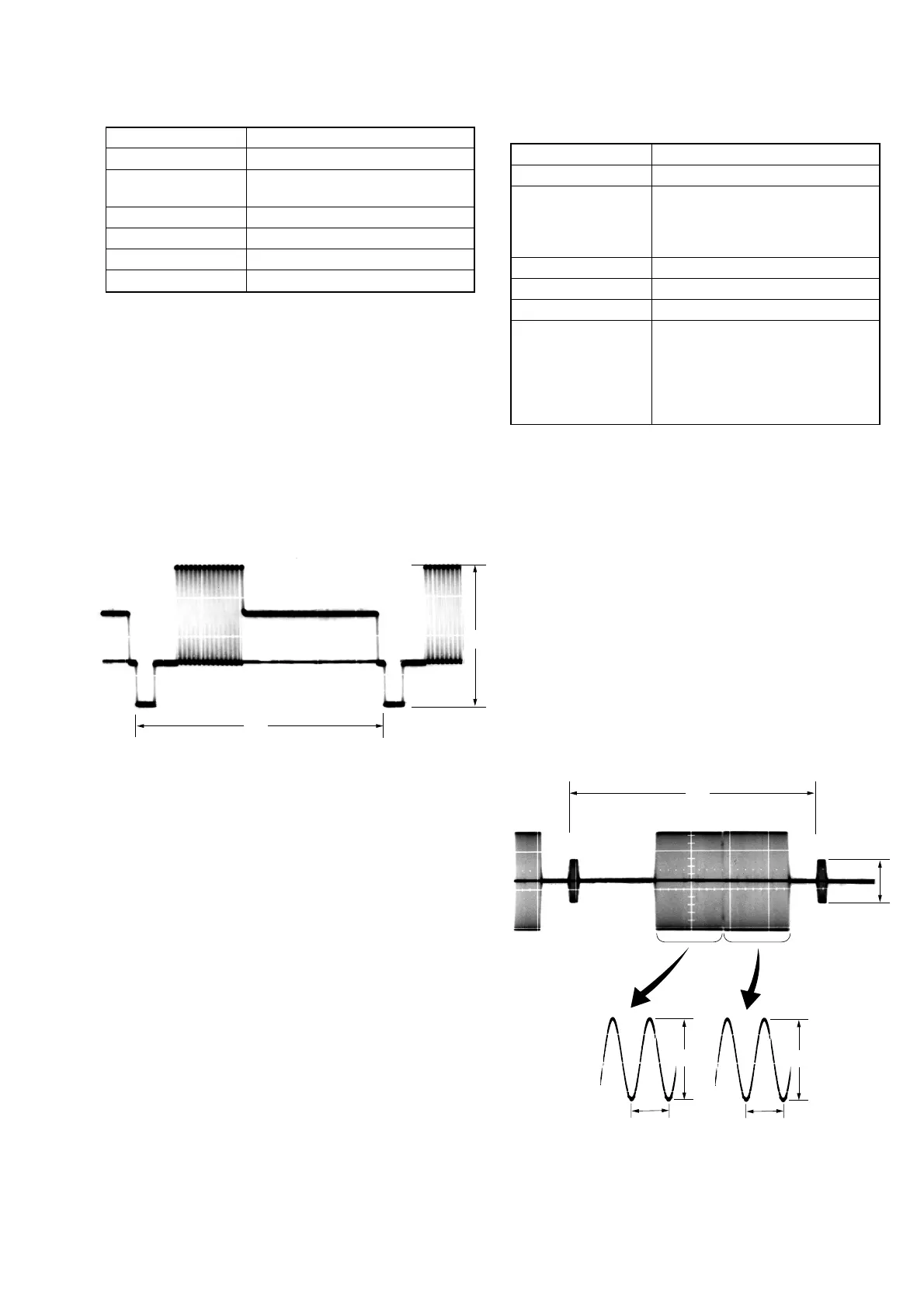
3. S VIDEO OUT Y Level Adjustment (VC-235 board)
Mode VTR stop
Subject Arbitrary
Measurement Point Y signal terminal of S VIDEO jack
(75 Ω terminated)
Measuring Instrument Oscilloscope
Adjustment Page C
Adjustment Address 25
Specified Value A = 1000 ± 20 mV
Adjusting method:
1) Select page: 0, address: 01, and set data: 01.
2) Select page: D, address: 11, set data: 10, and press the PAUSE
button of the adjustment remote commander.
3) Select page: 3, address: 0C, set data: 02, and press the PAUSE
button.
4) Select page: C, address: 25, change the data and set the Y signal
level (A) to the specified value.
5) Press the PAUSE button.
6) Select page: 3, address: 0C, set data: 00, and press the PAUSE
button.
7) Select page: D, address: 11, set data: 00, and press the PAUSE
button.
8) Select page: 0, address: 01, and set data: 00.
Fig. 5-3-11
Fig. 5-3-12
H
A
H
C
A
0.28 µsec (NTSC)
0.23 µsec (PAL)
B
0.28 µsec (NTSC)
0.23 µsec (PAL)



 To Next Page