5-4
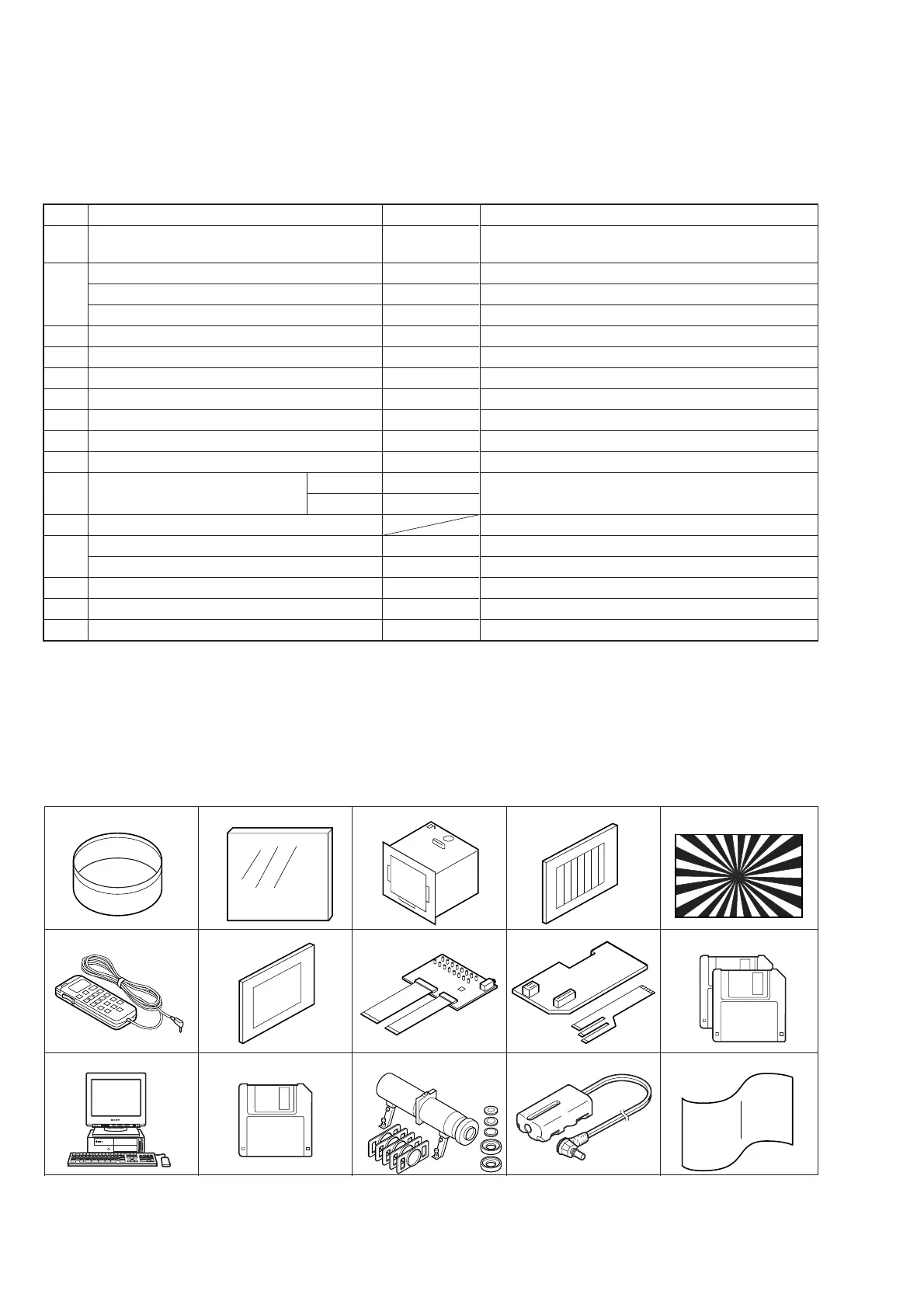
Ref. No.
J-1
J-2
J-3
J-4
J-5
J-6
J-7
J-8
J-9
J-10
J-11
J-12
J-13
J-14
J-15
Name
Filter for color temperature correction (C14)
ND filter 1.0
ND filter 0.4
ND filter 0.1
Pattern box PTB-450
Color chart for pattern box
Siemens star
Adjusting remote commander (RM-95 upgraded) Note2
Clear chart
CPC-9 (12-pin/18-pin, 0.5 mm)
Extension cable
Alignment disk (Two disks as a pair)
Personal computer
Cleaning disk (OR-D29WA)
Cleaning disk
Mini pattern box
Power cord (Note 3)
Back ground paper
Parts Code
J-6080-058-A
J-6080-808-A
J-6080-806-A
J-6080-807-A
J-6082-200-A
J-6020-250-A
J-6080-875-A
J-6082-053-B
J-6080-621-A
J-6082-393-B
J-6082-427-A
8-967-990-01
8-967-990-11
8-960-009-39
Available on market
J-6082-353-B
J-6082-223-A
J-2501-130-A
Usage
Auto white balance adjustment/check
White balance adjustment/check
White balance check
White balance check
White balance check
For checking the flange back
White balance adjustment.
LANC signal, R.G.B. signal check.
FDD UNIT-PK-47/48 board
Dynamic inspection disk with LCD adjustment signal
PC with Windows95 installed
FDD head cleaning *Note 1
For adjusting the flange back
For the battery end adjustment
For adjusting the strobe
5-1. CAMERA SECTION ADJUSTMENTS
1-1. PREPARATIONS BEFORE ADJUSTMENT
1-1-1. List of service tools
Oscilloscope Regulated power supply Vectorscope TV monitor
Digital voltmeter Frequency counter AC power adaptor (BC-V615)
Fig. 5-1-1
J-1
J-6
J-2 J-3 J-4 J-5
J-7
J-8
J-9
Note 2: If the microprocessor IC in the adjusting remote
commander is not the new microprocessor (UPD7503G-
C56-12), the pages cannot be switched.
In this case, replace with the new microprocessor (8-759-
148-35).
Note 3: Connect the adjusting remote commander to the LANC
jack, and set to HOLD switch to the “ADJ” side.
J-11 J-12
J-10
Note 1: Usage and operating note
One or two seconds of momentary use of cleaning disk is
sufficient such that FD is accessed momentarily by system
control when the main power is turned on. After cleaning,
insert a FD for playback. When cleaning is insufficient,
use a cleaning disk again.
Caution: Avoid using a cleaning disk excessively. Head
can be broken.
TFD2-1(+)
TFD2-2(–)
J-13
J-14
J-15











 To Next Page