5-19
7) Select page: 6, address: 01, set data: A7, and press the PAUSE
button of the adjusting remote commander.
8) Select page: 6, address: 01, set data: A5, and press the PAUSE
button of the adjusting remote commander.
(The auto white balance adjustment is performed and the ad-
justment data is stored in page: F, addresses: 3F and 40.)
9) Select page: 6, address: 02, and check that the data is “01”.
10) Select page: 6, address: 01, set data: 3F, and press the PAUSE
button of the adjusting remote commander.
11) Select page: 0, address: 03, and set data: 04.
12) Check the page: 1 displayed data is the R ratio specified value.
13) Select page: 0, address: 03, and set data: 05.
14) Check the page: 1 displayed data (Note 4) is the B ratio speci-
fied value.
15) Select page: F, address: 49 to 4C, and input the data noted
down at step 5).
Processing after Completing Adjustments:
1) Select page: 0, address: 03, and set data: 00.
2) Select page: 6, address: 01, set data: 00, and press the PAUSE
button of the adjusting remote commander.
3) Select page: 6, address: 10, and set data: 00.
4) Select page: B, address: 41, set data: 00, and press the PAUSE
button of the adjusting remote commander.
5) Select page: E, address: 52, set data noted down at step 3) and
press the PAUSE button of the adjusting remote commander.
6) Select page: 0, address: 01, and set data: 00.
11.Auto White Balance Adjustment
Adjust to the proper auto white balance output data.
If it is not correct, auto white balance and color reproducibility
will be poor.
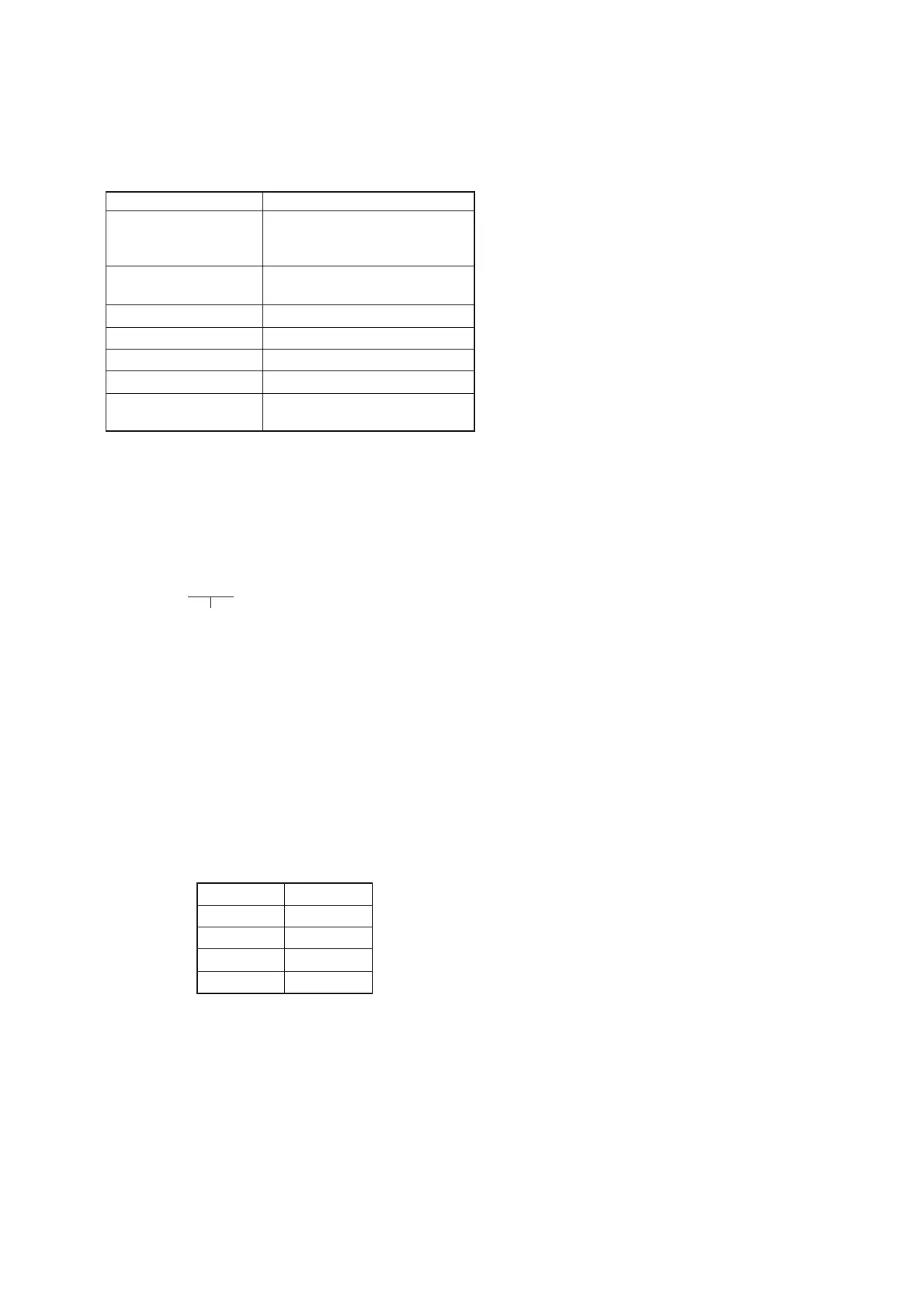
Mode STILL
Subject Clear chart
(Color reproduction adjustment
frame)
Filter Filter C14 for color temperature
correction
Measurement Point Displayed data of page: 1 (Note 4)
Measuring Instrument Adjusting remote commander
Adjustment Page F
Adjustment Address 3F, 40
Specified Value R ratio: 2A40 to 2AC0
B ratio: 5E00 to 5F00
Note 1: Perform “Auto White Balance Reference Data Input” be-
fore this adjustment.
Note 2: Perform “Auto White Balance ND Filter Adjustment” be-
fore this adjustment. (FD88)
Note 3: Check that the data of page: 6, address: 02 is “00”.
If not, turn the power of unit OFF/ON.
Note 4: The right four digits of the page: 1displayed data of the
adjusting remote commander.
1:XX:XX
→ Object data
Adjusting method:
1) Place the C14 filter for color temperature correction on the
lens.
2) Select page: 0, address: 01, and set data: 01.
3) Select page: E, address: 52, after noting down the data, set
data: 1B, and press the PAUSE button of the adjusting remote
commander.
4) Select page: 6, address: 10, and set data: 58.
5) Select page: B, address: 41, set data: 30, and press the PAUSE
button of the adjusting remote commander.
6) Select page: F, addresses: 49 to 4C, and noting down the data
of each address.
Write data in page: F, address: 49 to 4C as shown in the fol-
lowing table.
Address Data
49 2A
4A 80
4B 5E
4C 80











 To Next Page