5-12
1-3. VIDEO SYSTEM ADJUSTMENTS
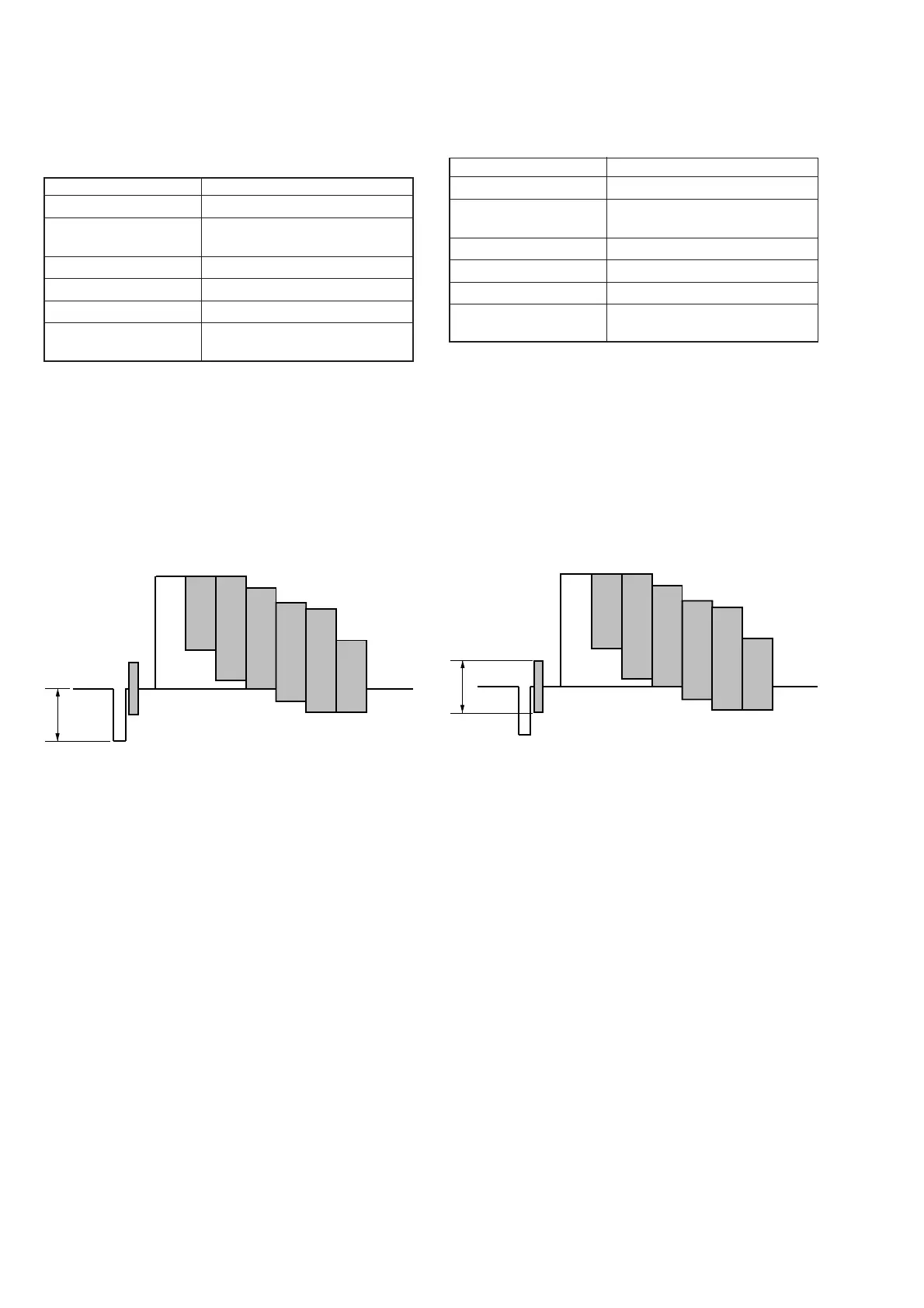
1. Video Sync Level Adjustment
Adjust the sync level of the composite video signal output
Mode PLAY
Signal Color bar (Test signal)
Measurement Point Video terminal of A/V OUT jack
(75 terminated)
Measuring Instrument Oscilloscope
Adjustment Page F
Adjustment Address 65
Specified Value A=286 ± 5 mV (NTSC)
A=300 ± 6 mV (PAL)
Adjusting method:
1) Select page: 0, address: 01, and set data: 01.
2) Select page: 5, address: F1, and set data: 04.
3) Select page: F, address: 65, change the data and set the sync
level (A) to the specified value.
4) Press the PAUSE button of the adjusting remote commander.
Processing after Completing Adjustments:
1) Select page: 5, address: F1, and set data: 00.
2) Select page: 0, address: 01, and set data: 00.
2. Video Burst Level Adjustment
Adjust the burst level of the composite video signal output
Mode PLAY
Signal Color bar (Test signal)
Measurement Point Video terminal of A/V OUT jack
(75 terminated)
Measuring Instrument Oscilloscope
Adjustment Page F
Adjustment Address 66
Specified Value A=286 ± 5 mV (NTSC)
A=300 ± 6 mV (PAL)
Adjusting method:
1) Select page: 0, address: 01, and set data: 01.
2) Select page: 5, address: F1, and set data: 04.
3) Select page: F, address: 66, change the data and set the burst
level (A) to the specified value.
4) Press the PAUSE button of the adjusting remote commander.
Processing after Completing Adjustments:
1) Select page: 5, address: F1, and set data: 00.
2) Select page: 0, address: 01, and set data: 00.
A
A
Fig. 5-1-10
Fig. 5-1-11











 To Next Page