STR-DA2800ES
40
Items Display Remark
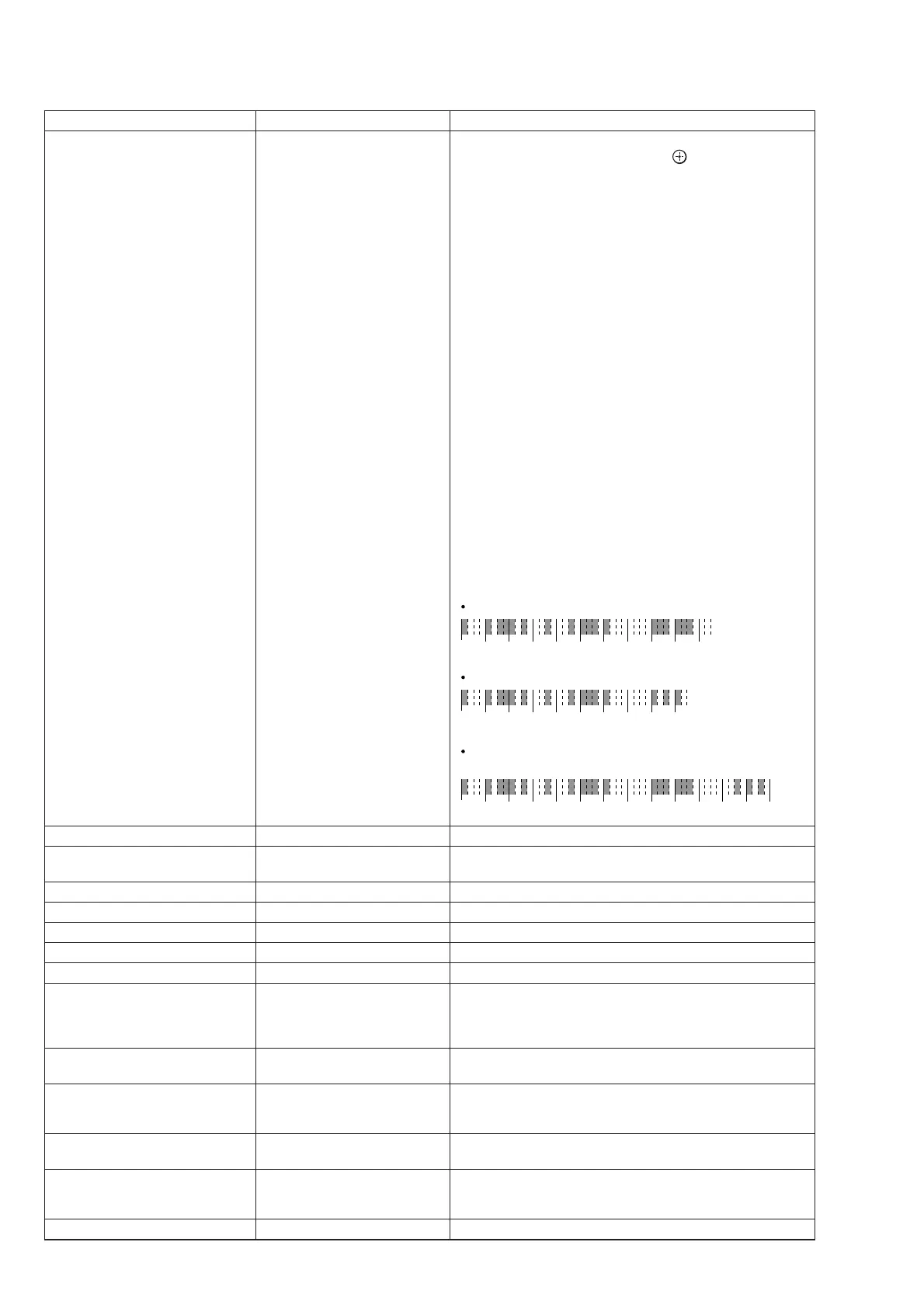
Network update check LCH FOR UPD
When [,] button on the remote commander is pressed, the
message “START ?” is appears. If the [
] button of the remote
commander is pressed, check is started. The signal path for
update is checked without connecting to network.
When all the checking results are OK, this unit is rebooted
about 2 minutes after.
When the checking results are NG, the NG factors are dis-
played.
Example of NG display:
Result is displayed on the fl uorescent indicator tube.
NG : MSVfDd
NG : DdVf
NG : Dd
NG : Vf
NG : V
NG : f
detail:
M : Main system controller
S : Sub system controller
V : Video system controller
f : Video processor (Not used in this unit)
D : DSP flash
d : DSP flash 2nd (Not used in this unit)
Example of main/sub system controller NG display:
Result is displayed by lighting of the [ON/STANDBY] LED.
gray color part = [ON/STANDBY] indicator is on.
When the main system controller is NG
01234 5678 910
When the sub system controller is NG
01234 5678 9
When the main system controller and sub system controoler
are NG
0 1 2 3 4 5 6 7 8 9 10 11 12 13 (sec)
Network audio/video test mode on/off NWC DIAG Not used for the servicing.
Network completion time-out on/off
setting
NET-OFF T.O. Not used for the servicing.
Network PIP video on/off PIP TEST Not used for the servicing.
HDCP key read HDCP KEY Not used for the servicing.
DDR2 check DDR2 CHK Not used for the servicing.
Model/destination change MODEL Not used for the servicing.
Video path check V PATH Not used for the servicing.
Auto cal mic test SP OUT
When [,] button on the remote commander is pressed, the
message “SOURCE” or “MIC” is appears.
SOURCE: normal mode, MIC: mode that output audio to the
speaker from microphone input
ARC check ARC XXX
XXX: “ON” or “OFF”
SPDIF signal reception on/off switched.
FL display fonts test FL FONT
When [,] button on the remote commander is pressed, the
message “0x** = X” is appears.
**
: 20 to FE, X: character
FL display test (All segments turn on)
Each time [DISPLAY MODE] button to change as follows all on
t test pattern 1 t test pattern 2 t all off t all on
Super reset RESET
Not used for the servicing
When EEPROM initialization is required, perform the “SHIP-
MENT MODE” (page 37)
RAM watch menu RAM WATCH Not used for the servicing.















 To Next Page