•
Remaining gas time for the active gas
•
Configurable tank pressure alarms
•
Logging of start, end and the used pressure
•
Logging of average gas consumption for every gas with Tank POD
•
Units in bar or PSI
5.6.1. How to install and link a Suunto Tank POD
To install and link a Suunto Tank POD:
1. Install the Tank POD as described in the Tank POD quick guide or in the Tank POD user
guide.
NOTE: To ensure the most accurate tank pressure readings, Suunto recommends
that you install Suunto Tank POD so it is on the same side as you wear your Suunto
Ocean.
2. After installing the Tank POD and opening the valve, wait for the green LED on the Tank
POD to
flash.
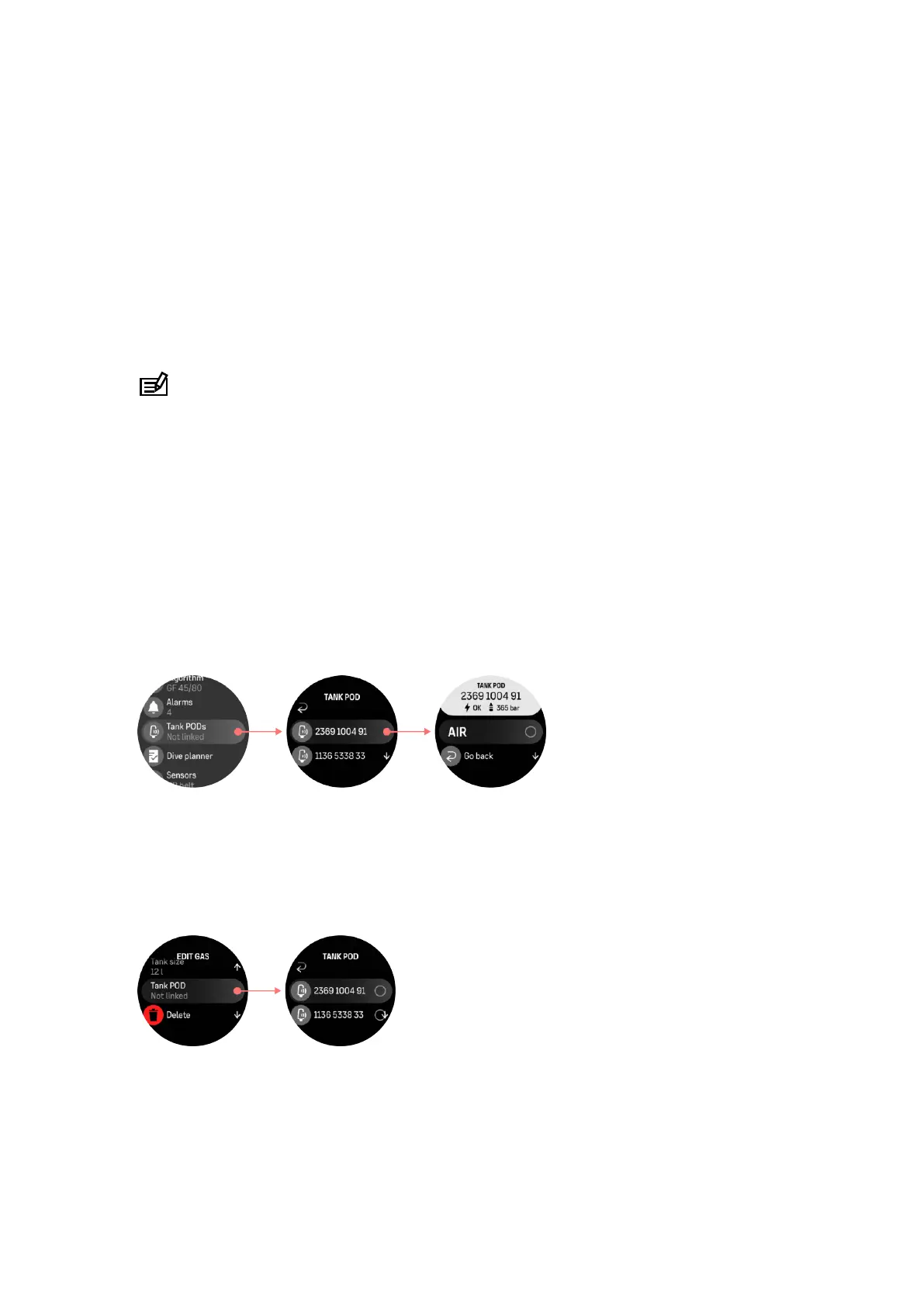
3. Go to the Tank POD menu under Dive options. If your Tank POD is active and in range
you see the Tank POD serial number listed.
4. Select the correct Tank POD and check its battery status and the tank pressure.
5. Select the correct gas from the list to link with your Suunto Tank POD (if diving with
multiple gases).
6. Make sure the tank size is correct to enable correct gas consumption metering.
7. Go Back to the main menu and you will see your Tank POD serial number listed under the
Tank POD menu.
Alternatively, you can link the Suunto Tank POD(s) from the Gases menu:
1. In the Gases menu, select the gas you want your Tank POD to link with.
2. Go to the Edit gas view and scroll to the Tank POD setting.
3. Make sure the Tank POD has been activated and that it is within range. Select your Tank
POD serial number from the list.
If you have linked the same Tank POD to several gases, remember to check before your dive
that you have the right active gas and that you have your Tank POD linked. In the dive main
views, only one tank pressure is shown and corresponds to the active gas.
Suunto Ocean
55















 To Next Page