5. Optical System
84 Instructions for Use for infinite® 200 No. 30017581 Rev. No. 1.4 2008-07
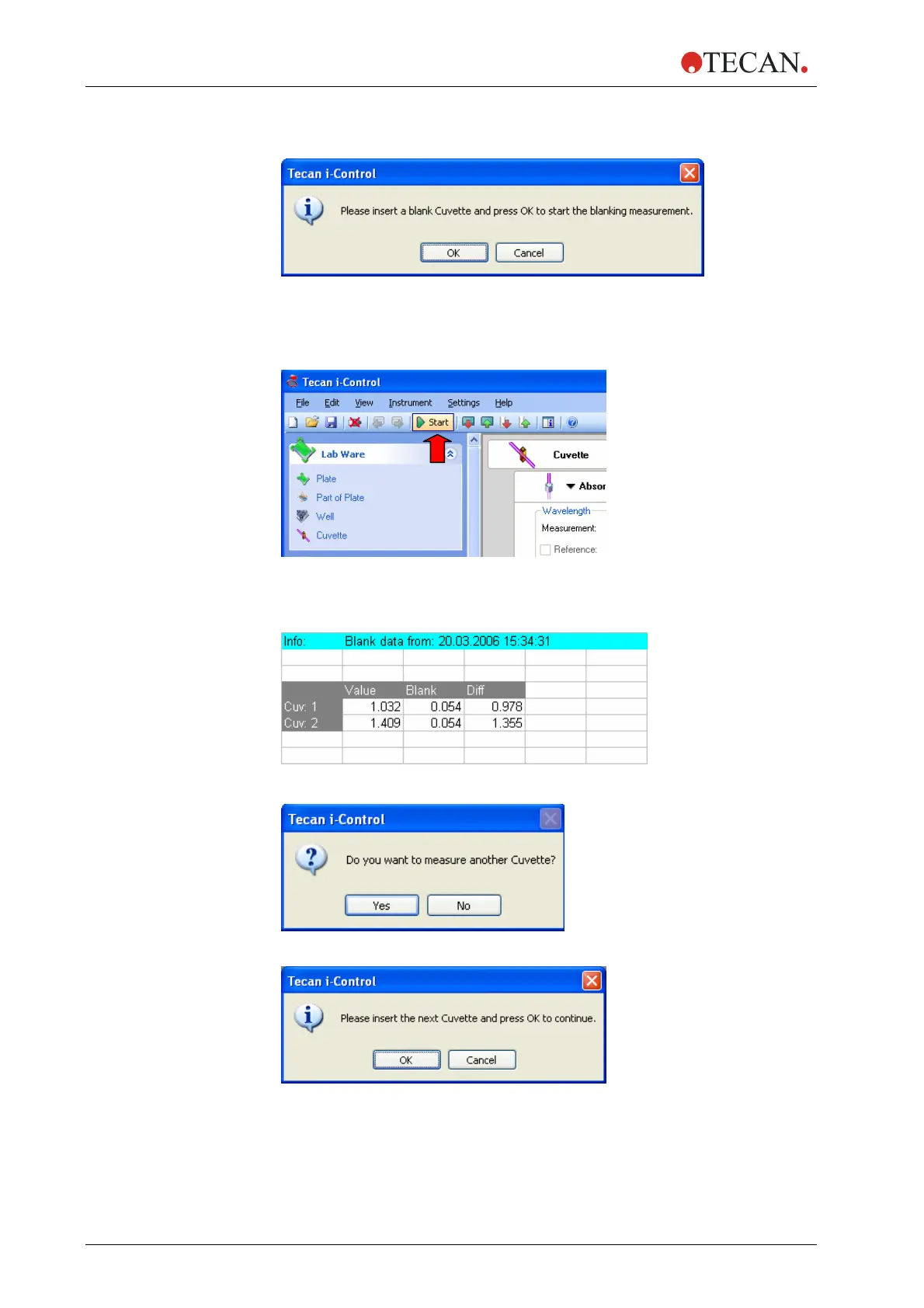
4) The instrument is initialized and the cuvette holder moves out. The user is
requested to insert the blank cuvette:
Insert the blank cuvette and click OK to start the blank measurement. The
measured blank data are displayed in an Excel
®
spreadsheet. The cuvette
holder moves out.
5) Remove and blank cuvette. Prepare sample cuvette and put it on the cuvette
holder. Start the measurement by clicking Start:
6) The cuvette holder is moved in and the measurement is performed. The
measured data (Value) as well as the blank data (Blank) and the blanked
data (Diff) are displayed in an Excel
®
spreadsheet:
Example for data display when measuring two cuvettes:
7) After finishing the measurement of the first cuvette (Cuv: 1) the following
message is displayed:
Click No to finish the measurement.
Click Yes to continue:
8) Insert the next sample cuvette and click OK to continue the measurement.



 To Next Page