4 Transmitter
50
4.4.5.7. Editing Message main menu
Messages can be confirmed/acknowledged, the last messages can
be called up and the display of the messages can be switched on
or off.
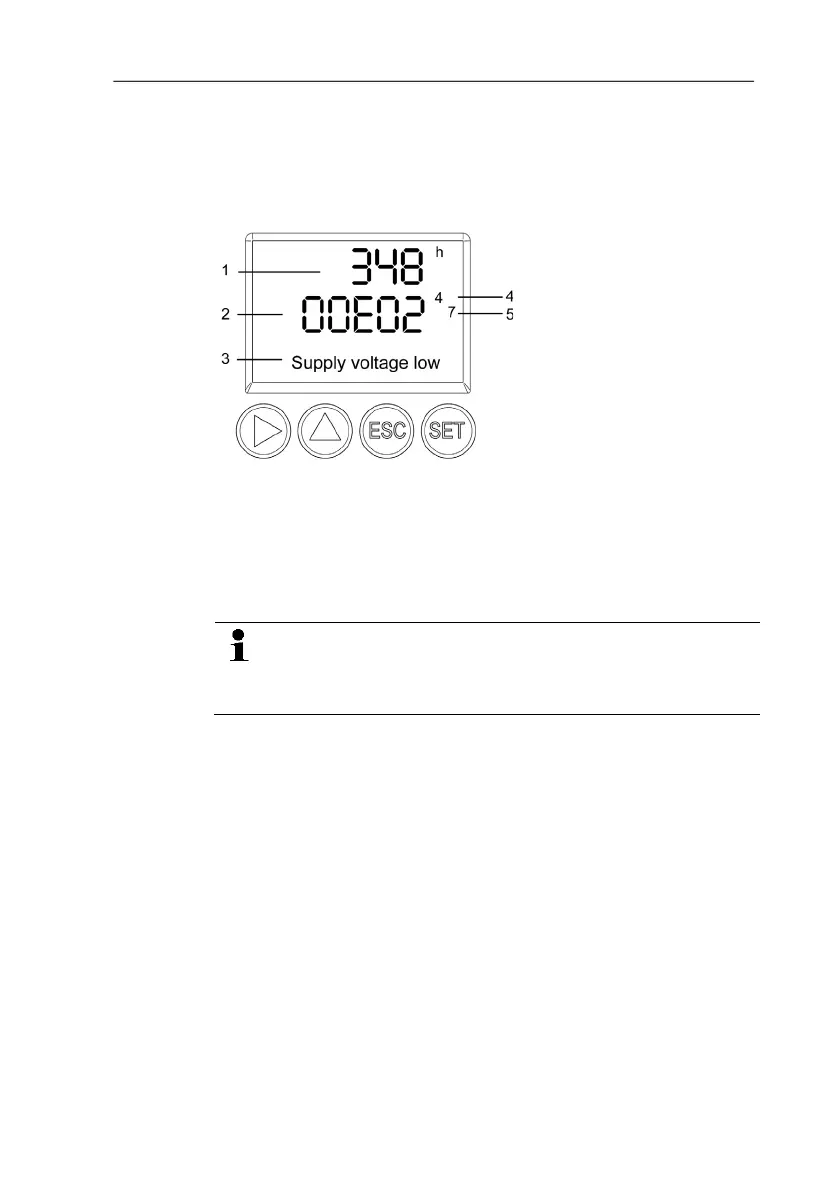
1 Operating hours at the
time of message
2 Message code (see
Status, warning and error
messages, page 55).
3 Message text
4 Message number
(example: "4/7" refers to
the fourth of seven
messages)
5 Number of messages
present (example: "4/7"
refers to the fourth of
seven messages)
Using the P2A software (see 7. volume 2, Parameterizing,
adjusting and analyzing software (P2A software)) you can
predefine whether messages are to be shown in the
display.
1. In the Measuring Mode press SET, select Main Menu Message
with or and confirm selection with SET.
2. Confirm Confirm message using SET.
3. Select Last messages with or and confirm with SET.
4. Scroll between the warning and error messages recorded so far
using or and return to Last messages using ESC.
5. Select Information with or and confirm with SET.
6. Scroll between the status messages recorded so far using or
and return to Information using ESC.
7. Continue to Display of message with or .
ON: Measurements are shown on the display in Measuring
Mode.
OFF: No messages shown on display.
8. Select ON or OFF with or and confirm selection with SET.
9. Return to Main Menu Message with ESC.



 To Next Page