7 Parameterizing, adjusting and analyzing software (P2A software)
127
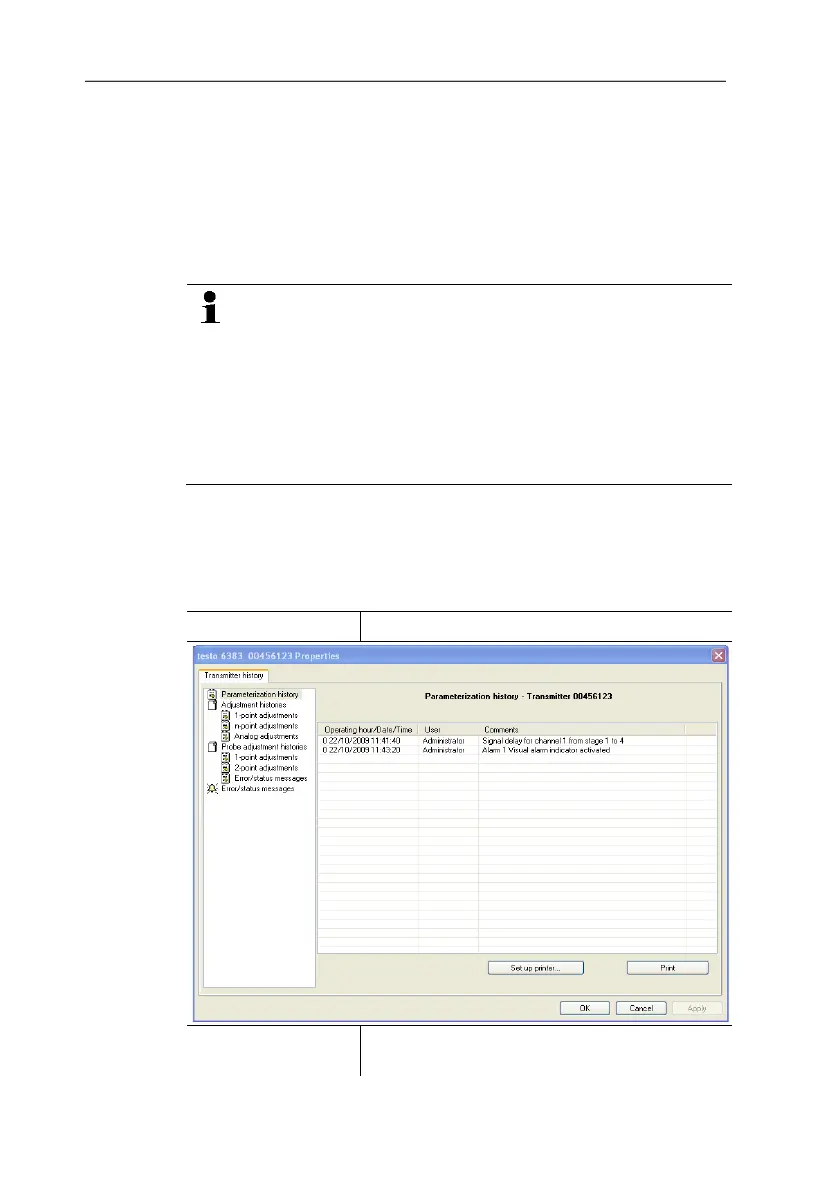
7.3.5. Transmitter history
Parameterizations, adjustment processes and messages that have
occurred are registered in the transmitter with an operating hours
stamp.
In the history overviews (explained later in more detail), past
processes and events can be made visible.
For parameter changes or adjustments that are performed
directly at the instrument (via the user menu), "Transmitter"
is entered in the User field and only the operating hour is
entered in the Date/time field instead of operating
hour/date/time.
For entries that are performed using the P2A software, the
name of the user logged into Windows appears in the User
field, while the date/time and operating hour are shown in
the Date/time field.
1. Mark the instrument file of the connected instrument.
2. Click on the [Transmitter history] button.
- The Properties of <Instrument type> <Serial number>
dialogue is opened with the Transmitter history register.
3. Click on the required entry in the list to change the display.
Operating hours /
date/time
Operating hour/time stamp at which the
change at the instrument was performed.



 To Next Page