14. CALCULATION FUNCTIONS
62
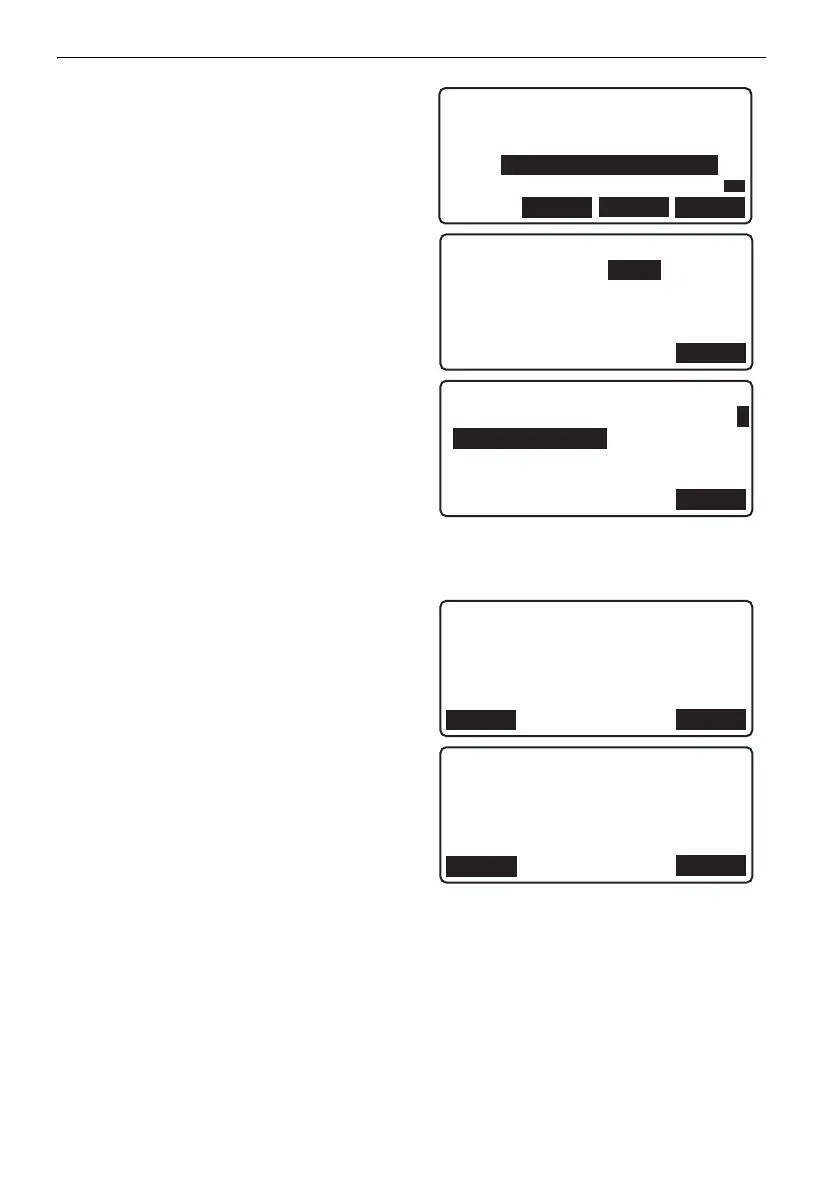
5. Repeat steps 3 to 4 and add all other routes
used in the link/loop.
Press [OK] when all routes have been added.
6. Use {}/{} to select closure type.
"Link": Starts and closes on different bench
marks.
"Loop": Starts and closes on the same bench
mark.
7. Press [OK]
• When "Link" is selected in step 6 the screen
shown at right is displayed. Input the
following values.
"Start bench mark elev.": Elevation of the start
point for the first route used in the link.
"End bench mark elev.": Elevation of the end
point for the last route used in the link
Press [OK] to display calculated closure
error.
• Press [ADJUST] to distribute closure error
among points.
• When "Loop" is selected in step 6 the screen
shown at right is displayed.
• The display range for dH results is -99.99 to
99.99 (mm). Results falling below/exceeding
this range will be displayed as -99.99 or 99.99
respectively.
8. Press [OK] to return to <Calculation menu>.
001 R001
002 R002
003 R003
004
LAST
TOP
OK
P1
Closure error
Closure type:Loop
OK
OK
Link closure
Start bench mark elev.
: 31.24367m
End bench mark elev.
46.50805m
1
Link closure
: -0.06mm
Relative height
dZ 15.26438m
Calc dH 15.26432m
OK
ADJUST
Loop closure
0.05mm
OK
ADJUST
DL-501_E.book 62 ページ 2015年9月17日 木曜日 午後1時21分



 To Next Page