8 CHECK AND ADJUSTMENT
8-2
8.2 Checking the Optical Axis
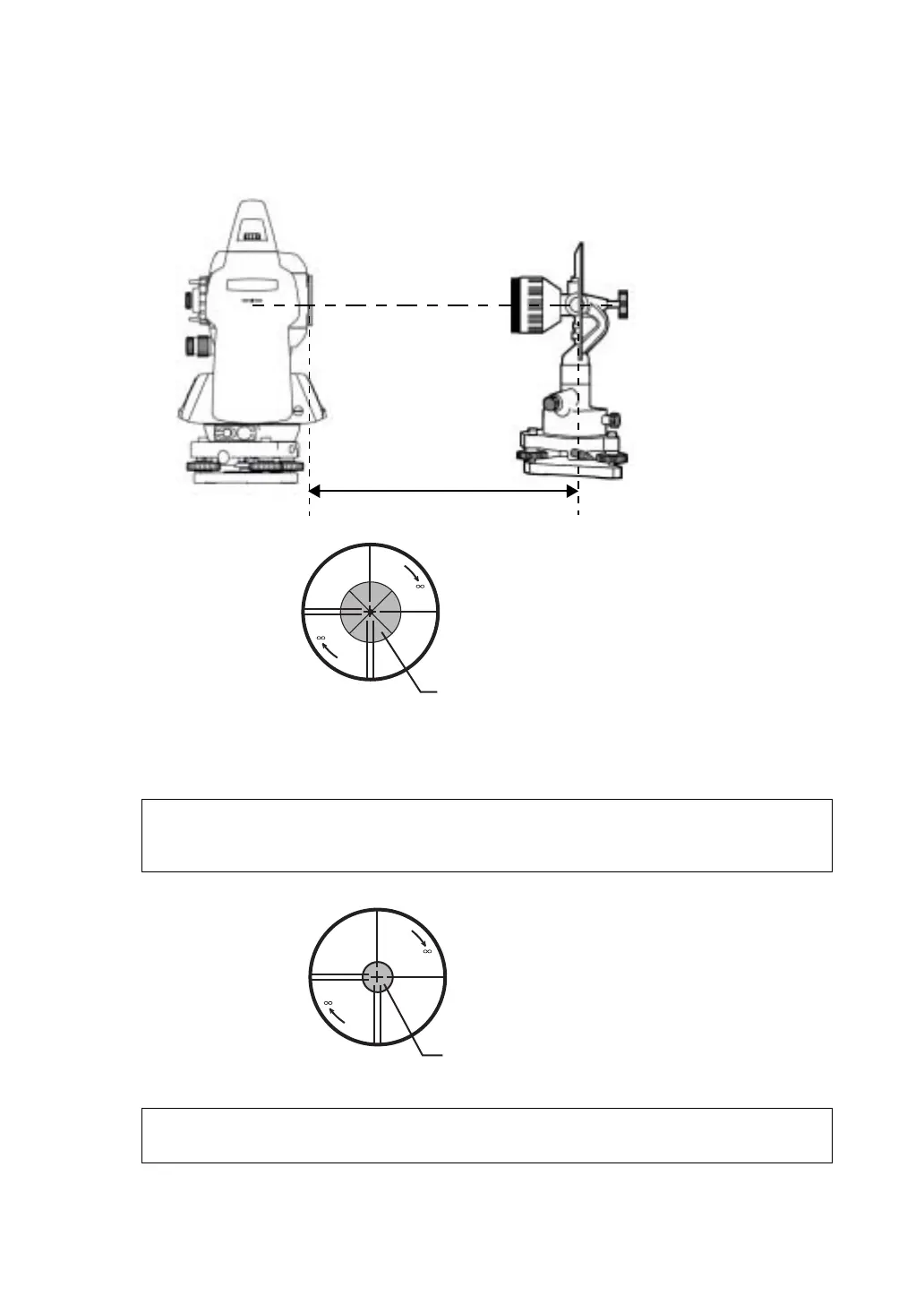
To check if the optical axis of EDM and theodolite are matched, follow the procedure below. It is
especially important to check after adjustment of the eyepiece reticle is carried out.
1) Position the Instrument and prism with about 2m apart and face them at each other.
(At this time, the power is ON. )
2) Sight through the eyepiece and focus to the prism. Then center the prism on the cross hairs.
3) Set to the measure mode to distance measurement or set audio.
4) Sight through the eyepiece and focus the (blinking) red light spot by turning the focusing knob in the
direction of infinity (clockwise). If displacement of the reticle cross hairs is within one-fifth of the
diameter of the round red light spot both vertically and horizontally, adjustment will not be required.
Note: If displacement is more than one-fifth in the above case, and still remains so after rechecking
the original line of sight, the instrument must be adjusted by competent technicians. Please
contact TOPCON or your TOPCON dealer to adjust the instrument.
Note: For checking the optical axis of GTS-600AF series, please contact Topcon or your Topcon
dealer.
about 2m
Prism
Prism
Red light spot








 To Next Page