Bluetooth Module Configuration
P/N 7010-0526
2-19
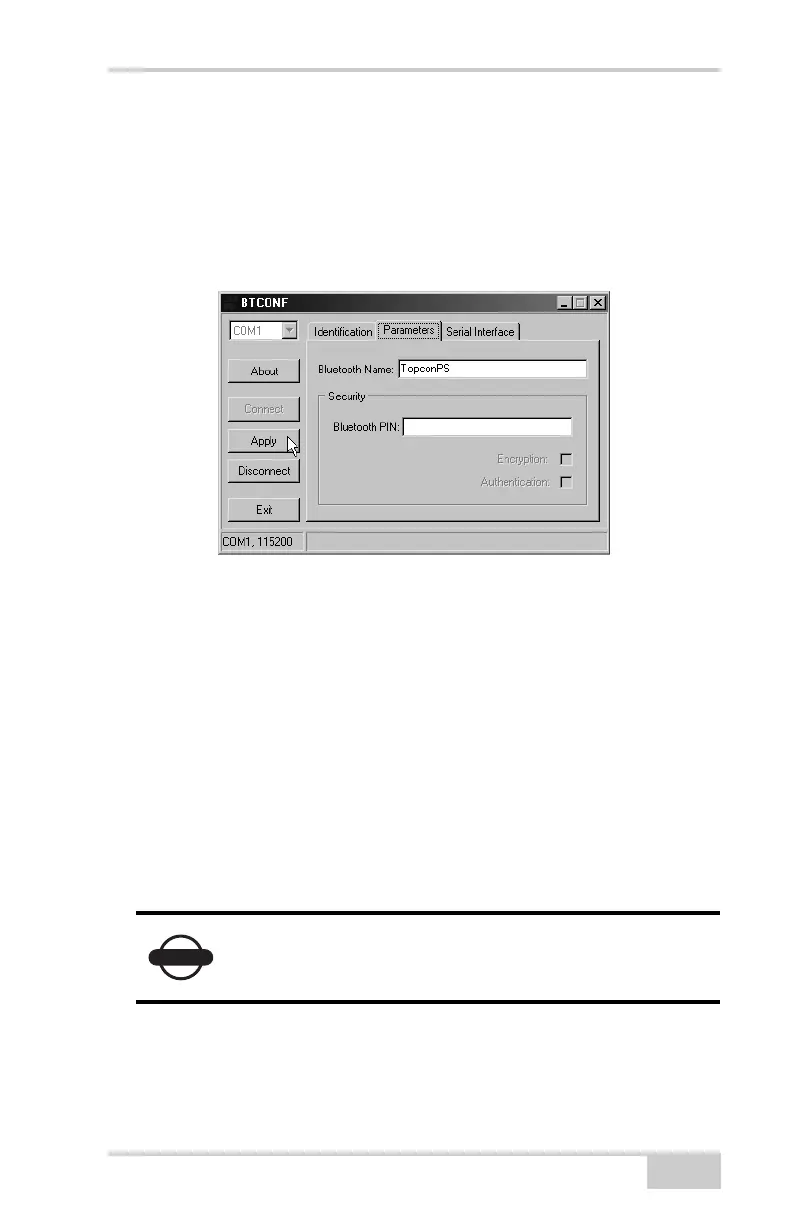
5. Click the Parameters tab (Figure 2-15). The Parameters tab sets
identifying and security information for your Bluetooth module.
The security section allows you to set data security and
unauthorized access parameters for the Bluetooth module.
6. Enter up to 14 characters to set a unique name for the Bluetooth
module (Figure 2-15), and click Apply.
Figure 2-15. BTCONF Parameters Tab
7. To set security parameters (Figure 2-16 on page 2-20), enter and
enable the following, then click Apply:
• Bluetooth PIN – enter up to 16 characters to specify a
personal identification number for the Bluetooth module.
• Encryption – enable to have the Bluetooth module encrypt
wirelessly sent data. To read encrypted data, the user must
have the same PIN used in the device that sent the data.
• Authentication – enable to require a PIN before two
Bluetooth enabled devices (such as, the receiver and a
computer) can establish a communication link. The two
devices must use the same PIN.
NOTICE
If you do not need security settings, leave these
parameters disabled.



 To Next Page